What Mesailerim actually does (from store listing)
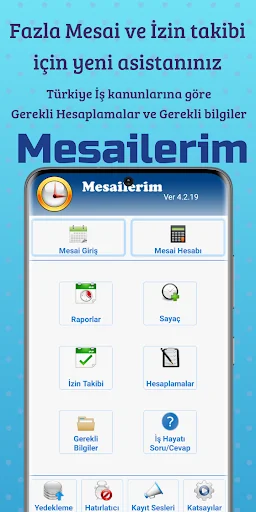
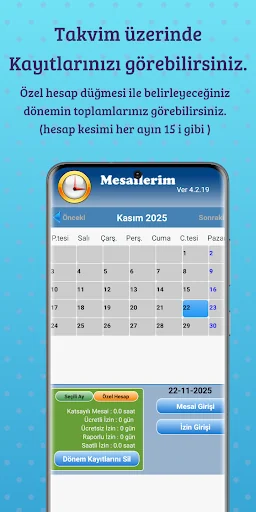
You can get monthly reports by registering your daily overtime hours by selecting the day on the calendar.
You can keep track of your paid (annual) leave, free leave (missing days), hourly leave and report days.
Your overtime; You can calculate your salary by entering your overtime hourly rate.
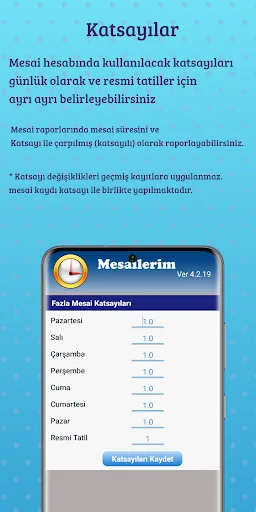
You can change the coefficient options in the settings menu.
If you activate the Reminder alarm in the Settings menu, it will give an alert if you have not entered overtime-leave at a time you set e…
You can get monthly reports by registering your daily overtime hours by selecting the day on the calendar.
You can keep track of your paid (annual) leave, free leave (missing days), hourly leave and report days.
Your overtime; You can calculate your salary by entering your overtime hourly rate.
You can change the coefficient options in the settings menu.
If you activate the Reminder alarm in the Settings menu, it will give an alert if you have not entered overtime-leave at a time you set every day.
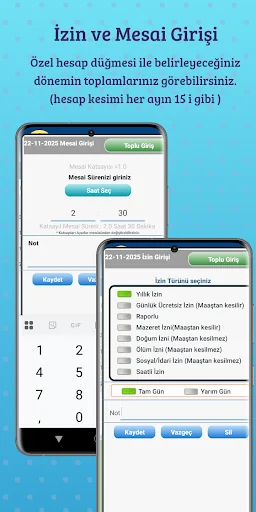
Overtime: Select the day you work on the calendar and press the Overtime button. In the window that opens, type your working time in the Duration box and press the Save button. To delete the message you entered incorrectly, save it by typing zero in the Duration box.
Permission Entry: Select the day you did not go to work from the calendar and press the Permission Entry button. Select the Permission Type and press the Save button
Report: You can see the Shifts and Permits in the months of your registration, as Annual, Monthly and Daily. You can send the Detailed Report option as a PDF file by whatsapp or mail.
Pressing the Delete Monthly Records button clears the leave and overtime records entered in the selected month.
You can see the current Minimum Wage Tariff and Minimum Living Discount information in the application.
In the Required Accounts menu, you can make Severance-Notice Pay Account, Unemployment Benefit and Short Work Allowance Account.
Ads in the app are Google Admob Ads.
Comparable Android apps
The five apps in Business with the closest revenue to Mesailerim. Click any to see its detail page.
Each forecast combines App Store rating, ratings count, monetisation model, pricing tier, IAP signals and ad-supported flag.
The base estimate is then multiplied by a per-category scaling factor learned from apps with founder-verified MRR.
Every number on this page comes from public APIs and bumetric's own snapshot history.
Full methodology covers input variables, accuracy bands per category and how we treat apps without comparable anchors.
See also the live data on Mesailerim's tracker page for current rating, reviews and snapshot timeline.
Building something similar? Get a free AI audit with $-revenue forecasts for every recommendation.


 Rozee Job Search
 Hours Tracker Time Tracking
 AppSheet
 Ecwid Ecommerce
 Fill and Sign PDF Forms