What Mirror Camera (Mirror + Selfi actually does (from store listing)
<b>Please watch the teach video to know how to use it.</b>
[ Tommorow, I will meet ... me ... yesterday. ]
Mirror + Selfie Camera (best mirror app for free)
Let your phone become a perfect smart mirror.
Handy!
Press mirror region to show/hide menu.
[Quick Mirror Camera Guideline]
When application start, it will hide all the menu. So it is really like a mirror.
You can use the following method to change other settings:
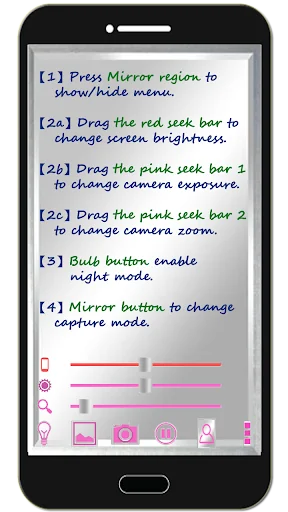
1. Press Mirror region to show/hide menu.
2. Drag …
Please watch the teach video to know how to use it.
[ Tommorow, I will meet ... me ... yesterday. ]
Mirror + Selfie Camera (best mirror app for free)
Let your phone become a perfect smart mirror.
Handy!
Press mirror region to show/hide menu.
[Quick Mirror Camera Guideline]
When application start, it will hide all the menu. So it is really like a mirror.
You can use the following method to change other settings:
1. Press Mirror region to show/hide menu.
2. Drag the red seek bar to change screen brightness.
3. Drag the pink seek bar 1 to change camera exposure.
4. Drag the pink seek bar 2 to let mirror zoom in/out.
5. Press bulb button enable/disable night mode.
6. Press mirror button to change capture mode. (Capture with "Image on Mirror" or "Your real Image")
7. Press the pause/resume button to pause/resume preview. (freeze image) Then double click the freeze image to let mirror zoom in/out. (Or use two fingers to let mirror zoom in/out)
8. [Volume Key] : Use volume-down key to pause/resume preview. (freeze image) Use volume-up key to do camera capture. You can change other option in the camera settings page.
[Others]
1. You also can take a picture or edit mirror photo image if you wish.
2. Night mode : Press the bulb button, use panel light at the edge of panel.
3. This application will not turn off screen when you use Camera. If user not touch the screen for 10 minutes, this application will auto exit to prevent power loss.
【Recommended External Mirror Image Photo Editor】
( Line Camera )
https://play.google.com/store/apps/details?id=jp.naver.linecamera.android
This APP is now tested more compatible. They support external photo edit more user friendly.
Or you can use system photo editor, it also work. (Test on Samsung Phones.)
【PS】
Please like us on Facebook. Give us the power of love.
https://www.facebook.com/jkfantasy
Comparable Android apps
The five apps in Beauty with the closest revenue to Mirror Camera (Mirror + Selfi. Click any to see its detail page.
Each forecast combines App Store rating, ratings count, monetisation model, pricing tier, IAP signals and ad-supported flag.
The base estimate is then multiplied by a per-category scaling factor learned from apps with founder-verified MRR.
Every number on this page comes from public APIs and bumetric's own snapshot history.
Full methodology covers input variables, accuracy bands per category and how we treat apps without comparable anchors.
See also the live data on Mirror Camera (Mirror + Selfi's tracker page for current rating, reviews and snapshot timeline.
Building something similar? Get a free AI audit with $-revenue forecasts for every recommendation.

 Hairstyles step by step
 Scentbird Monthly Perfume Box
 FoxEyes - Change Eye Color
 Avon ON
 언니의파우치 - 내돈내산 뷰티리뷰, 뷰티 앱테크