What MIUI-ify: Custom Notifications actually does (from store listing)
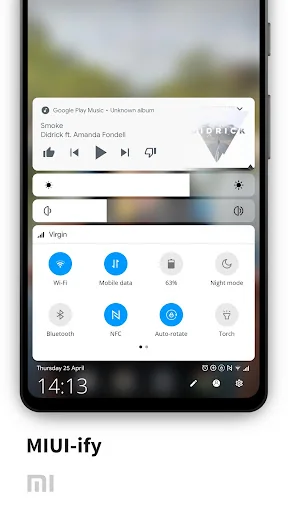
MIUI-ify provides a smooth, fast and native feeling MIUI 12 styled quick setting and notification panel at the bottom of your screen, allowing you to toggle settings like WiFi, Bluetooth, Flash and many more, as well as adding shortcuts to apps and websites in the panel too!
What is the difference between MIUI-ify and Bottom Quick Settings?
The main differences can be seen in the Play Store screenshots. MIUI-ify is cleaner, easier to use and follows the MIUI style. Bottom Quick Settings foll…
MIUI-ify provides a smooth, fast and native feeling MIUI 12 styled quick setting and notification panel at the bottom of your screen, allowing you to toggle settings like WiFi, Bluetooth, Flash and many more, as well as adding shortcuts to apps and websites in the panel too!
What is the difference between MIUI-ify and Bottom Quick Settings?
The main differences can be seen in the Play Store screenshots. MIUI-ify is cleaner, easier to use and follows the MIUI style. Bottom Quick Settings follows the style of Android P/Q.
NOTIFICATION SHADE - Control all notifications
- Reply, open, dismiss, interact and manage
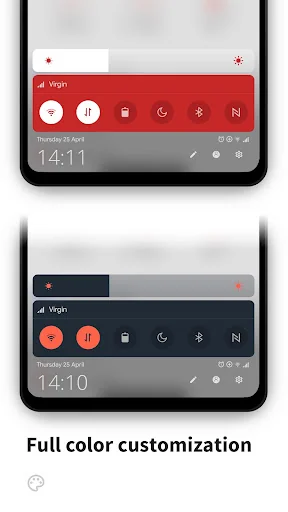
- Full color customization
- Dynamic colors
BOTTOM STATUS BAR - Move your device's status bar to the bottom of the screen
- Full support for notifications and system setting icons
- Full colour personalization
- Blacklist: hide the status bar in specific apps
QUICK SETTING TILES - 40+ different settings
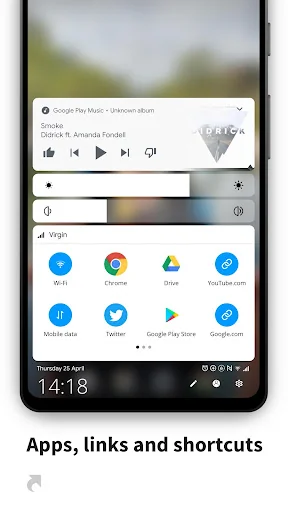
- Add any app or URL as a shortcut in the panel
- Layout: Change the number of tile rows and columns
- Sliders: Screen brightness, ringtone, alarm, notification and media volume
- MIUI 12 themed
HANDLE TRIGGER AREA - Customizable position and size so it doesn't interfere with navigation gestures
- Options to hide in landscape and fullscreen
- Blacklist: hide the handle trigger in specific apps
OTHER CUSTOMIZATIONS - Blur the background
- Change the colors of the panel background and the quick setting icons
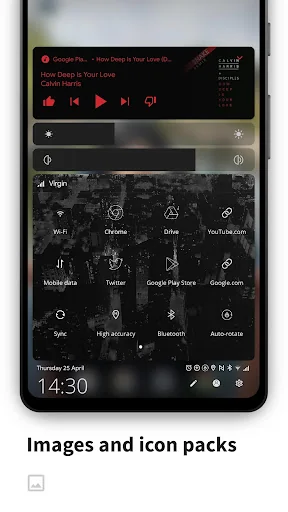
- Add a background image to the panel
- Select an app icon pack
- Match the navigation bar color to the footer color
- Dark mode
- Integration with Tasker
BACKUP / RESTORE - Backup and Restore your customisations
Get extra features with Root / ADB - Ability to toggle secure system settings such as Mobile Data and Location. These settings can only be toggled with root or a one time ADB command, due to Android's security restrictions
Some of the main quick settings: - WiFi
- Mobile data
- Bluetooth
- Location
- Rotate mode
- Do not disturb
- Airplane mode
- Night mode
- Sync
- Torch / Flashlight
- NFC
- Music controls
- WiFi hotspot
- Screen timeout
- Immersive mode
- Caffeine (keep screen awake)
- Invert colors
- Battery Saver
- And over 20 more!
iOS has had the control center at the bottom of the screen for years.
With MIUIify and its MIUI notification bar, you can finally get the same ease of access and more with a material design style!
MIUI-ify uses Accessibility Services to display the custom quick settings on the screen.
Each forecast combines App Store rating, ratings count, monetisation model, pricing tier, IAP signals and ad-supported flag.
The base estimate is then multiplied by a per-category scaling factor learned from apps with founder-verified MRR.
Every number on this page comes from public APIs and bumetric's own snapshot history.
Full methodology covers input variables, accuracy bands per category and how we treat apps without comparable anchors.
See also the live data on MIUI-ify: Custom Notifications's tracker page for current rating, reviews and snapshot timeline.
Building something similar? Get a free AI audit with $-revenue forecasts for every recommendation.


 Fireworks Live Wallpaper
 Dot Live Wallpaper
 Galaxysparkle Keyboard Theme
 HD Space Live Wallpaper
 Stormy Sea Keyboard Wallpaper