ML revenue forecast.
Calibrated against 36598 apps in this category.
Confidence band
±15%
High — many comparable apps with verified data
At a glance
Earns 2.13× more than the category median (154/mo).
Ranks #6,784 of 36,598 in Finance (top 18.5% by revenue).
Launched Aug 06, 2018 · last updated May 26, 2026.
What the app looks like
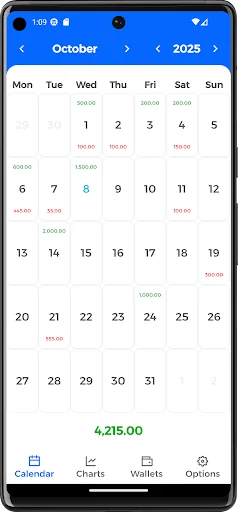
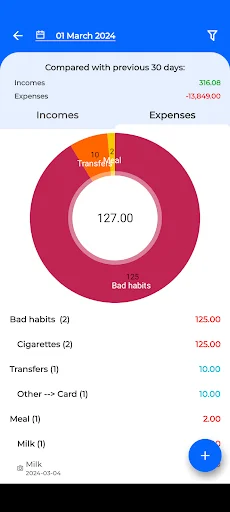
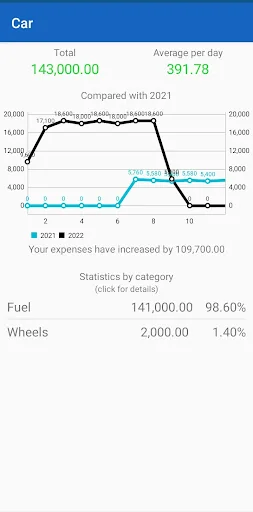
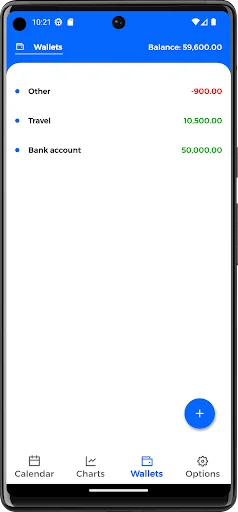
Live screenshots from the Play Store, captured by our snapshot worker. Tap any image to enlarge.
Money Calendar's revenue trajectory
Forecast revenue from snapshot history. Last 1 months.
Where Money Calendar sits in Finance
Revenue distribution of 36598 comparable apps. Money Calendar highlighted.
Money Calendar vs comparable apps
Revenue trajectory side-by-side. Bold = Money Calendar, ghosted = peers.
App spec
Version
0.56.10
Last update
May 26, 2026
Launched
Aug 06, 2018
Price
Free
Monetization
Free
What Money Calendar actually does (from store listing)
Money Calendar is a convenient solution to keep track of income and expenses, analyze and plan a budget, and view financial information in the form of a calendar. Created to help the user understand what financial condition he is in, how he manages his cash flows, what expenses or income have increased or decreased over a certain period.
With the help of this application you can adjust your or family budget, become more financially literate and independent.
The application is also suitable for…
Money Calendar is a convenient solution to keep track of income and expenses, analyze and plan a budget, and view financial information in the form of a calendar. Created to help the user understand what financial condition he is in, how he manages his cash flows, what expenses or income have increased or decreased over a certain period.
With the help of this application you can adjust your or family budget, become more financially literate and independent.
The application is also suitable for small businesses, such as cost and sales accounting.
- Clear interface:
The calendar on the main screen shows the amount of expenses and income in days, at the top the balance at the beginning of the month, at the bottom the cash flow or balance at the end of the month, depending on the settings.
To add an operation, just click on a day in the calendar or long press.
You can also quickly add income and expenses through application shortcuts
- Personalization:
You can create and manage an unlimited number of income and expense categories, customize the calendar display, choose a dark or light theme, and enable daily notifications when new financial transactions are added.
- Detailing:
Using the filter, you can view, compare and analyze finances for any period, by any category, wallet, and even title. The graphs will show in detail where and in what month there was a drop or rise in costs or income for a certain category or transaction heading in a category, and also compare with the previous period
- Wallets
You can distribute money among wallets, like bank accounts, and make transactions between them. Convenient to use to accumulate savings
- Regular payments:
Specify how often to repeat and when to complete regular payments for income and expenses. Can be performed in the past and planned for the future. It is also possible to immediately schedule all monetary transactions by indicating the payment end date.
- Limits:
Set and maintain daily and monthly spending limits for a category or wallet
- Data:
Cash transactions can be exported by filter to Excel. A backup will help you save all application data and restore it on a new device. There is a function to delete all data.
- Safety:
You can put a password on the application to protect your financial data.
Financial accounting of expenses and income, as well as budget planning is the key to financial literacy and independence!
Comparable Android apps
The five apps in Finance with the closest revenue to Money Calendar. Click any to see its detail page.
Each forecast combines App Store rating, ratings count, monetisation model, pricing tier, IAP signals and ad-supported flag.
The base estimate is then multiplied by a per-category scaling factor learned from apps with founder-verified MRR.
Every number on this page comes from public APIs and bumetric's own snapshot history.
Full methodology covers input variables, accuracy bands per category and how we treat apps without comparable anchors.
See also the live data on Money Calendar's tracker page for current rating, reviews and snapshot timeline.
Building something similar? Get a free AI audit with $-revenue forecasts for every recommendation.


 First Fed Bank Mobile Banking
 MiCredix
 Valiutu Kursai
 Santander Nómina
 Nagaland Lottery Result