What MovieSlate® 8 actually does (from App Store listing)
SEE IT
Videos/Details at movie-slate.com.
AS SEEN IN APPLE’S iPAD TV ADS
“MovieSlate® is the the Rolls-Royce of slates” says HandHeldHollywood.com. A convenient, all-in-one digital slate, clapper board, shot log, and notepad is used for film, TV, documentaries, music videos, and interviews, this professional production tool is the easy way to log footage and take notes as you shoot— saving you valuable time later when capturing/editing footage, and creating reports. All at a mere fraction of a …
AS SEEN IN APPLE’S iPAD TV ADS “MovieSlate® is the the Rolls-Royce of slates” says HandHeldHollywood.com. A convenient, all-in-one digital slate, clapper board, shot log, and notepad is used for film, TV, documentaries, music videos, and interviews, this professional production tool is the easy way to log footage and take notes as you shoot— saving you valuable time later when capturing/editing footage, and creating reports. All at a mere fraction of a bulky digital clapperboard’s cost.
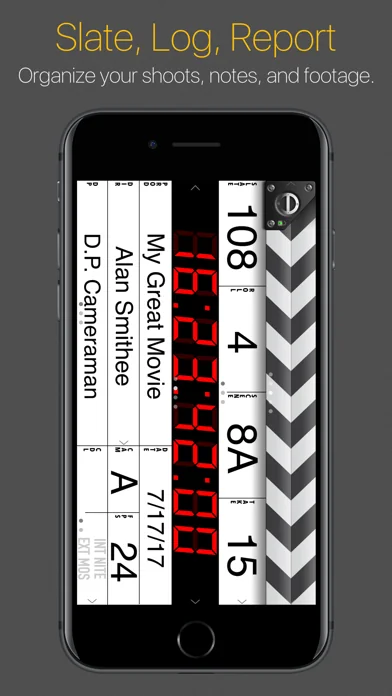
SLATE Tap a field to edit production info. Choose info from default/custom snippets, contacts, or saved history. Enter new info with the keyboard. Use the optimized keypad to quickly enter numeric info like: roll, scene, take, timecode. Or swipe up/down on fields to increment/decrement numbers.
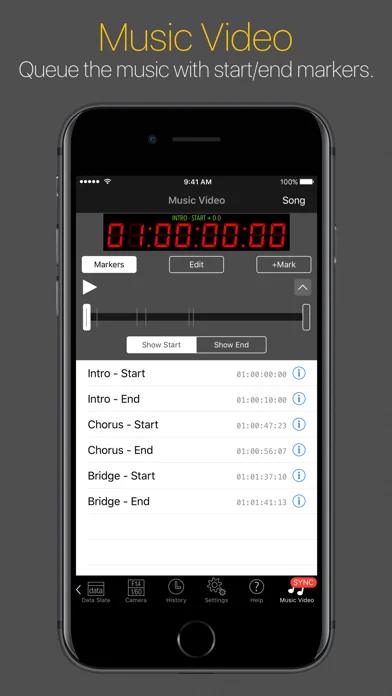
TIMECODE Entering timecode is easy with our optimized keypad. Sync to clock time, or an iTunes song (Music Video mode). With optional PRO Features in-app purchase: LTC/WiFi sync with: compatible cameras, recorders, generators, Timecode Systems Hubs, wireless timecode slates; and other MovieSlate apps.
CLAPPER To begin a shot: photograph the slate’s production info, then tap the clapper sticks. Sticks open & clap closed, creating an audible/visible marker. All slate data is logged to history. Optional credits animations briefly display each production field, full screen.
NOTES For each shot, you can: circle a take; rate sound/picture quality; write multiple shot notes; record voice notes; take picture notes. Example: when shooting interviews, create notes to timecode-mark when a particular question was asked, or something remarkable was said. Enter notes using the microphone, camera, keyboard— or insert snippet phrases (such as “Interview”, “Question”, or “Tail Sticks”).
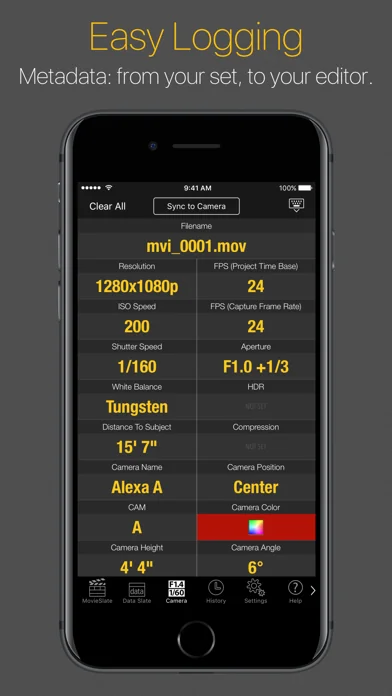
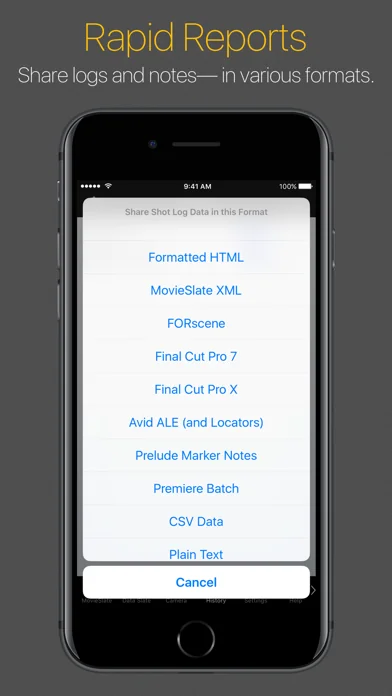
LOG HISTORY Get fast, searchable access to shot info, without wading through hours of footage. For each shot: all production, GPS location, and timecode data is stored to the app’s Shot Log History, where you can view, edit, or rate shots. History/Notes can be exported/emailed as: HTML, XML, CSV formats. Supports multiple projects.
CUSTOMIZE Choose behaviors, layouts, sounds, themes (clapper/hinge designs, backgrounds, fonts, colors)— even your production logo on the slate and in reports.
ALWAYS READY With MovieSlate: lost clapper boards are a thing of the past. Your shot history is always ready to view, review, edit, or send.
PRO FEATURES in-app purchase: $9.99/month (auto-renewable) or $299.99 one-time • Timecode Sync - with compatible gear via WiFi/headphone jack. • Denecke TS-TCB - sync claps/timecode/data. • Sound Dept - data/notes logging/reports for up to 32 tracks. • Sound Recorder Sync - with Sound Devices 6-Series. • Reality MultiCam - data/notes logging/reports for up to 26 cameras. • Camera Sync - with ARRI + RED cameras. • KeyClips - keyword-based logging for FCPX. • MovieSlate Cloud Pro - advanced backup/restore/sharing. • App-to-App - sync and remote control.
SCRIPT DEPT SUBSCRIPTION in-app purchase: $24.99/month (auto-renewable) • Includes Script Dept features and all Pro Features
SUBSCRIPTIONS Listed prices are $USD. At purchase confirmation: payment is charged to your iTunes Account; any unused portion of free trial period is forfeited. Auto-renewable subscriptions are billed monthly through the App Store. Subscriptions automatically renew unless auto-renew feature is turned off at least 24-hours before end of current subscription/trial period. Your iTunes Account is charged for renewal within 24-hours prior to end of current period. To manage subscription auto-renewal see http://support.apple.com/kb/HT4098
PRIVACY http://movie-slate.com/privacy
TERMS OF USE http://movie-slate.com/tou
REQUIRES iOS 16-26
🆕 What's new · v8.9.56
• Added translations for many languages; choose from Settings tab > Globe button.
• Settings > Text Fields - added Translate button for additional, optional English to Spanish translations.
• Added Onboarding screen to approve access to system features in an organized way.
• When tabbar is hidden, there’s now a "TABS" button (in lower left corner) to show tabbar.
• Settings > Tabs - added option to show/hide badges on tabbar buttons.
• Settings > Text Snippets - fixed issue with adding new Snippets and Groups.
• Settings > Appearance:
+ Slate Options - added "Show Auto-Increment" Icons on/off switch.
+ Theme - added share buttons to export MovieSlate Theme (".mst") files.
• Settings > Timecode + Sync > Calibrate Timecode Lag - now works for Tentacles.
• MovieSlate Theme (".mst") files can now be imported into MovieSlate.
• MovieSlate Backup (".msh") files were sometimes not imported.
• Added a QuickLook extension to preview MovieSlate files from the Files app.
• iPadOS 26 - added "Show All Shortcuts" to Help menu (or hold down command key for a few seconds).
• iPadOS 26 - added "Save Annotations" to File menu (for Script Dept),
and Open to File menu for importing msh and mst files (and pdfs in Script Dept).
• Many, many improvements and bug fixes (particularly for Liquid Glass).
• Userbits - are now properly restored after force-quitting the app.
• Music Sync - many user interface fixes and improvements.
• Sound Dept > Edit Tracks - wider slider, new track count menu & adjustment stepper.
• Script Dept:
+ Logging - added auto-increment to Script Camera fields (tap a field’s label to enable).
+ Logging - "More Scenes" behavior/layout changes and new pref in Settings > Script Dept.
+ Logging - fixes for choosing multiple days when inserting Facing Pages.
+ Logging & Breakdowns - fixed appearance of many navigation bar buttons (OS 26).
+ Breakdowns > PDF Scan - added "AI Scanning" to populate descriptions, props, costumes, and other elements (OS 26).
+ Breakdowns > PDF Scan > Characters - now include voiceover and offscreen suffixes (if any).
+ Breakdowns - added element count badges.
+ Breakdowns > SYNOPSIS > Add Rulerlines can now optionally add Scene Numbers too.
+ Breakdowns > Element lists > Edit > 3 dots button - added "Move To" and "Uppercase".
+ Breakdown Reports - added option to build/preview/send as CSV files.
+ Progress Report - some scene notes were appearing when they shouldn’t have.
+ Facing Pages & Editors Log Reports - added "Camera Data Prefixes" footer.
+ History - Script Camera field labels now match those on the Logging screen.
+ Settings > Script Dept > Data Logging - added "Adjust Notes Text Size".
+ PDF Editor - updated to new version.
Comparable iOS apps
The five apps in Photo & Video with the closest revenue to MovieSlate® 8. Click any to see its detail page.
Each forecast combines App Store rating, ratings count, monetisation model, pricing tier, IAP signals and ad-supported flag.
The base estimate is then multiplied by a per-category scaling factor learned from apps with founder-verified MRR.
Every number on this page comes from public APIs and bumetric's own snapshot history.
Full methodology covers input variables, accuracy bands per category and how we treat apps without comparable anchors.
See also the live data on MovieSlate® 8's tracker page for current rating, reviews and snapshot timeline.
Building something similar? Get a free AI audit with $-revenue forecasts for every recommendation.


 SKRWT
SKRWT
 Loopideo Pro - Loop Videos
 Artista Impresso
 AI Captions for Videos - Dubs
 Vintage Scene