IMPORTANT: This application is for MegaSquirt and Speeduino ECUs *ONLY*! THIS IS *NOT* FOR OBD2!
A complete, fully-integrated application for MegaSquirt, providing everything you need on your phone or tablet for beautiful dashboards, full ECU tuning and configuration, datalog recording, and powerful graphical reviewing of datalogs including simultaneous map GPS route. Support is for MS1, MS2, MS3 ( including the MS/Extra variants) and Speeduino.
Features include:
- Flexible multi-page …
IMPORTANT: This application is for MegaSquirt and Speeduino ECUs *ONLY*! THIS IS *NOT* FOR OBD2!
A complete, fully-integrated application for MegaSquirt, providing everything you need on your phone or tablet for beautiful dashboards, full ECU tuning and configuration, datalog recording, and powerful graphical reviewing of datalogs including simultaneous map GPS route. Support is for MS1, MS2, MS3 ( including the MS/Extra variants) and Speeduino.
Features include:
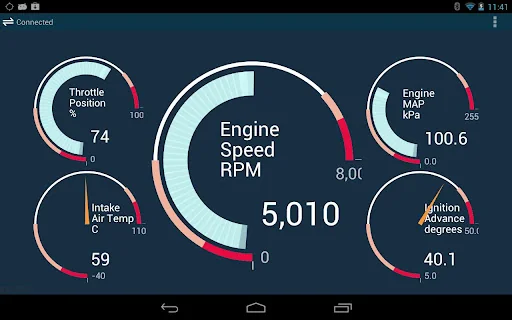
- Flexible multi-page dashboard that can be customised. Widgets (such as gauges) can be arranged as you like using a drag-and-drop editing style.
- Logging.
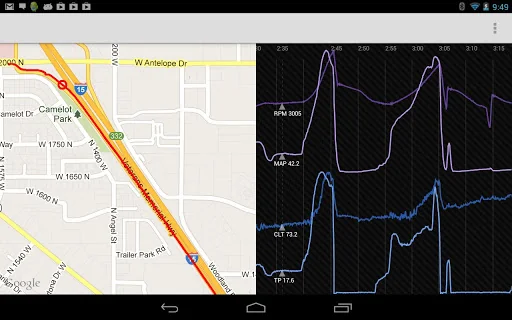
- Powerful integrated datalog viewer which allows logs to be viewed in traditional graph form, together with an optional map to show GPS route information. This datalog viewer actually shows data along a true time axis rather than on record basis, meaning it represents time accurately even if data sampling rate is inconsistent. The synchronized cursors make it easy to see exactly where you were on your route or racetrack corresponding to a particular cursor position in your datalog.
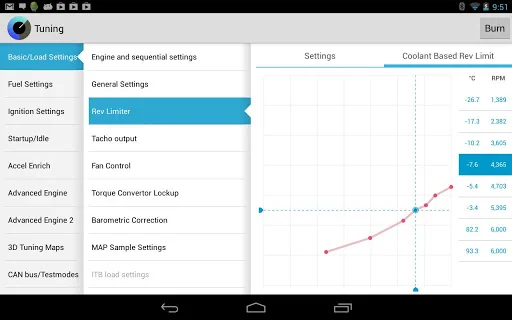
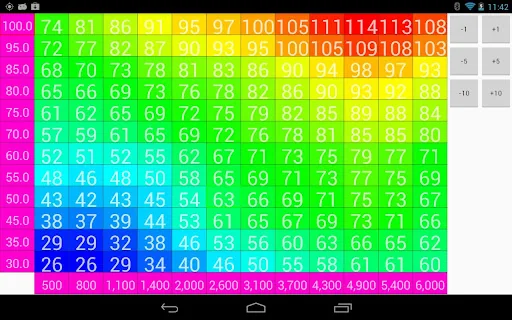
- Support for all tuning screens, including table and curve editors. (Some tuning pages are blank or unavailable and are work in progress; please email me if a particular dialog is missing that you want us to make higher priority.)
- MSDroid is driven by traditional Megasquirt .ini files. If the application doesn't come with the correct .ini for your particular ECU, you can easily add it.
- Carefully designed to support all device sizes from phones to tablets, with layouts optimised to suit your particular device's screen size.
- MSDroid is used with either a Bluetooth to RS232 (serial) interface or, if your device supports USB Host mode, you can use a USB to RS232 (serial) interface. If you have a device that supports USB Host and you're a user of MS3 then all you then need is a USB cable, thanks to MS3's internal FTDI USB interface!
MSDroid needs read/write access to storage to store project definitions, INI files, MSQ files and MSL log files. It will not work if you deny it access.
Please like our Facebook page for updates about upcoming features: https://www.facebook.com/pages/MSDroid-Android-Tuning-for-Megasquirt/475545652456190
(MegaSquirt® and MicroSquirt® are registered trademarks. References made to MegaSquirt trademark and associated literature under express permission from Bruce A Bowling and Al Grippo)
Comparable Android apps
The five apps in Maps & Navigation with the closest revenue to MSDroid. Click any to see its detail page.
Each forecast combines App Store rating, ratings count, monetisation model, pricing tier, IAP signals and ad-supported flag.
The base estimate is then multiplied by a per-category scaling factor learned from apps with founder-verified MRR.
Every number on this page comes from public APIs and Bumetric's own snapshot history.
Full methodology covers input variables, accuracy bands per category and how we treat apps without comparable anchors.
See also the live data on MSDroid's tracker page for current rating, reviews and snapshot timeline.
Building something similar? Get a free AI audit with $-revenue forecasts for every recommendation.

 Paris Metro Maps
 Easy Route Map: GPS Navigation
 Sörmlandstrafiken
 ElevMaps
 Montreal STM Bus - MonTransit