What Navier HUD 3 actually does (from store listing)
🔥 Supports Dartrays HUD device now, check it out here http://www.dartrays.com/
--- For Navier HUD 2 users ----------------
Navier HUD 2, will have no further maintain, is replaced by 3, but you can download Navier HUD 3 for free from your order history or the below link, and no need to purchase Navier HUD3.
Navier HUD 2 link : https://play.google.com/store/apps/details?id=idv.xunqun.navier.premium
------------------------------------------------------------
NOTE: Needs network connecti…
🔥 Supports Dartrays HUD device now, check it out here http://www.dartrays.com/
--- For Navier HUD 2 users ----------------
Navier HUD 2, will have no further maintain, is replaced by 3, but you can download Navier HUD 3 for free from your order history or the below link, and no need to purchase Navier HUD3.
Navier HUD 2 link : https://play.google.com/store/apps/details?id=idv.xunqun.navier.premium
------------------------------------------------------------
NOTE: Needs network connection for navigation features
NAVIER HUD – New navigation concept
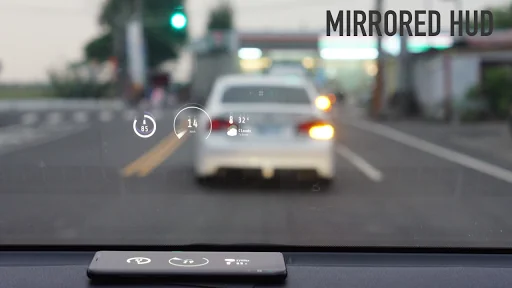
Navier HUD is a navigation App designed to use for the HUD (Head-up display) and helps drivers put attention on the road when driving. The driving information is projected onto the windshield by reflecting the smartphone screen while putting the phone in front of the vehicle's windshield.
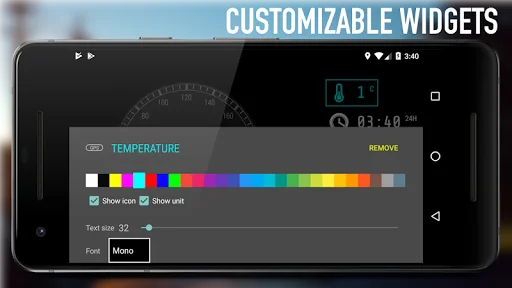
Navier HUD is an information provider for driving. It contains a customizable layout, which is able to put widgets they care and remove what they don't care. Navier HUD calculates the real-time information via the phone sensor, such as GPS and gyroscope. Meanwhile, Navier HUD supports to acquire the vehicle data from OBD2 Bluetooth adapter. Through the data from OBD2 protocol, the information, such as vehicle's speed, engine RPM, and engine coolant temperature can be shown through the interface and which is more accurate than the data from sensors of the smartphone.
[Safer driving]
Navier HUD (head-up display) projects navigational instructions on the windshield, effectively providing essential information to the driver without having to take your eyes off the road.
[Turn-by-turn navigation]
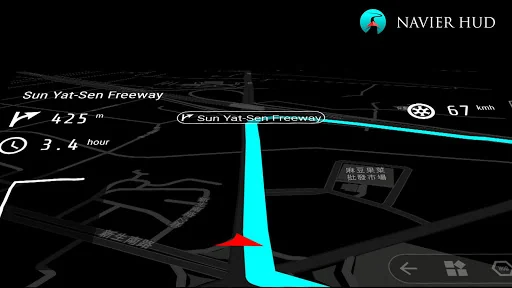
The navigational instructions are designed to be read clearly in HUD mode. Simple instructions and signals are the main goals here. Turn-by-turn speech instructions are supported (not all languages).
[OBD2 support]
You can acquire information via the OBD2 dongle on your car, such as the runtime speed, revs, and fuel level.
[Usable for different vehicles]
Navier HUD can be used for driving, biking, jogging... You can switch between HUD and normal mode for regular use on a phone holder.
[Customize your layout]
Navier HUD lets you create your own panel layout with parts like a compass, routin
Comparable Android apps
The five apps in Maps & Navigation with the closest revenue to Navier HUD 3. Click any to see its detail page.
Each forecast combines App Store rating, ratings count, monetisation model, pricing tier, IAP signals and ad-supported flag.
The base estimate is then multiplied by a per-category scaling factor learned from apps with founder-verified MRR.
Every number on this page comes from public APIs and bumetric's own snapshot history.
Full methodology covers input variables, accuracy bands per category and how we treat apps without comparable anchors.
See also the live data on Navier HUD 3's tracker page for current rating, reviews and snapshot timeline.
Building something similar? Get a free AI audit with $-revenue forecasts for every recommendation.

 Essence&CO
 Live Earth Map-Street View Map
 Paris Aéroport – Official App
 Blumeter - Taximeter
 Karwa Official