ML revenue forecast.
Calibrated against 77129 apps in this category.
Confidence band
±15%
High — many comparable apps with verified data
At a glance
Tracks close to the Android app category median (189/mo).
Ranks #50,937 of 77,129 in Tools (top 66.0% by revenue).
Launched Mar 15, 2021 · last updated May 04, 2026.
What the app looks like
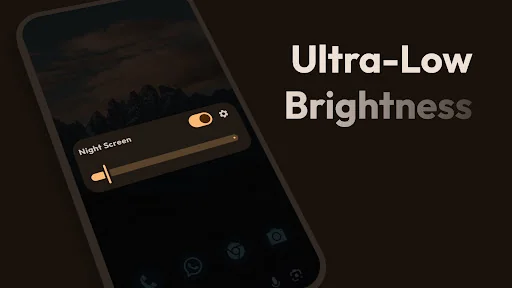
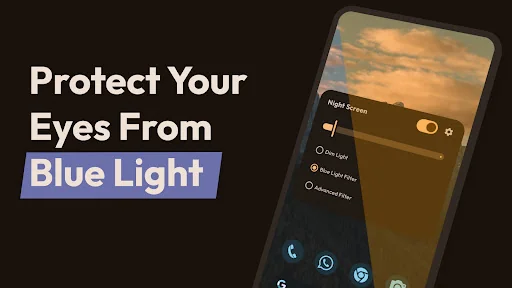
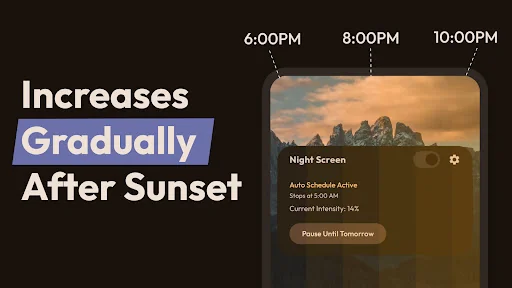
Live screenshots from the Play Store, captured by our snapshot worker. Tap any image to enlarge.
Night Screen: Ultra Dim Mode's revenue trajectory
Forecast revenue from snapshot history. Last 1 months.
Where Night Screen: Ultra Dim Mode sits in Tools
Revenue distribution of 77129 comparable apps. Night Screen: Ultra Dim Mode highlighted.
Night Screen: Ultra Dim Mode vs comparable apps
Revenue trajectory side-by-side. Bold = Night Screen: Ultra Dim Mode, ghosted = peers.
App spec
Version
1.4.3
Last update
May 04, 2026
Launched
Mar 15, 2021
Price
Free
Monetization
Free
What Night Screen: Ultra Dim Mode actually does (from store listing)
<h1><b>Night Screen</b></h1> Night screen is a Free app that dim the brightness of your Screen lower than the phone minimum brightness settings, it has many night screen modes: night mode reading screen, Ultra-low screen brightness, Customize your night screen filters
<h2><b>Different Night modes that are included in Night Screen app:</b></h2>
<b>• Dim Light:</b>
You can adjust your screen brightness accordingly. Get a better viewing experience, Reduce brightness levels, reduce stress on …
Night screen is a Free app that dim the brightness of your Screen lower than the phone minimum brightness settings, it has many night screen modes: night mode reading screen, Ultra-low screen brightness, Customize your night screen filters
Different Night modes that are included in Night Screen app:
• Dim Light: You can adjust your screen brightness accordingly. Get a better viewing experience, Reduce brightness levels, reduce stress on the eyes and protect eyes from screen light.
• Blue light filter (Reading Mode): Blue light filter is used to decrease blue light by reducing the intensity. Shifting Night screen mode to Blue light filter can relieve your eyes stress, and your eyes will feel at comfort during night reading. Also, Blue light filter will protect your eyes and assist you to sleep comfortably. Great for low-light gaming, web browsing, and eBook reading.
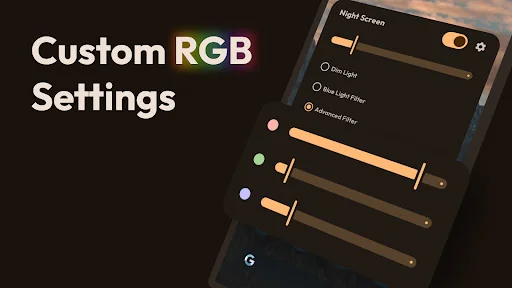
• Customize Screen Filter (RGB): The color picker function makes you choose any color which is best for your eyes and begin using your smartphone with the Night Screen mode. This will protect your eyes from the flashing screen and use at night time with the Night Screen app.
• Auto Schedule: Automatically enable night screen at sunset and disable it in the morning. Set your preferred sunset and morning times, and Night Screen will handle everything automatically. The filter gradually increases in intensity after sunset, helping your eyes adjust naturally and improving your sleep quality. You can customize the transition duration (1-4 hours) and maximum filter intensity (10-100%). Smart pause feature lets you temporarily disable the schedule until the next day.
• Easy to Use: beautiful buttons help you turn on and turn off and adjust the Night screen settings app in one second. Very useful screen dimmer & night modes app for eye care and safety.
Night Screen (screen dimmer) Tools Features: • Beautiful dark and light theme
• All modes in one place
• Reduce blue light on the screen
• Customize Screen Filter (RGB)
• Dim the entire screen
• Customize screen filter(shade and color) to anything you wish.
• Blue light filter (Reading Mode)
• Eye protector from Blue screen light
• Auto Schedule - automatically turn on at sunset and off in the morning
• Gradual intensity transition for natural eye adjustment
• Quick stop from Notification.
• Very simple to use.
Permissions Notice:
Display overlay- it is used to change the color of the overlay
Comparable Android apps
The five apps in Tools with the closest revenue to Night Screen: Ultra Dim Mode. Click any to see its detail page.
Each forecast combines App Store rating, ratings count, monetisation model, pricing tier, IAP signals and ad-supported flag.
The base estimate is then multiplied by a per-category scaling factor learned from apps with founder-verified MRR.
Every number on this page comes from public APIs and bumetric's own snapshot history.
Full methodology covers input variables, accuracy bands per category and how we treat apps without comparable anchors.
See also the live data on Night Screen: Ultra Dim Mode's tracker page for current rating, reviews and snapshot timeline.
Building something similar? Get a free AI audit with $-revenue forecasts for every recommendation.

 Currency Converter - Calculato
 Alert Voice
 Voice assistant integration pl
 AShare Share & Transfer
 Kelag-Mobility-App