What Notifications for Android TV actually does (from store listing)
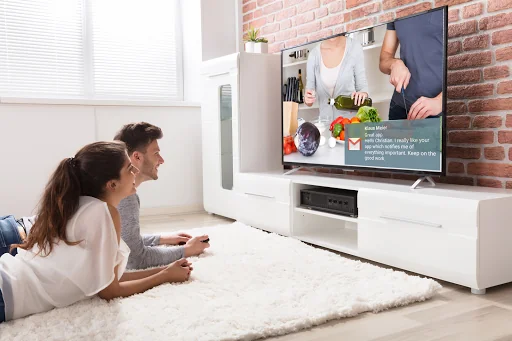
Forward notifications from your mobile device immediately to your TV screen using Android TV or Google TV.
Including application logo and images contained in the notification.
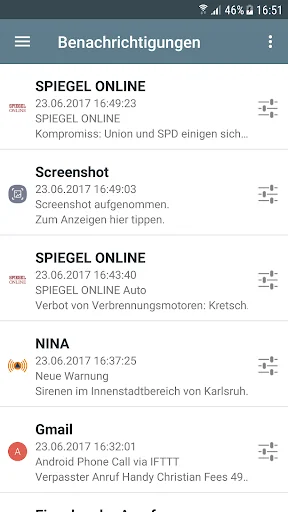
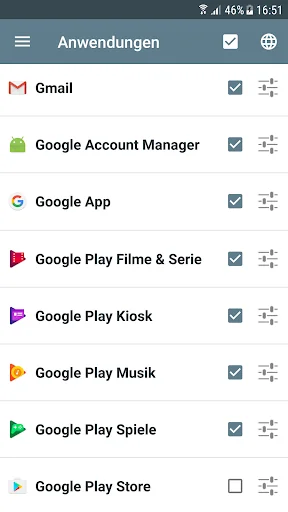
Scroll through every notified message on the Android TV in fullscreen mode. You can change the settings individually for each application.
Works best with the following apps, but basically works with any app:
- Messenger Apps: WhatsApp, SMS, Gmail
- News apps: Spiegel Online, SWR3, kicker
Also displays incoming…
Forward notifications from your mobile device immediately to your TV screen using Android TV or Google TV.
Including application logo and images contained in the notification.
Scroll through every notified message on the Android TV in fullscreen mode. You can change the settings individually for each application.
Works best with the following apps, but basically works with any app:
- Messenger Apps: WhatsApp, SMS, Gmail
- News apps: Spiegel Online, SWR3, kicker
Also displays incoming and outgoing calls.
Important: You need to install the app 'Notifications for Android TV' on your Android TV or Google TV.
• Immediate forwarding of your notifications to your Android TV or Google TV
• Browse through notification details on the TV screen including application logo and notification images
• App specific settings including privacy mode
Supported devices: Nexus Player, Nvidia Shield, Philips Android TV devices, Sony Android TV devices, Xiaomi MI Box 4K and other Android TV and Google TV devices.
Android 11 or higher is required. For older Android versions please see FAQ.
Comparable Android apps
The five apps in Communication with the closest revenue to Notifications for Android TV. Click any to see its detail page.
Each forecast combines App Store rating, ratings count, monetisation model, pricing tier, IAP signals and ad-supported flag.
The base estimate is then multiplied by a per-category scaling factor learned from apps with founder-verified MRR.
Every number on this page comes from public APIs and bumetric's own snapshot history.
Full methodology covers input variables, accuracy bands per category and how we treat apps without comparable anchors.
See also the live data on Notifications for Android TV's tracker page for current rating, reviews and snapshot timeline.
Building something similar? Get a free AI audit with $-revenue forecasts for every recommendation.



 inexPHONE
 아톡 개인용 - 스마트폰 070 인터넷전화
 Stipop: AI Chat·Virtual Dating
 말씀모아
말씀모아
 12Voip