ML revenue forecast.
Calibrated against 22864 apps in this category.
Confidence band
±15%
High — many comparable apps with verified data
At a glance
Earns 1.96× more than the category median (162/mo).
Ranks #4,240 of 22,864 in Communication (top 18.5% by revenue).
Launched Oct 19, 2014 · last updated Jul 10, 2025.
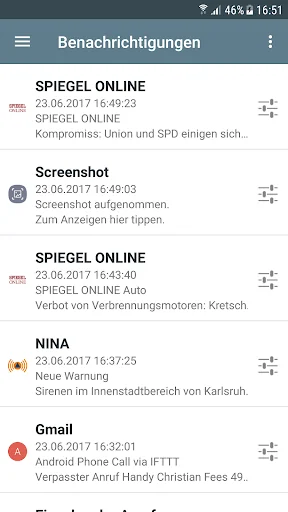
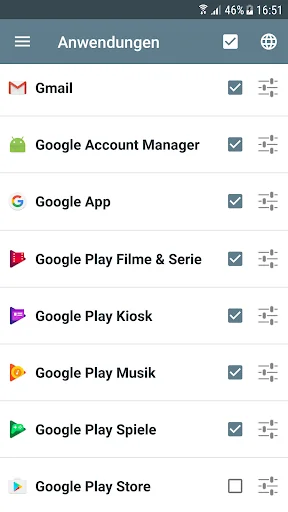
What the app looks like
Live screenshots from the Play Store, captured by our snapshot worker. Tap any image to enlarge.
Notifications for Fire TV's revenue trajectory
Forecast revenue from snapshot history. Last 1 months.
Where Notifications for Fire TV sits in Communication
Revenue distribution of 22864 comparable apps. Notifications for Fire TV highlighted.
Notifications for Fire TV vs comparable apps
Revenue trajectory side-by-side. Bold = Notifications for Fire TV, ghosted = peers.
App spec
Version
5.6.0
Last update
Jul 10, 2025
Launched
Oct 19, 2014
Price
Free
Monetization
Free
What Notifications for Fire TV actually does (from store listing)
Forward notifications from your mobile device(s) immediately to your TV screen using Amazon Fire TV.
Including application logo and images contained in the notification.
Scroll through every notified message on the Amazon Fire TV in fullscreen mode. You can change the settings individually for each application.
Best working with these apps, but unlimited to every app which displays notifications:
- Messenger apps: WhatsApp, SMS, Gmail
- News apps: Spiegel Online, SWR3
Also shows incomi…
Forward notifications from your mobile device(s) immediately to your TV screen using Amazon Fire TV.
Including application logo and images contained in the notification.
Scroll through every notified message on the Amazon Fire TV in fullscreen mode. You can change the settings individually for each application.
Best working with these apps, but unlimited to every app which displays notifications:
- Messenger apps: WhatsApp, SMS, Gmail
- News apps: Spiegel Online, SWR3
Also shows incoming and outgoing phone calls.
Important: You need to install the app 'Notifications for Fire TV' on your Amazon Fire TV or Fire TV stick:
- Go to apps and select category 'Productivity' to find it on the Fire TV, then install and start the app
or
- Open the Amazon website and search for the app 'Notifications for Fire TV', get the app, on the Fire TV choose settings, my account and synchronize. Then the app should appear within your favorite apps. Install and start the app to continue.
• Immediate forwarding of your notifications to your Amazon Fire TV or Fire TV stick
• Browse through notification details on the TV screen including application logo and notification images
• App specific settings including privacy mode
Comparable Android apps
The five apps in Communication with the closest revenue to Notifications for Fire TV. Click any to see its detail page.
Each forecast combines App Store rating, ratings count, monetisation model, pricing tier, IAP signals and ad-supported flag.
The base estimate is then multiplied by a per-category scaling factor learned from apps with founder-verified MRR.
Every number on this page comes from public APIs and bumetric's own snapshot history.
Full methodology covers input variables, accuracy bands per category and how we treat apps without comparable anchors.
See also the live data on Notifications for Fire TV's tracker page for current rating, reviews and snapshot timeline.
Building something similar? Get a free AI audit with $-revenue forecasts for every recommendation.




 Email for Hotmail and Outlook
 Softros LAN Messenger
 Loga Internet
 Tchap
Tchap
 Receive SMS Temporary number