What 누구 - NUGU, 세상을 깨우는 AI actually does (from store listing)
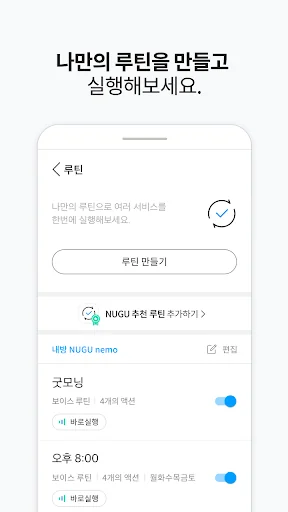
● <b>Routines</b>
Run multiple services at once with your own custom routines.
You can execute voice routines with your own commands or set schedule routines for your desired time.
● <b>NUGU Widgets</b>
Control your devices easily through widgets.
You can quickly send text commands to the speaker.
● <b>Device Controller</b>
Clearer and simpler! Add devices,
and use device controls more conveniently, including text commands, Bluetooth, and mood lights.
● <b>Solution Mes…
Run multiple services at once with your own custom routines.
You can execute voice routines with your own commands or set schedule routines for your desired time.
● NUGU Widgets
Control your devices easily through widgets.
You can quickly send text commands to the speaker.
● Device Controller
Clearer and simpler! Add devices,
and use device controls more conveniently, including text commands, Bluetooth, and mood lights.
● Solution Message Cards
We notify you when a new device is detected or when service account linking is required.
Take quick commands with a single touch using the 'Run Now' button.
Meet a smart world with NUGU.
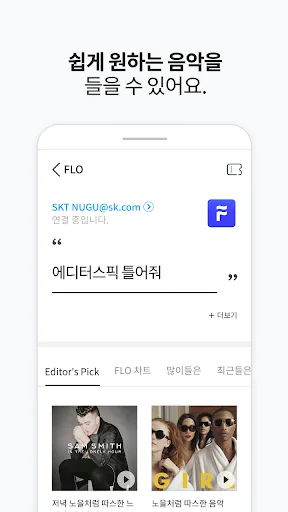
1. Music Life with FLO and Melon
"Play the FLO charts"
"Play sweet music on Melon"
"Play healing music"
2. Information without lifting a finger during a busy day - Weather, News
"What is the weather like in Euljiro today?"
"Tell me the latest news"
"Tell me today's sports news"
3. Ask NUGU if you are curious! - NUGU Encyclopedia, Language Dictionary
"Tell me about Paul Gauguin's paintings"
"What is 'How is the weather today' in Chinese?"
"What is 'Good luck' in English?"
※ The following permissions are required when using the NUGU app.
[Optional Access Permissions]
1. Contacts: Used when setting up Emergency SOS recipients.
2. Location: Used for weather services and device connection.
3. Files and Media (Photos and Videos): Used when setting the device home screen. (Required only for Android 12.0 and below)
4. Notifications: Used to use the Find My Phone service.
5. Nearby Devices: Used when connecting a device. (Required for Android 12.0 and above)
※ You can use the service even if you do not agree to optional access permissions, but the provision of features requiring those permissions may be limited.
※ The ability to set permissions individually is available starting from Android 6.0. If you are using a device running Android 6.0 or lower, selective consent to or withdrawal of access permissions is not possible. We recommend contacting your device manufacturer and upgrading to Android 6.0 or higher.
- NUGU Customer Center: +82-2-1670-0110
Comparable Android apps
The five apps in Lifestyle with the closest revenue to 누구 - NUGU, 세상을 깨우는 AI. Click any to see its detail page.
Each forecast combines App Store rating, ratings count, monetisation model, pricing tier, IAP signals and ad-supported flag.
The base estimate is then multiplied by a per-category scaling factor learned from apps with founder-verified MRR.
Every number on this page comes from public APIs and Bumetric's own snapshot history.
Full methodology covers input variables, accuracy bands per category and how we treat apps without comparable anchors.
See also the live data on 누구 - NUGU, 세상을 깨우는 AI's tracker page for current rating, reviews and snapshot timeline.
Building something similar? Get a free AI audit with $-revenue forecasts for every recommendation.



 Quran French - Arabic in Audio
 JSwipe – Jewish Dating & Love
 Sleep Timer (Audio & Video)
 MyEdenred France
 백점 2026 – 신년운세, 사주, 상담