What Offline Notepad actually does (from store listing)
Offline notepad is exactly what it says on the tin: A notepad which operates completely offline. No server syncs or data loss if you forget the login credentials to your account! Main features include:
Creating Content:
1- Create as many notes as you like, and search for them by title or anything in the note body to find them again at ease.
2- Create & write your weekly shopping list or anything else with the dedicated list creation feature. Add as many items as you like! Check off item…
Offline notepad is exactly what it says on the tin: A notepad which operates completely offline. No server syncs or data loss if you forget the login credentials to your account! Main features include:
Creating Content:
1- Create as many notes as you like, and search for them by title or anything in the note body to find them again at ease.
2- Create & write your weekly shopping list or anything else with the dedicated list creation feature. Add as many items as you like! Check off items, filter by complete/incomplete items & see your progress at ease with a progress percentage bar!
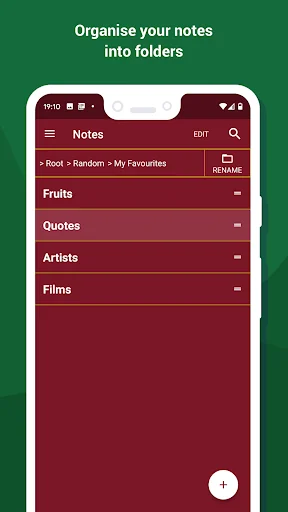
3- Organise your notes & lists into folders and sub-folders, create as many folders as you like - as many layers deep as you like also!
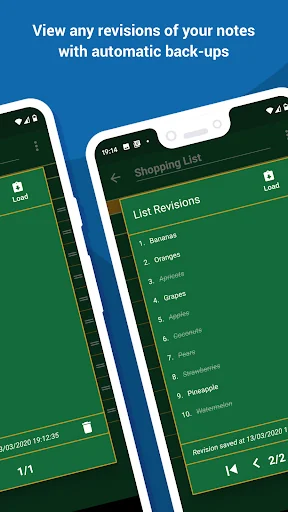
4- Revisit old revisions/edits of a note/list to see the history of that item. You may also replace the current version of that note or list with an older version of it.
Convenience & Utility:
5- A completely uninterrupted user experience: no videos or ads in any shape or form! The app is 100% free & simply accepts donations for those who love it enough to support it. Simple!
6- Lock the app to portrait (default) or landscape so you can use it on phones & tablets alike!
7- Flag and highlight your favoured notes to make them stand out from the rest. Organise & sort them all by either dragging & dropping or by alphabetical order.
Security & Backup:
8- Protect your notes by setting up an app PIN & fingerprint unlocking within the app.
9- Export & import your items to yourself across devices by following the export/import process within the app. As this is an offline notepad, the export/import process is done by emailing your data to yourself. Your exported items are encrypted by default.
Customise:
10- Reskin the entire look of your app from a variety of themes! Choose from ‘panda white’, ‘dark mode’ & ‘rich red’ just to name a few!
11- Resize the text throughout the entire app to better suit your visual needs.
Offline notepad is entirely free & your notes, lists and folders are only stored within the app itself. There are no limitations on how many items you can create or how many times you can edit your notes/lists.
This app is updated regularly with brand new features, fixes & improvements; and all of these changes are documented frequently in the ‘News & Updates’ section found from the home screen in the app!
That's all there is to it - happy note taking!
Comparable Android apps
The five apps in Tools with the closest revenue to Offline Notepad. Click any to see its detail page.
Each forecast combines App Store rating, ratings count, monetisation model, pricing tier, IAP signals and ad-supported flag.
The base estimate is then multiplied by a per-category scaling factor learned from apps with founder-verified MRR.
Every number on this page comes from public APIs and Bumetric's own snapshot history.
Full methodology covers input variables, accuracy bands per category and how we treat apps without comparable anchors.
See also the live data on Offline Notepad's tracker page for current rating, reviews and snapshot timeline.
Building something similar? Get a free AI audit with $-revenue forecasts for every recommendation.




 Life Registration
 NaturaList
 Split PDF, Remove PDF Pages
 Vibration meter - Seismometer
 Router Admin Setup - IP Tools