ML revenue forecast.
Calibrated against 77129 apps in this category.
Confidence band
±15%
High — many comparable apps with verified data
At a glance
Tracks close to the Android app category median (189/mo).
Ranks #33,156 of 77,129 in Tools (top 43.0% by revenue).
Launched Jun 10, 2020 · last updated Feb 20, 2024.
What the app looks like
Live screenshots from the Play Store, captured by our snapshot worker. Tap any image to enlarge.
One Tap Translator On Screen's revenue trajectory
Forecast revenue from snapshot history. Last 1 months.
Where One Tap Translator On Screen sits in Tools
Revenue distribution of 77129 comparable apps. One Tap Translator On Screen highlighted.
One Tap Translator On Screen vs comparable apps
Revenue trajectory side-by-side. Bold = One Tap Translator On Screen, ghosted = peers.
App spec
Version
8.0
Last update
Feb 20, 2024
Launched
Jun 10, 2020
Price
Free
Monetization
Free
What One Tap Translator On Screen actually does (from store listing)
Translate your whole mobile phone’s screen with a single touch using this one-tap translator app.
You can also translate individual text from any document that is present on your phone. You just need to set the floating icon on the word or text and you will get its translated text instantly in your preferred language.
If you are traveling to a country whose language is not known to you or you are having some documents that are written in another language then One Tap Translator app will ma…
Translate your whole mobile phone’s screen with a single touch using this one-tap translator app.
You can also translate individual text from any document that is present on your phone. You just need to set the floating icon on the word or text and you will get its translated text instantly in your preferred language.
If you are traveling to a country whose language is not known to you or you are having some documents that are written in another language then One Tap Translator app will make your work easy in those situations.
There are 2 main functionalities of this app 1) On-screen translation and 2) Text translation.
How to translate on-screen: - From the home screen of the app, turn on the Show translate floating button.
- Then a popup box will appear, to proceed you have to click on Start Now.
- Select the language in which you want to translate the on-screen text.
- For on-screen text, only English text can be translated into other languages.
- Select the medium of translation.
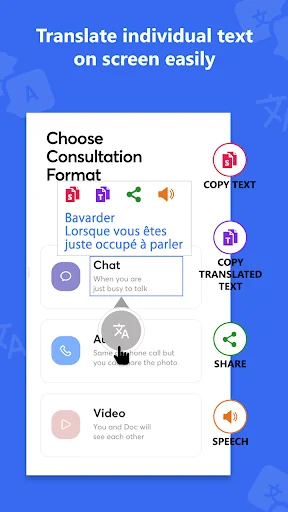
- Using the bubble pointer, you have to mark the text on the screen and it will get translated.
- You can also copy selected & translated text, share translated text, and pronounce the translated text.
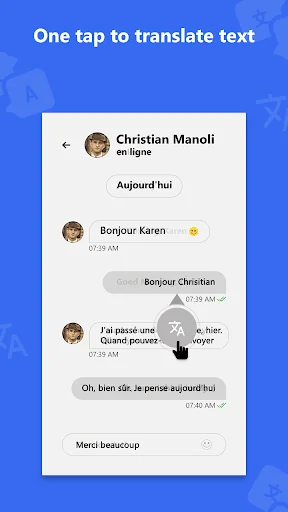
- If you tap on the bubble pointer once, then the whole screen will get translated in just one tap.
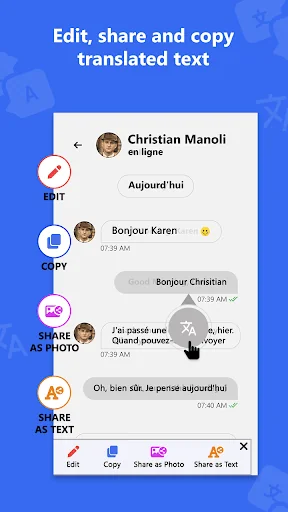
- Full screen translated text can also be edited and copied.
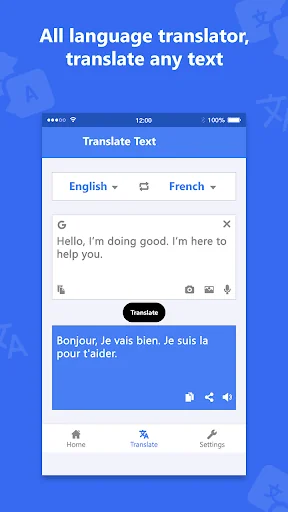
How to translate text to another language: - From the Translate section, select two languages.
- Here you can translate the text of any language to another language.
- The first language that you select in that language you have to enter your text.
- Click on the Translate button and the app will translate the text into the second language that you have selected.
- You can copy, share, and pronounce the text that has been translated.
- Instead of manual typing here you can also use voice typing.
- This app can also translate the text present in the image, you can capture the image using your phone's camera or import it from the gallery.
BIND_ACCESSIBILITY_SERVICE Permission is used to detect text on screen and translate that text using a floating icon or perform full screen translate of all text on screen by tapping the floating icon.
Features: - It has a floating button.
- You can also close the floating button service from the notification area.
- It has a tutorial to guide you.
- It has 3 translating mediums: Google Translate, My Memory Translate, and Yandex Translate.
- It has an on-screen translation that can translate English text to other languages.
- A single click on the floating button can translate full on-screen text instantly in your selected language.
- In the text translation, you can paste text from other sources and it supports almost all languages.
- You can also insert text using the keyboard, voice typing, camera image, and gallery image.
- You can copy, share, and pronounce the translated text.
So if you want to translate your phone’s screen or some text into another language then download the One Tap Translator app.
Comparable Android apps
The five apps in Tools with the closest revenue to One Tap Translator On Screen. Click any to see its detail page.
Each forecast combines App Store rating, ratings count, monetisation model, pricing tier, IAP signals and ad-supported flag.
The base estimate is then multiplied by a per-category scaling factor learned from apps with founder-verified MRR.
Every number on this page comes from public APIs and bumetric's own snapshot history.
Full methodology covers input variables, accuracy bands per category and how we treat apps without comparable anchors.
See also the live data on One Tap Translator On Screen's tracker page for current rating, reviews and snapshot timeline.
Building something similar? Get a free AI audit with $-revenue forecasts for every recommendation.


 T-Mobile Doctor
 privacyIDEA Authenticator
 Meme Editor X Easy Meme Maker
 Minutis Mobile
 Pico
Pico