ML revenue forecast.
Calibrated against 77129 apps in this category.
Confidence band
±15%
High — many comparable apps with verified data
At a glance
Earns 8.45× more than the category median (189/mo).
Ranks #3,268 of 77,129 in Tools (top 4.2% by revenue).
Launched Jul 24, 2016 · last updated Apr 25, 2026.
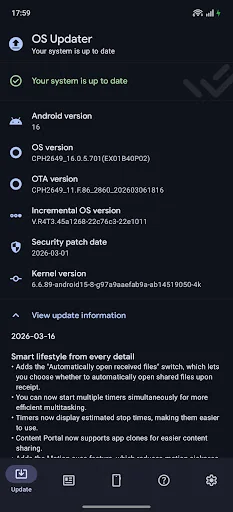
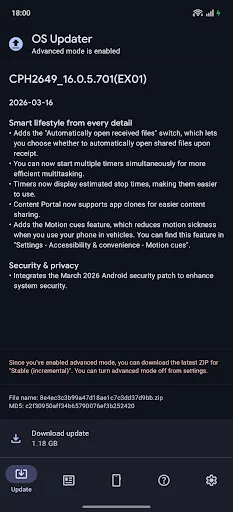
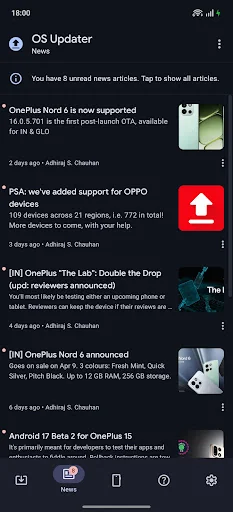
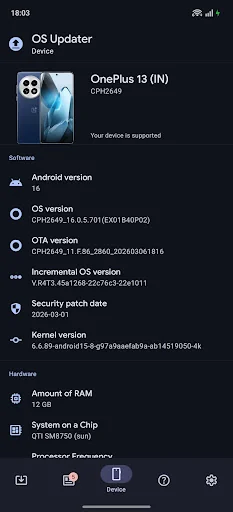
What the app looks like
Live screenshots from the Play Store, captured by our snapshot worker. Tap any image to enlarge.
OS Updater's revenue trajectory
Forecast revenue from snapshot history. Last 1 months.
Where OS Updater sits in Tools
Revenue distribution of 77129 comparable apps. OS Updater highlighted.
OS Updater vs comparable apps
Revenue trajectory side-by-side. Bold = OS Updater, ghosted = peers.
App spec
Version
7.1.0
Last update
Apr 25, 2026
Launched
Jul 24, 2016
Price
Free
Monetization
Free
What OS Updater actually does (from store listing)
An open-source app supported by ads & donations. Ads can be removed by purchasing the ad-free unlock in the app’s settings.
<i>This is a third-party app, not an official OPPO/OnePlus/realme app.</i>
<b>App’s purpose</b>
Android OEMs roll out OTA updates in a staged manner, meaning you might have to wait a long time before receiving an update. That’s where this app comes in—you can <b>download official OTA ZIPs</b> directly, with built-in <b>MD5 checksum verification</b>. They're the exact s…
An open-source app supported by ads & donations. Ads can be removed by purchasing the ad-free unlock in the app’s settings.
This is a third-party app, not an official OPPO/OnePlus/realme app.
App’s purpose Android OEMs roll out OTA updates in a staged manner, meaning you might have to wait a long time before receiving an update. That’s where this app comes in—you can download official OTA ZIPs directly, with built-in MD5 checksum verification. They're the exact same files as system OTA, except we're faster 99% of the time. By doing so, this app lets you skip the rollout queue and install official updates ASAP.
Note: if you’re not receiving notifications, double-check app & Android settings. Also disable battery optimizations: https://dontkillmyapp.com/oneplus#user-solution.
Features 🪄 First-launch setup wizard: auto-detects correct device/method & allows configuring privacy options
📝 View important info: changelog & device/OS versions (including security patch)
📖 Fully transparent: check filename & MD5 checksums
✨ Robust download manager: recovers from network errors to avoid wasting data
🔒 MD5 verification: protects against corruption/tampering
🧑🏫 Detailed install guides: never miss a step
🤝 World-class support: email & Discord (thanks to our community)
📰 High-quality news articles: cover a variety of topics about OPPO/OnePlus/realme, OxygenOS/ColorOS, and our project
☀️ Themes: Light, Dark, System, Auto (time-based)
♿ Fully accessible: professionally-crafted design (adhering to WCAG 2.0), support for screen readers
Supported devices All devices that aren’t carrier-branded (e.g. T-Mobile & Verizon) work perfectly. Carrier-branded devices run a custom, completely locked-down OxygenOS/ColorOS flavour. If you own such a device, be aware that you cannot manually update your firmware, even if you don’t use our app.
See https://oxygenupdater.com/ for a full list of supported devices, and https://oxygenupdater.com/faq/ for frequently asked questions.
Works perfectly without root If you grant root access to the app, there are some additional features you can take advantage of: "become a contributor" feature, which tries to submit OTA URLs captured from your device (opt-in), and improved update method recommendations (full vs incremental).
If you want to update a rooted device while maintaining root, follow these steps:
1. Install via “local upgrade” as you normally would, but *DO NOT* reboot
2. Open Magisk and select the “flash to inactive slot” option
3. Reboot and enjoy
Supports all update tracks & package types Tracks:
• Stable (default): supposed to be pristine quality, daily-driver material
• Open Beta (opt-in): may contain bugs, but you can experience new features early
• Developer Preview (opt-in, if available for your device): unstable, meant only for developers or hardcore enthusiasts
Switching between different tracks may require enabling “advanced mode” in the app’s settings.
Package types:
• Incremental (default): much smaller than full, meant for a specific source → target version combo (e.g. 1.2.3 → 1.2.6). Incompatible if rooted, standard Android behaviour. Note: app falls back to full if for whatever reason an incremental isn’t available.
• Full: contains the entire OS, so they’re quite large. Uses: switching between different tracks, or upgrading to a brand new major Android version (e.g. 11 → 12), or if you’re rooted. In all other cases, incremental is recommended.
Contact us via email or Discord if you need to.
This is a third-party app, not an official OPPO/OnePlus/realme application. Neither the developer of this app nor OPPO/OnePlus/realme are responsible for your actions. Back up your files/media regularly.
OnePlus, OxygenOS and the respective logos are registered trademarks of OnePlus Technology (Shenzhen) Co., Ltd.
AdMob™, AdSense™, Android™, Google Play and the Google Play logo are registered trademarks of Google LLC.
Comparable Android apps
The five apps in Tools with the closest revenue to OS Updater. Click any to see its detail page.
Each forecast combines App Store rating, ratings count, monetisation model, pricing tier, IAP signals and ad-supported flag.
The base estimate is then multiplied by a per-category scaling factor learned from apps with founder-verified MRR.
Every number on this page comes from public APIs and bumetric's own snapshot history.
Full methodology covers input variables, accuracy bands per category and how we treat apps without comparable anchors.
See also the live data on OS Updater's tracker page for current rating, reviews and snapshot timeline.
Building something similar? Get a free AI audit with $-revenue forecasts for every recommendation.


 MobileFence - Parental Control
 HTML Website Inspector Editor
 LetsVPN
 AI Translator Offline
 Gallery Vault-Hide Photo Video