How much does ParKing: Where is my car? Find earn?
Android app
from Talent Apps
· Maps & Navigation
ML forecast★ 4.1 · 9KFree
~945/mo
ML revenue forecast.
Calibrated against 14173 apps in this category.
Confidence band
±15%
High — many comparable apps with verified data
At a glance
Earns 5.23× more than the category median (180/mo).
Ranks #695 of 14,173 in Maps & Navigation (top 4.9% by revenue).
Launched Nov 13, 2015 · last updated Sep 28, 2025.
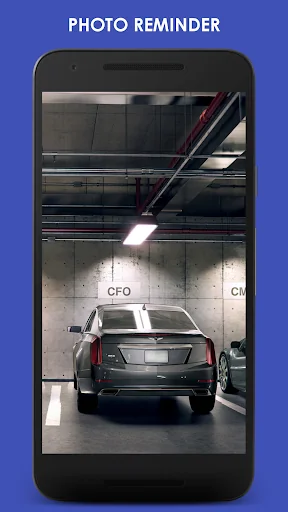
What the app looks like
Live screenshots from the Play Store, captured by our snapshot worker. Tap any image to enlarge.
ParKing: Where is my car? Find's revenue trajectory
Forecast revenue from snapshot history. Last 1 months.
Where ParKing: Where is my car? Find sits in Maps & Navigation
Revenue distribution of 14173 comparable apps. ParKing: Where is my car? Find highlighted.
ParKing: Where is my car? Find vs comparable apps
Revenue trajectory side-by-side. Bold = ParKing: Where is my car? Find, ghosted = peers.
App spec
Version
Varies with device
Last update
Sep 28, 2025
Launched
Nov 13, 2015
Price
Free
Monetization
Free
What ParKing: Where is my car? Find actually does (from store listing)
Keep forgetting where you parked? Asking yourself where is my car? Where did I park? Find my car?
With ParKing, the KING of parking, it will never happen again!
This simple car locator app is exactly the solution you need to locate your vehicle!
<b>Key features</b>
<b>One Click Parking</b> - Save a new parking reminder on a map with just one click.
<b>Parking History</b> - History of your previous parking places.
<b>Automatic Parking</b> - Automatic parking detection using your car's B…
Keep forgetting where you parked? Asking yourself where is my car? Where did I park? Find my car?
With ParKing, the KING of parking, it will never happen again!
This simple car locator app is exactly the solution you need to locate your vehicle!
Key features
One Click Parking - Save a new parking reminder on a map with just one click.
Parking History - History of your previous parking places.
Automatic Parking - Automatic parking detection using your car's Bluetooth device.
User Defined Zones - User defined zones with no automatic parking notifications (e.g. home, office).
Parking Time Reminder / Parking Timer - Parking time reminder to avoid fines.
Navigation - Multiple navigation options to your car.
Indoor / Underground Parking - Add a photo or a text note to your parking for indoor/underground parking places. No GPS is required!
Tablet Support - ParKing car locator app for Android tablets.
Smartwatch Support - ParKing car finder app for Android smartwatches.
Widget - Beautiful home screen widget.
Try our find my car app now!
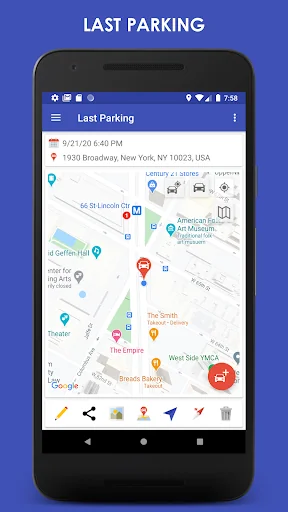
One Click Parking To save a new parking reminder, you simply click once on a map.
ParKing will automatically show the location and address of your parking and your current location.
Parking History ParKing saves all of your previous parking places.
You can edit or delete each parking place, or see all the parking places on a map.
In addition, you can set an automatic cleanup of your parking history.
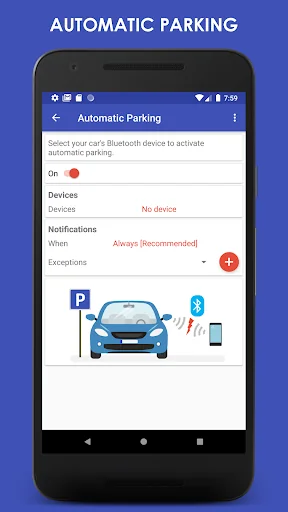
Automatic Parking With automatic parking, you don't need to manually save where you parked your car,
ParKing will do it for you automatically!
When you activate automatic parking, the app detects when your mobile device disconnects from your car's Bluetooth device and saves your parking automatically.
ParKing saves your battery and doesn't need to run in the background in order to detect automatic parking.
User Defined Zones In case you park at the same place many times, e.g. at home or at the office,
ParKing lets you define zones where you will not receive automatic parking notifications.
ParKing will simply save your parking place silently.
You will only be notified when you park in a new parking place.
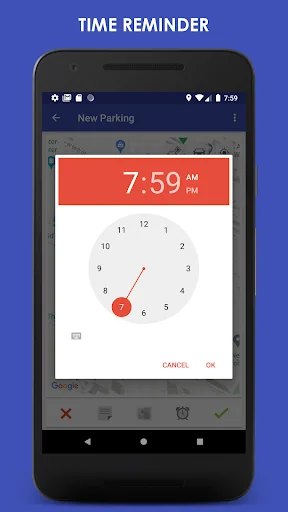
Parking Time Reminder In case you have a limited parking time, you can add a parking time reminder.
You will be notified when your parking time is about to end.
Navigation ParKing offers multiple options to navigate to your car:
- Use your favorite navigation app to find your car: Google Maps, Waze etc.
- Use a built-in map with a marker of your parking place.
- Use a built-in compass to locate your car.
Indoor / Underground Parking In case you park your car indoors or underground, GPS signal might not be available.
In such cases, you can add a photo or a text note to help you find your car.
Tablet Support ParKing car locator app is also available for Android tablets.
Make sure you have GPS and Bluetooth in order to enjoy all the parking features.
Smartwatch Support ParKing car finder app is also available for Android Wear smartwatches.
On your smartwatch you can place a new parking reminder, add a parking time reminder, navigate to your parking place & locate your car.
All actions will be synced with your smartphone ParKing find my car app.
Comparable Android apps
The five apps in Maps & Navigation with the closest revenue to ParKing: Where is my car? Find. Click any to see its detail page.
Each forecast combines App Store rating, ratings count, monetisation model, pricing tier, IAP signals and ad-supported flag.
The base estimate is then multiplied by a per-category scaling factor learned from apps with founder-verified MRR.
Every number on this page comes from public APIs and bumetric's own snapshot history.
Full methodology covers input variables, accuracy bands per category and how we treat apps without comparable anchors.
See also the live data on ParKing: Where is my car? Find's tracker page for current rating, reviews and snapshot timeline.
Building something similar? Get a free AI audit with $-revenue forecasts for every recommendation.

 RedTaxi: Ride Booking App
 Singapore MRT and LRT Offline
 Cestovné poriadky CP
 Offline Maps, GPS Directions
 Truckfly - Truck GPS