iOS app
from iTECH DEVELOPMENT SYSTEMS INC.
· Business
ML forecast★ 3.9 · 2K→ StablePaid
~7.6K/mo
ML revenue forecast.
Calibrated against 2472 apps in this category.
Confidence band
±15%
High — many comparable apps with verified data
At a glance
Earns 9.59× more than the category median (789/mo).
Ranks #221 of 2,472 in Business (top 8.9% by revenue).
Launched Apr 01, 2010 · last updated Jun 25, 2019.
24 months of snapshot history tracked.
What the app looks like
Live screenshots from the App Store, captured by our snapshot worker. Tap any image to enlarge.
PDF Reader Pro Edition®'s revenue trajectory
Forecast revenue from snapshot history. Last 24 months.
Where PDF Reader Pro Edition® sits in Business
Revenue distribution of 2472 comparable apps. PDF Reader Pro Edition® highlighted.
PDF Reader Pro Edition® vs comparable apps
Revenue trajectory side-by-side. Bold = PDF Reader Pro Edition®, ghosted = peers.
App spec
Version
9
Last update
Jun 25, 2019
Launched
Apr 01, 2010
Min OS
10.0
Rating
4+
Price
Free
Monetization
Paid
Languages
EN, FR, DE, IT +7
What PDF Reader Pro Edition® actually does (from App Store listing)
**Winner of the Tabby Awards for best iPad- Productivity/Documents App**
PDF Reader Pro Edition is the best app to read, manage and annotate PDF files and it works beautifully on iOS 12.
The most powerful PDF reader, carefully designed and optimized specially for the iPhone & iPad.
The best mobile PDF reader for your iPad Pro and Apple Pencil.
Part of the @work campaign by Apple.
Some of the great features of PDF Reader Pro Edition are:
• Real-time online collaboration & chat
Now you can col…
**Winner of the Tabby Awards for best iPad- Productivity/Documents App**
PDF Reader Pro Edition is the best app to read, manage and annotate PDF files and it works beautifully on iOS 12. The most powerful PDF reader, carefully designed and optimized specially for the iPhone & iPad. The best mobile PDF reader for your iPad Pro and Apple Pencil.
Part of the @work campaign by Apple.
Some of the great features of PDF Reader Pro Edition are:
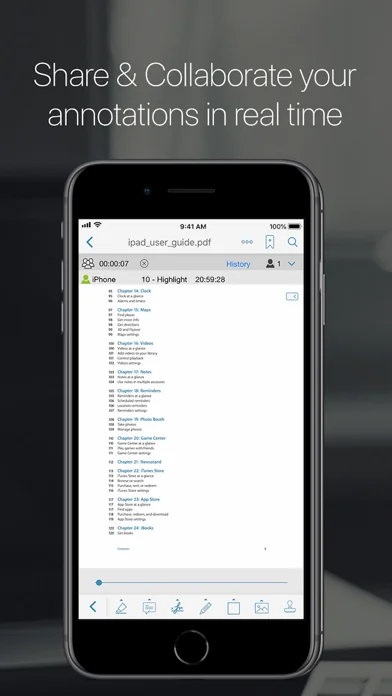
• Real-time online collaboration & chat Now you can collaborate and add annotations with other users on the same file over the internet in real time and you can chat about your progress simultaneously. They will be able to see what changes you are making as you make them all in real time.
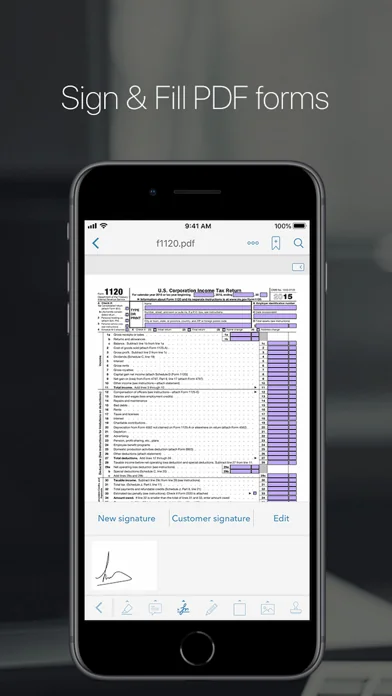
• PDF forms support Now you can fill out PDF forms directly on your iPad/iPhone.
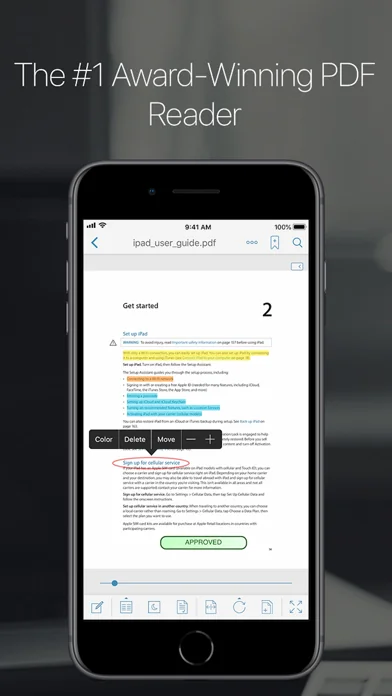
• Full Annotations/highlight support Now you can add notes directly from your iPad anywhere on the document. Highlighter, stamps, sticky notes, text boxes, underlines, strikeout, dynamic stamps (with date & time), freehand drawing, signature, free highlight, lines, arrows, rectangles and ovals, fully compatible with Apple Preview and Adobe Acrobat.
• New EasyReview mode With this new amazing feature you are able to mark up PDF documents faster and easier than ever before. Just tap on the part of text where you need to make changes and correct it in the text editor (similar to Word). The text will be marked as removed and the new text will have a different color so you can easily identify it. When you save the PDF file all the modifications will appear as standard annotations (replace text and insert text annotations).
• Fresh new user interface specially design to merge beautifully with iOS 12.
• Create new PDF files Extract and email pages from a PDF file or create a new document using pages from an existing file.
• Share & collaborate Connect with all your colleagues and friend to share and collaborate your PDF files and annotations in real time.
• Rotate function You can rotate a single page or the whole document.
• Vault folder Securely store your important PDF files.
• Bookmarks/Outlines Bookmark pages on your PDF files. Add outlines to create or modify a table of contents for your document directly from your iPad.
• Reflow mode
• Full Web browser to download PDF files from the web
• Scanner Create multipage documents in PDF format.
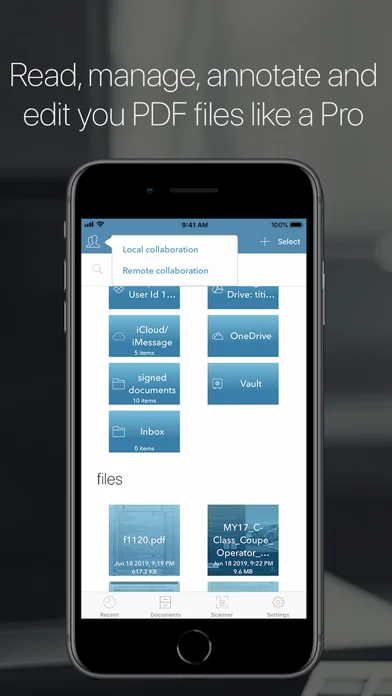
• Document manager Copy, cut, paste and delete your documents. Organize your PDFs into folders.
• PDF hyperlinks support Jump back and forth within the document. Jump back button to quickly go back to the page you came from.
• Text search Easily find any word on your PDF file.
• Save email attachments Open attachments directly from the Mail app, you can also open PDF files from any other application using the Open in function.
• Download PDF files from Safari Use the Open in function to download a PDF file from Safari to PDF Reader Pro Edition.
• Transfer files You can easily and securely copy your PDF files from your Mac or PC using Airdrop, the USB or WiFi sharing feature.
• Print Print your PDF files and annotations directly from the app.
• Email your files Email your PDF files directly from the app, you can email the entire document with all annotations or you can also email specific pages from a PDF file. You can also email a flatten copy of a PDF file, this option will compress and flatten your annotations onto the document to prevent them from being modified.
• Cloud support Download/upload your PDF files to iCloud, Dropbox, Box, Google Drive, SugarSync & OneDrive.
• Great for presentations Use Airplay or an HDMI cable to show your documents on an external display while you annotate them in real time.
• The only mobile PDF Reader application that supports Vitrium* protected PDF files (Like University of Phoenix ebooks)
Join the hundred of thousands users already enjoying all the great features of PDF Reader Pro Edition.
More amazing features coming soon!
🆕 What's new · v9
• Completely new user interface especially designed for the new iPhone and iPad Pro.
• Optimized for iOS 12.
• iPhone Xs, Xr and new iPad Pro support.
• Performance enhancements. This update contains stability improvements.
• Under-the-hood updates for better performance.
• Bug fixes and performance improvements.
Comparable iOS apps
The five apps in Business with the closest revenue to PDF Reader Pro Edition®. Click any to see its detail page.
Each forecast combines App Store rating, ratings count, monetisation model, pricing tier, IAP signals and ad-supported flag.
The base estimate is then multiplied by a per-category scaling factor learned from apps with founder-verified MRR.
Every number on this page comes from public APIs and Bumetric's own snapshot history.
Full methodology covers input variables, accuracy bands per category and how we treat apps without comparable anchors.
See also the live data on PDF Reader Pro Edition®'s tracker page for current rating, reviews and snapshot timeline.
Building something similar? Get a free AI audit with $-revenue forecasts for every recommendation.


 Document Scanner ㅤ
 Percentages Calculator
 Handoff Construction Estimator
 Send FAX from iPhone: uFAX app
 FineReader Pro: PDF Scanner