iOS app
from RootRise Technologies Pvt. Ltd.
· Productivity
ML forecast★ 4.8 · 136+338.7% MoMPaid
~2.4K/mo
ML revenue forecast.
Calibrated against 2218 apps in this category.
Confidence band
±15%
High — many comparable apps with verified data
At a glance
Earns 2.29× more than the category median (1.0K/mo).
Ranks #589 of 2,218 in Productivity (top 26.6% by revenue).
Ratings volume grew 338.7% over the last 30 days, suggesting active user acquisition.
Launched Aug 06, 2014 · last updated Jan 19, 2026.
20 months of snapshot history tracked.
What the app looks like
Live screenshots from the App Store, captured by our snapshot worker. Tap any image to enlarge.
PDF to JPG - Converter's revenue trajectory
Forecast revenue from snapshot history. Last 20 months.
Where PDF to JPG - Converter sits in Productivity
Revenue distribution of 2218 comparable apps. PDF to JPG - Converter highlighted.
PDF to JPG - Converter vs comparable apps
Revenue trajectory side-by-side. Bold = PDF to JPG - Converter, ghosted = peers.
App spec
Version
6.0
Last update
Jan 19, 2026
Launched
Aug 06, 2014
Min OS
15.6
Rating
4+
Price
Free
Monetization
Paid
Languages
EN
What PDF to JPG - Converter actually does (from App Store listing)
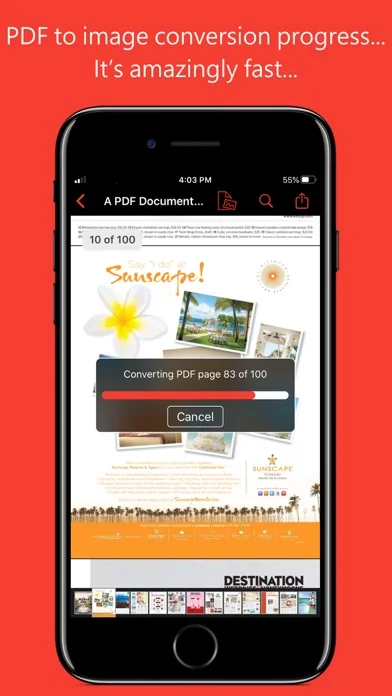
PDF to JPG is an intuitive app to convert PDF documents into best quality JPG, PNG and TIFF images on iPhones and iPads. PDF to JPG converts each PDF page as image and make it available for any application for reuse.
* * * "PDF to JPG" and "PDF to JPG Pro" for macOS are also available on the Mac App Store. * * *
Easy to access PDF files stored in folders on your device or stored remotely on cloud storages using integrated iOS Files browser. In addition, PDF documents in another app (For Exampl…
PDF to JPG is an intuitive app to convert PDF documents into best quality JPG, PNG and TIFF images on iPhones and iPads. PDF to JPG converts each PDF page as image and make it available for any application for reuse.
* * * "PDF to JPG" and "PDF to JPG Pro" for macOS are also available on the Mac App Store. * * *
Easy to access PDF files stored in folders on your device or stored remotely on cloud storages using integrated iOS Files browser. In addition, PDF documents in another app (For Example Mail, DropBox or SkyDrive etc.) that uses the share action button, use Copy to... action to open the PDF document in PDF to JPG. You can also transfer PDF documents from your desktop computer via iTunes into PDF to JPG application on your iPhone or iPad. CONVERSION OPTIONS
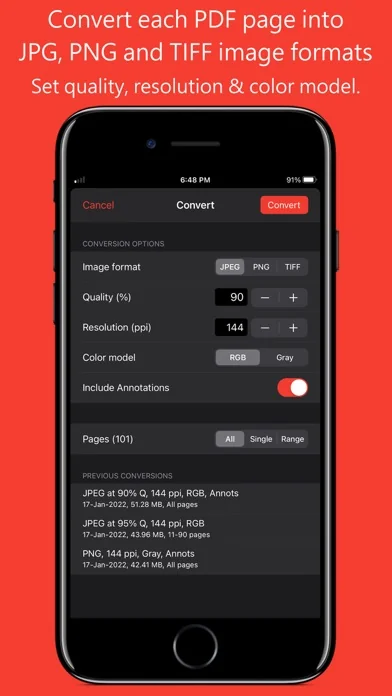
◆ IMAGE FORMATS : JPEG, PNG and TIFF are supported.
◆ QUALITY: The quality control only available for JPEG image format. The quality value allowed between 0 to 100 percent. You can use quality stepper control to increase and decrease quality value. Lower the quality percentage can convert low quality image but results into smaller file size due to high compression. Whereas higher quality percent can convert into excellent quality image but results into larger file size due to low compression.
◆ RESOLUTION: Enter resolution to scale PDF page proportionally for conversion into image. 72 ppi is equals 1x scale. Higher the resolution, bigger the output image. You can use resolution stepper control to increase and decrease quality value.
◆ COLOR MODEL: RGB or Gray to specify output image color space model. Conversion using Gray color model can create smaller file size images with only grayscale colors.
◆ INCLUDE ANNOTATIONS: Switch on to enable display of all types of annotations from PDF pages into respective converted images.
KEY FEATURES:
- Password protected PDF documents supported for conversion using correct password.
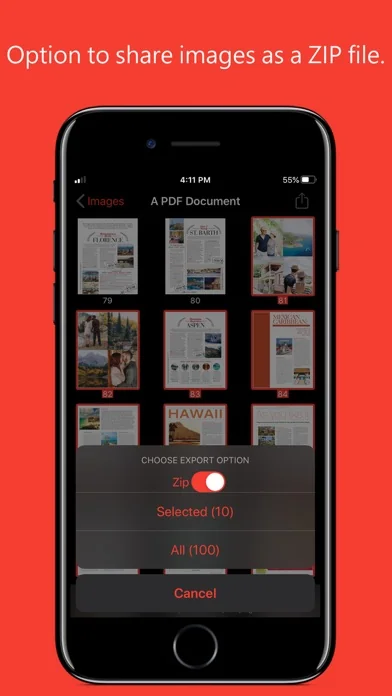
- Option to share PDF files and converted images as a ZIP (*.zip) file.
- Allows converted images to Copy, Save to Albums, Save to Files, Copy to… in another application, Mail, Message, Print, share PDFs to nearby iOS devices via AirDrop and many more standard share actions.
- Use Copy to iTunes to save and share converted images on your desktop computer.
PDF VIEWER:
- Inbuilt PDF viewer with fully selectable and searchable text contents. Select and copy text to clipboard for further use.
- Pinch out and Pinch in to ZoomIn and ZoomOut view.
- Built in search feature to find a character, word or sentence any where in the PDF document.
- Scroll through your document by thumbnail view or Go to page feature.
IMAGE THUMBNAIL BROWSER:
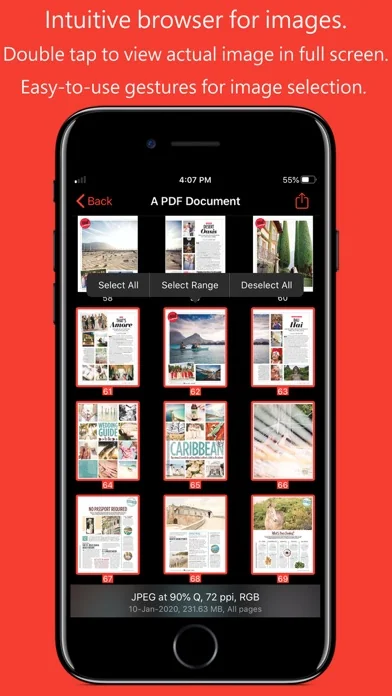
◆ Inbuilt image thumbnail browser view to for easy to see, select and share converted images.
◆ Single tap on thumbnail to select image.
◆ Double tap on thumbnail to open full screen image view. Pinch and double tap gestures on image viewer to Zoom in - Zoom out image view. Swipe left right to navigate to previous and next converted image.
◆ Long press on thumbnail to popup easy selection menu options for range selection or select/deselect all images.
Note: PDF to JPG is standalone application running natively to convert PDF documents into images securely on your iOS device.
You can refer inbuilt User Manual for any assistance Or Contact Support.
🆕 What's new · v6.0
- Updated user interface to streamline with latest iOS.
- Other minor bug fixes and improvements.
If PDF to JPG useful to you, we would appreciate an App Store review. It will help other people find the app and make them delighted.
Thank you all users for your feedback :)
Comparable iOS apps
The five apps in Productivity with the closest revenue to PDF to JPG - Converter. Click any to see its detail page.
Each forecast combines App Store rating, ratings count, monetisation model, pricing tier, IAP signals and ad-supported flag.
The base estimate is then multiplied by a per-category scaling factor learned from apps with founder-verified MRR.
Every number on this page comes from public APIs and bumetric's own snapshot history.
Full methodology covers input variables, accuracy bands per category and how we treat apps without comparable anchors.
See also the live data on PDF to JPG - Converter's tracker page for current rating, reviews and snapshot timeline.
Building something similar? Get a free AI audit with $-revenue forecasts for every recommendation.


 NoteCrypt Encrypted Notes
 Voice Record Pro 7 Full
 List!
List!
 Work Diary Pro
 GTW - Markdown & Text Editor