What Permission Manager X actually does (from store listing)
▶ <big><b>Features:</b></big>
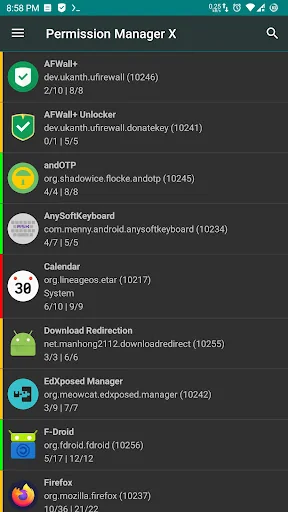
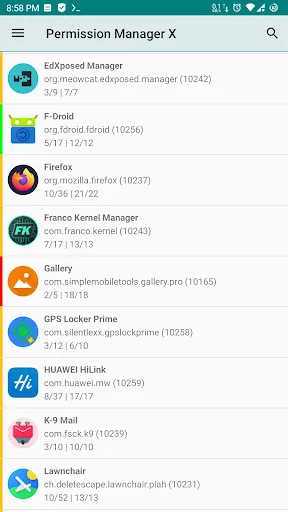
Using e<b>X</b>tended <b>Permission Manager</b>, for each installed app, on single screen, you can:
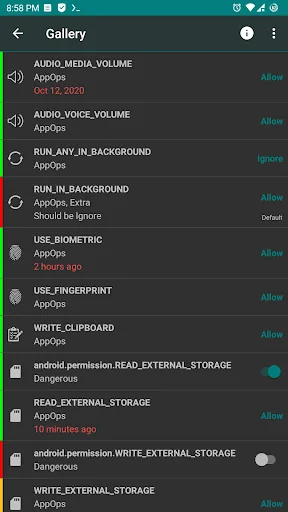
● View, grant or revoke manifest permissions
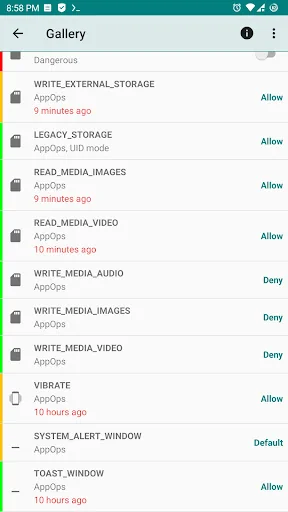
● View AppOps permissions and choose one of multiple modes
● Set your desired reference value for every changeable permission
<b>Manifest permissions</b> are those normally called permissions e.g. Storage, Camera etc. <b>AppOps</b> (app operations) is a robust framework Android uses at back end for access control. Th…
▶ Features: Using eXtended Permission Manager, for each installed app, on single screen, you can:
● View, grant or revoke manifest permissions
● View AppOps permissions and choose one of multiple modes
● Set your desired reference value for every changeable permission
Manifest permissions are those normally called permissions e.g. Storage, Camera etc. AppOps (app operations) is a robust framework Android uses at back end for access control. They provide a fine-grained control over many of the manifest permissions. Plus it provides additional controls like background execution, vibration, clipboard access etc.
With every Android release manifest permissions are becoming more dependent on AppOps. So it's fun to control both simultaneously and see how they relate to each other.
When you reinstall an app, or change your device, or upgrade your ROM, it's a time-taking process to review all installed apps for granted permissions and revoke the unnecessary ones (after all privacy matters). PMX provides you the solution. Set reference states of permissions, which can be quickly backed up and restored, and colored bars at left make it quite easy to review packages and permissions at a glance.
▶ Need help? We are here to explain.
Guide / FAQs: https://mirfatif.github.io/PermissionManagerX/help/help
It answers the basic questions including:
● What is PMX?
● Why do I need to use PMX?
● What are manifest permissions and AppOps?
● What are Permission References?
Are you concerned about Performance, Privacy and Control?
You can control, which apps:
- Run in background
- Keep your device awake
- Know about your location
- Can send SMS and make calls
- Read your contacts and logs
- Are aware of your accounts
- Are making sounds and vibrations
- Use camera and mic
- Access your files
- Can read and write to clipboard
- Can install other apps
And many more, depending on your device and Android version.
▶ Paid Features: ● Sort apps and permissions by different parameters
● Scheduled Checks to notify bad reference states
● Auto Revoke granted permissions with RED states
● Permission Watcher to remove unwanted permissions quickly
● Make changes to critical apps and permissions
● Multi-users / work profile support
● Auto create backup file on changes
● Permissions description
● Search suggestions
● Theming options
● Permission summary view
● Batch operations (profiles)
Permission Watcher removes permissions as soon as you stop using an app. For details please see the help / guide linked above.
▶ Required Privileges / Permissions: ● In order to let Permission Manager X serve you fully, either the device must be ROOTED or you need to enable ADB over network. Otherwise, very limited information is available.
● Internet permission is required to use ADB over network. We respect your privacy. No data is collected.
▶ Note: ● You need to uninstall the app installed from other sources before installing this one.
● The app is tested on stock Android 7-16. Some highly customized ROMs may behave unexpectedly.
And yes, the basic functionality of Permission Manager X is completely free and open-source. No ads, no trackers, no analytics. You are encouraged and requested to support the development.
Want to get instant updates, test beta builds, and get direct support from the developer? Join our Telegram support group: https://t.me/PermissionManagerX
Comparable Android apps
The five apps in Tools with the closest revenue to Permission Manager X. Click any to see its detail page.
Each forecast combines App Store rating, ratings count, monetisation model, pricing tier, IAP signals and ad-supported flag.
The base estimate is then multiplied by a per-category scaling factor learned from apps with founder-verified MRR.
Every number on this page comes from public APIs and bumetric's own snapshot history.
Full methodology covers input variables, accuracy bands per category and how we treat apps without comparable anchors.
See also the live data on Permission Manager X's tracker page for current rating, reviews and snapshot timeline.
Building something similar? Get a free AI audit with $-revenue forecasts for every recommendation.


 Bengali Calendar (India)
 Account Manager
 Flash Alerts on Call and SMS
 Ultimate Flash Alerts
 My CU
My CU