What PHOENIX CONTACT MARKING system actually does (from store listing)
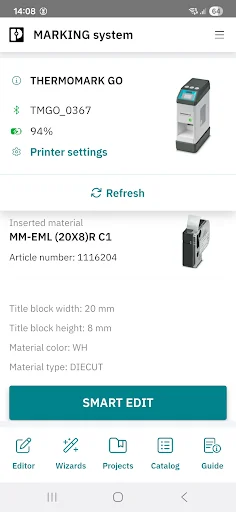
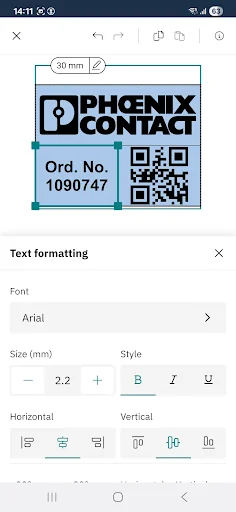
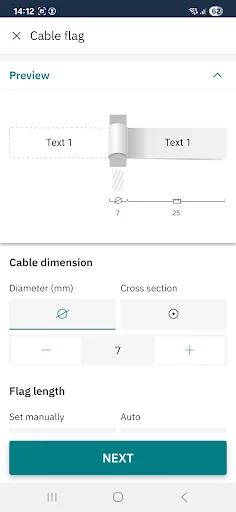
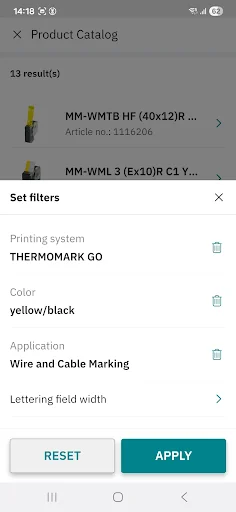
Which marking suits your requirements? Find out with the MARKING system app! With the help of the integrated wizards and based on your key criteria, you can select a marking material quickly and easily from more than 3000 marking solutions for three different marking technologies. Once the appropriate marking material has been found, the individual, application-specific marking solution can be designed in no time at all – without requiring any specialist knowledge. The ability to create the nece…
Which marking suits your requirements? Find out with the MARKING system app! With the help of the integrated wizards and based on your key criteria, you can select a marking material quickly and easily from more than 3000 marking solutions for three different marking technologies. Once the appropriate marking material has been found, the individual, application-specific marking solution can be designed in no time at all – without requiring any specialist knowledge. The ability to create the necessary marking directly on site is a particular advantage when carrying out service call-outs where components need to be marked retrospectively. The label templates that are created can of course also be stored for future applications. Thanks to automatic data updates, you are always up to date.
Functions of the MARKING system app:
- Marking Editor: easy and mobile marking of marking material.
- Application Wizards: efficient and step-by-step creation of application-specific marking solutions.
- Application Guide: quickly and easily find the application-specific marking materials - no special knowledge of the field is required.
- My projects: manage the projects you have created in a structured and clear manner.
- Dashboard: the current printing status at a glance at any time.
- Barcode scanner: easily and quickly call up matching marking solutions for Phoenix Contact terminal blocks.
Note:
Please note that the MARKING system app requires different permissions on your device for the full functionality.
Bluetooth permission
Without the permission to use Bluetooth, MARKING system is unable to connect to the available printers.
Location permission
Without the permission to access your location, MARKING system is unable to find the available Bluetooth printers.
The location sharing is technically needed because we use the user-friendly BLE (Bluetooth Low Energy) technology to communicate with the THERMOMARK GO. With the help of BLE technology, available printers in the immediate surroundings can be automatically found and connected to the app.
Camera permission
Without the permission to use the camera, MARKING system is unable to scan barcodes.
Comparable Android apps
The five apps in Tools with the closest revenue to PHOENIX CONTACT MARKING system. Click any to see its detail page.
Each forecast combines App Store rating, ratings count, monetisation model, pricing tier, IAP signals and ad-supported flag.
The base estimate is then multiplied by a per-category scaling factor learned from apps with founder-verified MRR.
Every number on this page comes from public APIs and bumetric's own snapshot history.
Full methodology covers input variables, accuracy bands per category and how we treat apps without comparable anchors.
See also the live data on PHOENIX CONTACT MARKING system's tracker page for current rating, reviews and snapshot timeline.
Building something similar? Get a free AI audit with $-revenue forecasts for every recommendation.


 Sensors Toolbox - Multi Tool
 Linfox ePOD (Asia)
 Time Changer Shortcut
 DO-RA.Pro
 Pocket Informant