How much does Photo On Video, Image To Video earn?
Android app
from Desa Mobi
· Video Players & Editors
ML forecast★ 3.8 · 16KFree
~410/mo
ML revenue forecast.
Calibrated against 9327 apps in this category.
Confidence band
±15%
High — many comparable apps with verified data
At a glance
Earns 1.91× more than the category median (215/mo).
Ranks #2,135 of 9,327 in Video Players & Editors (top 22.9% by revenue).
Launched Jul 06, 2020 · last updated Sep 13, 2025.
What the app looks like
Live screenshots from the Play Store, captured by our snapshot worker. Tap any image to enlarge.
Photo On Video, Image To Video's revenue trajectory
Forecast revenue from snapshot history. Last 1 months.
Where Photo On Video, Image To Video sits in Video Players & Editors
Revenue distribution of 9327 comparable apps. Photo On Video, Image To Video highlighted.
Photo On Video, Image To Video vs comparable apps
Revenue trajectory side-by-side. Bold = Photo On Video, Image To Video, ghosted = peers.
App spec
Version
4.9
Last update
Sep 13, 2025
Launched
Jul 06, 2020
Price
Free
Monetization
Free
What Photo On Video, Image To Video actually does (from store listing)
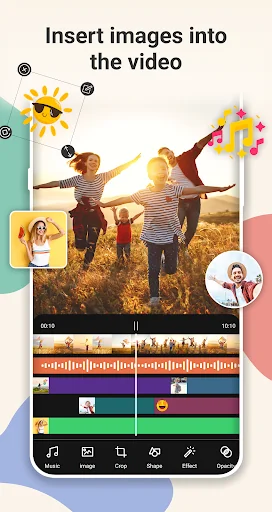
Photo On Video - photo and video overlay app helps you insert multiple images into videos easily and quickly. You can choose variety of images, audios and make an awesome custom video to share with your friends and family. Just select a video from your gallery then just add photo to video and done.
With our advanced video editing tools, you can add photos to multiple parts of the same video, preview and save your new video without losing video quality.
To make your videos more lively, you …
Photo On Video - photo and video overlay app helps you insert multiple images into videos easily and quickly. You can choose variety of images, audios and make an awesome custom video to share with your friends and family. Just select a video from your gallery then just add photo to video and done.
With our advanced video editing tools, you can add photos to multiple parts of the same video, preview and save your new video without losing video quality.
To make your videos more lively, you should try the GIF on video feature, you can choose GIF animations available on your device, or download GIF animations from online GIF libraries like Giphy easily. Just search for any GIF animation you want and add GIF to your video.
Besides, the app also provides the features of a photo editing app, whether you want to edit photos, add photo on photo, add photo on another photo, add image on image, add image to image, add picture on picture, add pictures to a photo, this app can meet your needs.
Let's explore the main features of the add image to video app: - Easy and fast to insert photos on videos.
- Add unlimited images to videos.
- Add GIF animations to videos.
- Search and download GIFs on Giphy.
- Insert images into images.
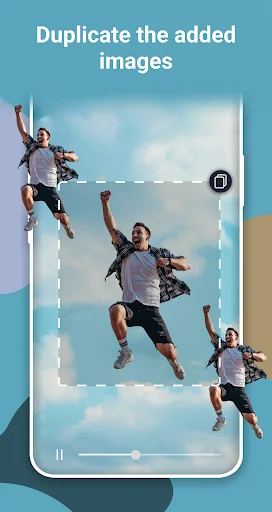
- Make copies of already added images.
- Duplicate photo.
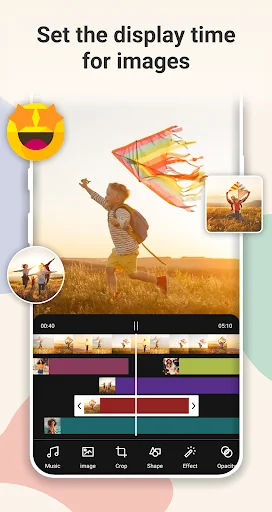
- Select the display time for each image.
- Crop images with various ratios.
- Rotate, reposition and zoom the image so it's perfect.
- Remove background of images.
- Make transparent photo background.
- Change effects and colors to make images more beautiful.
- Change opacity for images.
- Change shape for images, such as: circle, square, triangle, etc.
- Change color and size for the image border.
- Flip the image horizontally, flip the image vertically.
- Align the image to the center.
- Keep the original aspect ratio of the image.
- Insert music into your video.
- Cut your favorite music in songs.
- Supports all video and audio formats.
- Preview your new video before saving it.
- Fast processing and high quality output.
- Simple user interface easy to use it.
With this app, you can: - Insert image into video.
- Insert logo into video.
- Add watermark on videos.
- Add watermark on a part videos.
- Create videos quickly by adding pictures and music.
How to use? - Select any video from your gallery.
- Just simply add photo as per your choice.
- Change photo size, shape, border, etc.
- Also you can insert music into videos.
- Save the video on your phone gallery.
- Share it in many social media platforms.
Once you have created the desired video, you can share it to TikTok, Youtube, Youtube Shorts, Facebook Videos, Instagram (post, story, reels), Threads from Instagram, Twitter, Snapchat and all other social networking platforms.
Do you like this app? Please leave your reviews and suggestions, it will help us to improve this app in the next versions! Thank you!
Comparable Android apps
The five apps in Video Players & Editors with the closest revenue to Photo On Video, Image To Video. Click any to see its detail page.
Each forecast combines App Store rating, ratings count, monetisation model, pricing tier, IAP signals and ad-supported flag.
The base estimate is then multiplied by a per-category scaling factor learned from apps with founder-verified MRR.
Every number on this page comes from public APIs and bumetric's own snapshot history.
Full methodology covers input variables, accuracy bands per category and how we treat apps without comparable anchors.
See also the live data on Photo On Video, Image To Video's tracker page for current rating, reviews and snapshot timeline.
Building something similar? Get a free AI audit with $-revenue forecasts for every recommendation.



 Slow Video Maker
 Video Joiner
 Watermark Remover:Video&Photo
 LightSource - Christian Video
 Multi GIGA Admin