What Photo report maker actually does (from store listing)
Overview
- Photo report maker is a photo book creation application that can be used for free.
Features
- You can add images from your camera or gallery.
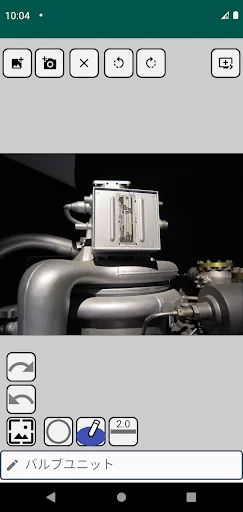
- You can add comments.
- You can add simple shapes such as circles and squares to images.
- The photo book can be saved as a PDF or EXCEL file.
How to use
https://www.junkbulk.com/android/PhotoReportMaker/manual/Photo_report_maker_first_step_en.html
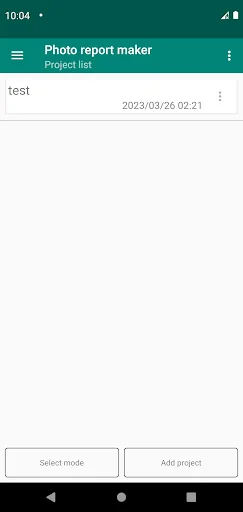
- Create a project first. If you press the button on the bottom right, a dialo…
Overview
- Photo report maker is a photo book creation application that can be used for free.
Features
- You can add images from your camera or gallery.
- You can add comments.
- You can add simple shapes such as circles and squares to images.
- The photo book can be saved as a PDF or EXCEL file.
How to use
https://www.junkbulk.com/android/PhotoReportMaker/manual/Photo_report_maker_first_step_en.html
- Create a project first. If you press the button on the bottom right, a dialog for project name entry appears. Enter the project name.
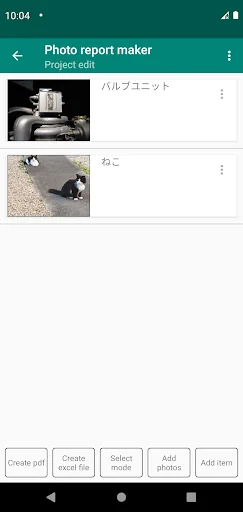
- Next, the project edit screen appears. You can add and edit new items by pressing the button at the bottom right of the project edit screen.
- On the item edit screen, please add an image and enter a comment.
- Return to the project editing screen with the back button on your smartphone.
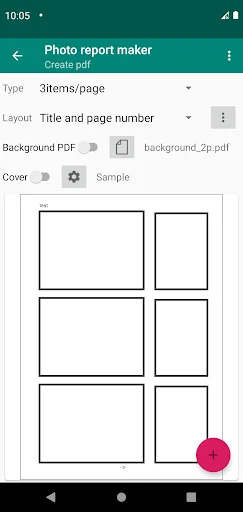
- Press the "Setting" button on the project edit screen to set the PDF layout.
- Layout settings allow you to set the resolution of photos, the number of photos per page, and display settings for titles and page numbers. You can also specify a PDF with the company logo etc. as the background.
- Click the preview button to check the PDF image.
- You can select save or share from the button on the bottom right of the preview screen.
- You can add photos at once on the project edit screen. You need an app such as "Google Photos" to add them all at once.
- In order to create an Excel file, on the project edit screen,move from "Create excel file" to the Excel file creation screen .
- You can specify the image resolution and template on the Excel file creation screen. You can output in your own format by creating a template.
- Initially, a sample template is set. The sample supports up to 15 items.
- You can save the Excel file with the "Save" button and send it by e-mail with the "Share" button.
Notes
- This application can be used free of charge.
- This application is displaying advertisements.
- The author shall not be liable for any damages arising from the use of this application.
- The author is not obligated to support this application.
Comparable Android apps
The five apps in Productivity with the closest revenue to Photo report maker. Click any to see its detail page.
Each forecast combines App Store rating, ratings count, monetisation model, pricing tier, IAP signals and ad-supported flag.
The base estimate is then multiplied by a per-category scaling factor learned from apps with founder-verified MRR.
Every number on this page comes from public APIs and bumetric's own snapshot history.
Full methodology covers input variables, accuracy bands per category and how we treat apps without comparable anchors.
See also the live data on Photo report maker's tracker page for current rating, reviews and snapshot timeline.
Building something similar? Get a free AI audit with $-revenue forecasts for every recommendation.


 Reminder App with alarm
 SWIFT Token
 Diálogos de Carreira
 All Pints North
 Opera App