What Pigments Color Palette Creator actually does (from store listing)
Pigments is the all-around tool when it comes to creating and editing color palettes.
<b>Key Features:</b>
Smart Color Generation:
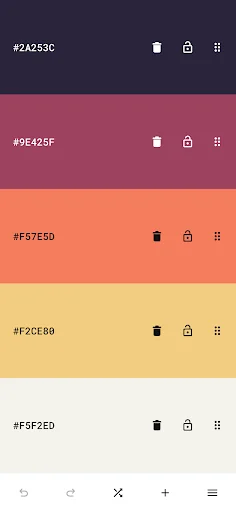
- Create color schemes instantly with a single tap.
- Choose from a variety of generator modes: random, gradient, pastel, neutral, metallic, AI-powered (artificial intelligence) generator modes, and more.
- Great for artistic inspiration and fast creative workflows.
Adjustable and Customizable:
- Modify individual colors using the color picker mode of yo…
Pigments is the all-around tool when it comes to creating and editing color palettes.
Key Features:
Smart Color Generation:
- Create color schemes instantly with a single tap.
- Choose from a variety of generator modes: random, gradient, pastel, neutral, metallic, AI-powered (artificial intelligence) generator modes, and more.
- Great for artistic inspiration and fast creative workflows.
Adjustable and Customizable:
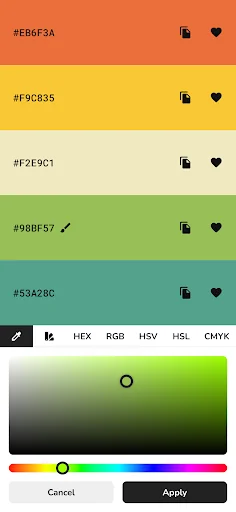
- Modify individual colors using the color picker mode of your choice (visual, HEX, RGB, HSV, HSL, or CMYK).
- Adjust the hue, saturation, brightness or temperature of the entire color palette.
- Add up to 30 colors to a palette.
- Rearrange colors in any order.
- Prevent specific colors from changing when generating a new color scheme.
- Undo or redo changes made to the color palette.
Design Tools:
- Color wheel - Interactive RGB and RYB color wheels for generating color harmonies (monochromatic, analogous, complementary, compound, triadic, and more).
- Contrast checker - Check the WCAG contrast score between two colors.
- Simulate color vision deficiencies - Validate the accessibility of a color palette by simulating color blindness (protanopia, deuteranopia, tritanopia, etc.).
- Isolation mode - Add spacing around the colors for better contrast.
- Blend mode - Mix two colors together.
- Image color picker - Create color palettes from images by manually selecting the colors or by using the auto-pick feature.
- Image color palette collage - Export a collage containing an image and its color palette.
Additional Features:
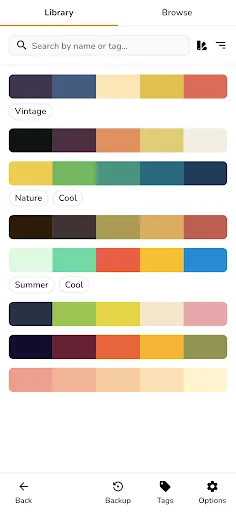
- Browse an inspiring online library of curated color palettes.
- Enable the minimal UI mode for a distraction-free interface.
- Choose between a light and a dark color theme.
Save, Export and Share:
- Save color palettes locally and organize them with tags.
- Export palettes in multiple formats compatible with design tools.
- Share palettes via link for collaboration or showcasing your work.
Perfect for:
- Web developers & UI/UX designers
- Digital artists & illustrators
- Brand designers & marketers
- Students & design educators
- Anyone working with colors.
Comparable Android apps
The five apps in Art & Design with the closest revenue to Pigments Color Palette Creator. Click any to see its detail page.
Each forecast combines App Store rating, ratings count, monetisation model, pricing tier, IAP signals and ad-supported flag.
The base estimate is then multiplied by a per-category scaling factor learned from apps with founder-verified MRR.
Every number on this page comes from public APIs and bumetric's own snapshot history.
Full methodology covers input variables, accuracy bands per category and how we treat apps without comparable anchors.
See also the live data on Pigments Color Palette Creator's tracker page for current rating, reviews and snapshot timeline.
Building something similar? Get a free AI audit with $-revenue forecasts for every recommendation.



 DIY Popsockets
 Crystal: Sketch Mirror for And
 Poster Maker - Fancy Text Art
 Quotes Creator & Quote Maker
 Papercopy - Tracer