What Planning crane maneuver actually does (from store listing)
This application enables you to position the crane in a limited space and to maneuverer it when obstacles of various heights prevent easy access to the cargo.
Open the application by touching or clicking the icon. Select the manufacturer and the crane model you wish to work with. Then, select from the following options:
Side view
Plan view
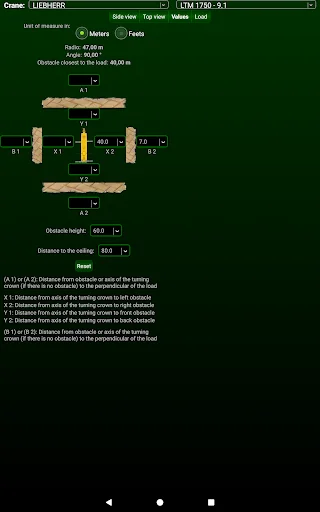
Dimensions display
Side view
It enables you to see the distance in between the turntable and the side of the obstacle facing the crane, represented by…
This application enables you to position the crane in a limited space and to maneuverer it when obstacles of various heights prevent easy access to the cargo.
Open the application by touching or clicking the icon. Select the manufacturer and the crane model you wish to work with. Then, select from the following options:
Side view
Plan view
Dimensions display
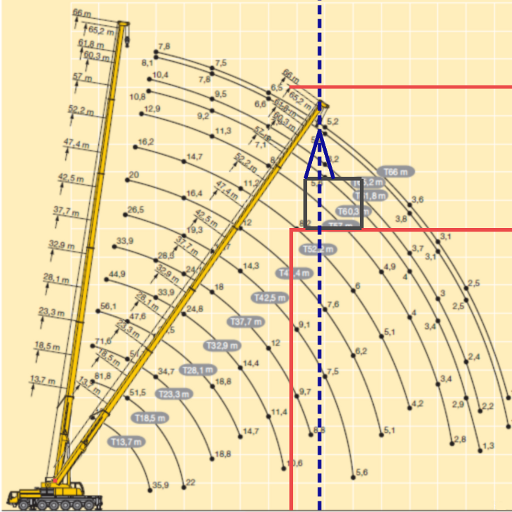
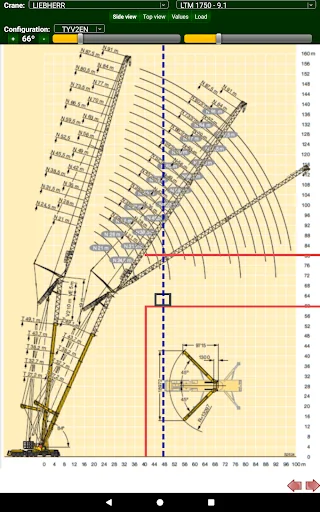
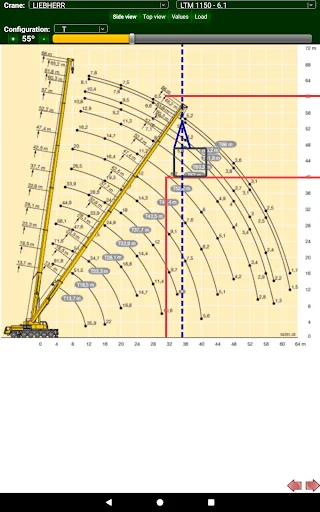
Side view
It enables you to see the distance in between the turntable and the side of the obstacle facing the crane, represented by the red line. The dotted blue line represents the vertical line of the cargo.
The movement of the boom can be fully simulated.
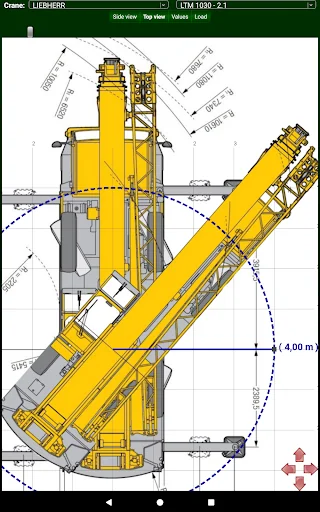
Plan view
It enables you to see the side of the obstacle facing the crane, represented by the red lines. The obstacles could be any nearby building, etc. The blue line represents the boom’s longitudinal axis, the radius and the position of the cargo.
The gyratory movement of the crane can be fully simulated showing if any obstacles hinder the turning of the counterweight and the cabin.
Dimensions display
Here the following dimensions can be amended:
Height of the obstacles.
Distance from the axis and the obstacles.
Longitudinal distance in between turntable and the perpendicular distance to the cargo.
Distance from the side of the obstacle facing the crane to the cargo.
Manufacturer and Models
The crane manufacturer and model can be changed in order to find out which is most suitable for the proposed job.
Comparable Android apps
The five apps in Tools with the closest revenue to Planning crane maneuver. Click any to see its detail page.
Each forecast combines App Store rating, ratings count, monetisation model, pricing tier, IAP signals and ad-supported flag.
The base estimate is then multiplied by a per-category scaling factor learned from apps with founder-verified MRR.
Every number on this page comes from public APIs and bumetric's own snapshot history.
Full methodology covers input variables, accuracy bands per category and how we treat apps without comparable anchors.
See also the live data on Planning crane maneuver's tracker page for current rating, reviews and snapshot timeline.
Building something similar? Get a free AI audit with $-revenue forecasts for every recommendation.

 BL Windows App Remote - Free
 SINAMICS SELECTOR
 Blaupunkt TV Remote
 Scan QRCode - Barcode
 RACC
RACC