ML revenue forecast.
Calibrated against 77129 apps in this category.
Confidence band
±15%
High — many comparable apps with verified data
At a glance
Earns 1.56× more than the category median (189/mo).
Ranks #21,954 of 77,129 in Tools (top 28.5% by revenue).
Launched Mar 07, 2013 · last updated Sep 26, 2024.
What the app looks like
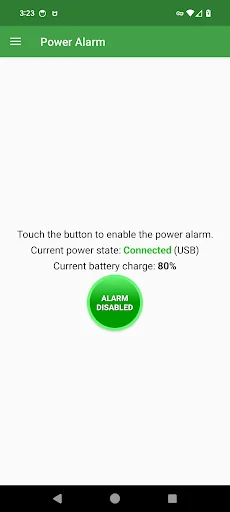
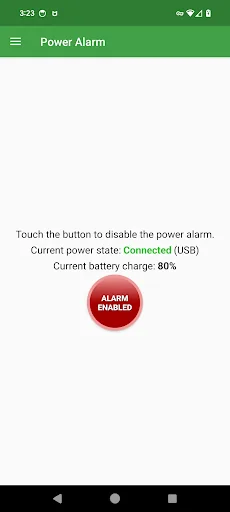
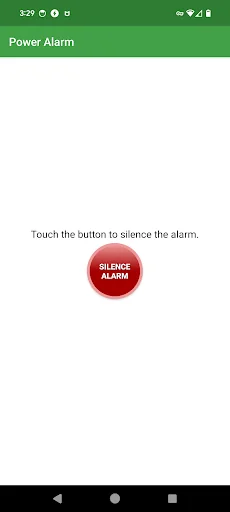
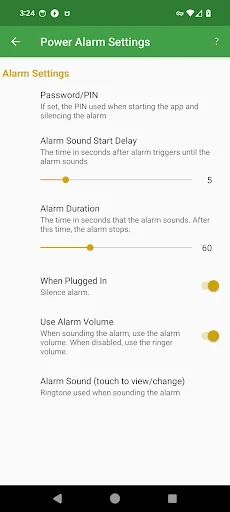
Live screenshots from the Play Store, captured by our snapshot worker. Tap any image to enlarge.
Power Alarm's revenue trajectory
Forecast revenue from snapshot history. Last 1 months.
Where Power Alarm sits in Tools
Revenue distribution of 77129 comparable apps. Power Alarm highlighted.
Power Alarm vs comparable apps
Revenue trajectory side-by-side. Bold = Power Alarm, ghosted = peers.
App spec
Version
1.1.8
Last update
Sep 26, 2024
Launched
Mar 07, 2013
Price
Free
Monetization
Free
What Power Alarm actually does (from store listing)
Power Alarm is a power state application. When the alarm is activated, and your device is charging (cable connected or wireless), if it is unplugged, or the power the cable is connected to is off, the app will vibrate, flash the screen and sound an alarm. The app can be used to notify you of a power outage. You would need to be within hearing distance for this to be useful. This could be useful related to the status of a breathing or other medical device.
Features:
The alarm sound is the …
Power Alarm is a power state application. When the alarm is activated, and your device is charging (cable connected or wireless), if it is unplugged, or the power the cable is connected to is off, the app will vibrate, flash the screen and sound an alarm. The app can be used to notify you of a power outage. You would need to be within hearing distance for this to be useful. This could be useful related to the status of a breathing or other medical device.
Features:
The alarm sound is the selected ringtone. You can change the selected ringtone in the Settings.
Power Alarm has two alarm states:
Enabled (red) - removal of power sounds the alarm.
Disabled (green) - removal of power does not sound the alarm.
The Power Alarm app does not have to be running for the alarm to sound. The alarm will sound even if the Android device is sleeping (screen is off). While the device is sleeping, when the alarm is tripped (power removed), you have to unlock the device then select the notification to go to the app to stop the alarm. Alternatively, instead of selecting the notification, you can open the app from the home screen. Note: Stopping the alarm sounding does not disable the alarm.
The app displays power connection state (connected or disconnected). The state displays if the device is connected to a computer (USB), wall outlet (AC) or wireless (Wireless) charging.
While the alarm is sounding, reconnecting power stops the alarm. The alarm can be enabled while power is not connected and the alarm will not sound until power is connected and then disconnected.
The alarm can optionally have a PIN set so silencing the alarm requires the entry of the PIN. This PIN is in addition to the wake up unlock password, swipe or fingerprint if present.
The alarm has a sound start delay setting where after the phone vibrates the alarm does not sound for the specified delay setting. If you forgot that the alarm is enabled, this enables you to re-connect power and stop the alarm from sounding.
The alarm has a duration setting after which the alarm ends without any other action. Other than the sound nuisance, stopping the alarm saves from the battery being drained.
When the alarm is active, an indicator is displayed in the notification at the top of the screen. You will find this feature helpful to remind you that the alarm is active and not trip the alarm yourself. This notification is also displayed on the lock screen.
Comparable Android apps
The five apps in Tools with the closest revenue to Power Alarm. Click any to see its detail page.
Each forecast combines App Store rating, ratings count, monetisation model, pricing tier, IAP signals and ad-supported flag.
The base estimate is then multiplied by a per-category scaling factor learned from apps with founder-verified MRR.
Every number on this page comes from public APIs and bumetric's own snapshot history.
Full methodology covers input variables, accuracy bands per category and how we treat apps without comparable anchors.
See also the live data on Power Alarm's tracker page for current rating, reviews and snapshot timeline.
Building something similar? Get a free AI audit with $-revenue forecasts for every recommendation.


 Pipe Guide Calculator
 AppLock Live Theme Bubble
 Calculation of arches, arces
 Ohm's Law Calculator
 CircleSquare