What PramukhIME Indic Keyboard actually does (from store listing)
If you can read your language name বাংলা/देवनागरी/ગુજરાતી/ಕನ್ನಡ/മലയാളം/ଓଡ଼ିଆ/ਪੰਜਾਬੀ/தமிழ்/తెలుగు correctly on your phone, then you may install and use PramukhIME Indic Keyboard, otherwise your phone may not support Indic languages and hence the app may not work.
PramukhIME Indic Keyboard supports 20 Indian languages (Assamese, Bengali, Bodo, Dogri, Gujarati, Hindi, Kannada, Konkani, Maithili, Malayalam, Manipuri, Marathi, Nepali, Odia, Punjabi, Sanskrit, Santali, Sindhi, Tamil and Telugu) to …
If you can read your language name বাংলা/देवनागरी/ગુજરાતી/ಕನ್ನಡ/മലയാളം/ଓଡ଼ିଆ/ਪੰਜਾਬੀ/தமிழ்/తెలుగు correctly on your phone, then you may install and use PramukhIME Indic Keyboard, otherwise your phone may not support Indic languages and hence the app may not work.
PramukhIME Indic Keyboard supports 20 Indian languages (Assamese, Bengali, Bodo, Dogri, Gujarati, Hindi, Kannada, Konkani, Maithili, Malayalam, Manipuri, Marathi, Nepali, Odia, Punjabi, Sanskrit, Santali, Sindhi, Tamil and Telugu) to help you type in easy to use transliteration/phonetic keyboard.
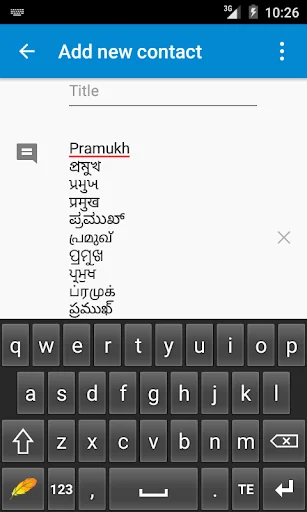
For example, type "pramukh" and you will automatically get "প্রমুখ/પ્રમુખ/प्रमुख/ಪ್ರಮುಖ್/പ്രമുഖ്/ପ୍ରମୁଖ/ਪ੍ਰਮੁਖ/ப்ரமுக்/ప్రముఖ్" typed in your phone.
How can I enable it and set it as the default input method/keyboard on my Android phone?
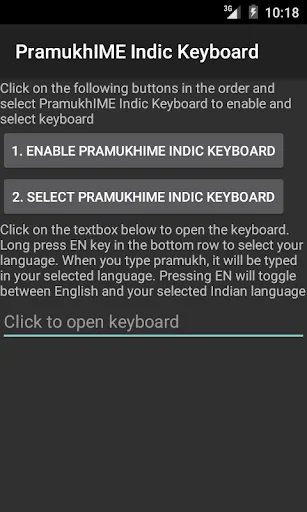
Look for "PramukhIME Indic Keyboard" app in your phone and open it up. Click on "1. Enable PramukhIME Indic Keyboard" button which will open up "Language and Input" settings window. Check "PramukhIME Indic Keyboard" and come back. Click on "2. Select PramukhIME Indic Keyboard", select "PramukhIME Indic Keyboard" and come back.
How can I change language?
When the keyboard opens up, long press "EN" key to choose the language. Short press "EN" key to quickly toggle between your selected Indian language and English.
How can I use this application?
Look at the short video on how to use this application.
How to type a certain letter?
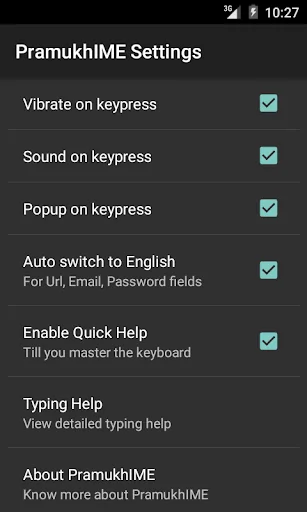
You can refer to "Quick Help" by pressing bottom left icon key which acts as a quick reference point for your typing needs. If you need to dig more into the details, you can long press bottom left icon key to go to "PramukhIME Settings > Typing Help > Your Language.
Why is there a warning about "collecting data" when I enable the keyboard?
This standard warning message is a part of the Android operating system. It will appear whenever you try to enable any third party keyboard.
Comparable Android apps
The five apps in Tools with the closest revenue to PramukhIME Indic Keyboard. Click any to see its detail page.
Each forecast combines App Store rating, ratings count, monetisation model, pricing tier, IAP signals and ad-supported flag.
The base estimate is then multiplied by a per-category scaling factor learned from apps with founder-verified MRR.
Every number on this page comes from public APIs and bumetric's own snapshot history.
Full methodology covers input variables, accuracy bands per category and how we treat apps without comparable anchors.
See also the live data on PramukhIME Indic Keyboard's tracker page for current rating, reviews and snapshot timeline.
Building something similar? Get a free AI audit with $-revenue forecasts for every recommendation.


 Black Screen: video screen off
 Monimoto
 SECHEEP Oficina Virtual
 Fast dial widget
 Speedometer mph Odometer