What PRTG for Android actually does (from store listing)
PRTG for Android brings the power of the PRTG Network Monitor interface to your Android 4.0+ devices. It requires a PRTG 14.1 or higher installation. If you encounter any bugs, please send them to support@paessler.com, as we're not notified of new comments.
Features include:
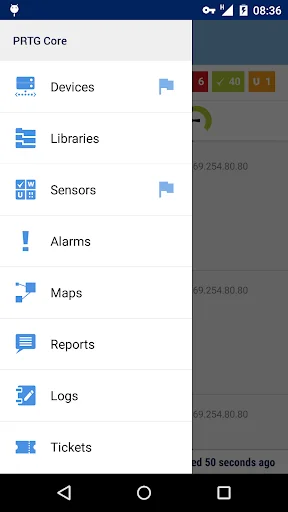
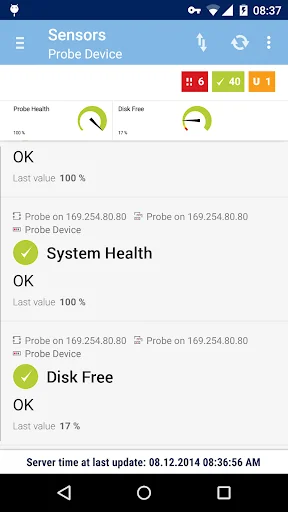
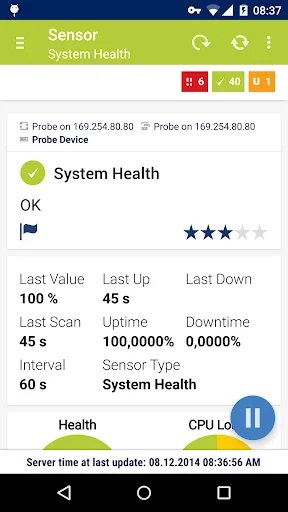
• Full visibility into the state of your probes, groups, devices, sensors, and channels on multiple PRTG instances.
• Pause, acknowledge alarms, trigger scans, run device auto-discovery, etc. You can do a lot of t…
PRTG for Android brings the power of the PRTG Network Monitor interface to your Android 4.0+ devices. It requires a PRTG 14.1 or higher installation. If you encounter any bugs, please send them to support@paessler.com, as we're not notified of new comments.
Features include:
• Full visibility into the state of your probes, groups, devices, sensors, and channels on multiple PRTG instances.
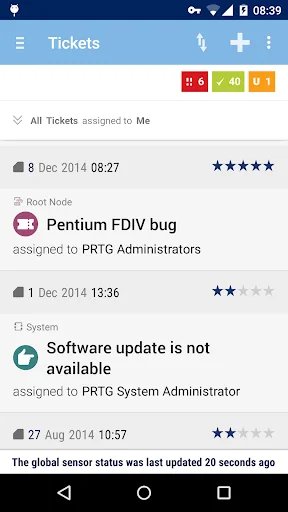
• Pause, acknowledge alarms, trigger scans, run device auto-discovery, etc. You can do a lot of things with the app that you can over the web interface or the Enterprise Console, with an interface tailored to your mobile device.
• QR code scanning makes it easy to jump directly to a sensor.
• Enhanced notifications can (optionally) alert you in your device's status bar when PRTG finds problems on your network.
• Home screen widgets (available only on 4.1 or higher, sorry!) allow you to keep an eye on your network without the app running in the foreground.
• Network tools such as ping, traceroute, and DNS lookups are included. We'll be adding more in the future!
To use this app, you need to run an installation of PRTG Network Monitor 14.1 or later that is accessible from the network your device is connected to. If you don't have a PRTG Network Monitor installed, you can still try a demo account, and the network tools are completely independent and don't require any PRTG server to operate.
Running an older version of Android or an older PRTG release? You can still use our previous release, PRTGdroid: https://play.google.com/store/apps/details?id=com.paessler.prtg
Required Permissions:
• INTERNET - Rather critical :-)
• CAMERA - Required for the QR scanner.
• WAKE_LOCK - Necessary for the alert functionality. Don't worry, we put a lot of effort into keeping our battery and network use as low as possible.
• Notifications can optionally VIBRATE your phone.
• We use ACCESS_NETWORK_STATE and ACCESS_WIFI_STATE to check if the internet is available, and to determine whether or not we should load large graphs (we don't load them when you're on a mobile data network).
• WRITE_EXTERNAL_STORAGE is needed to cache certain data.
• RECEIVE_BOOT_COMPLETED lets us set notifications back up after a reboot.
If you have any problems or suggestions, we're happy to hear them. Just send us an email at support@paessler.com.
Comparable Android apps
The five apps in Business with the closest revenue to PRTG for Android. Click any to see its detail page.
Each forecast combines App Store rating, ratings count, monetisation model, pricing tier, IAP signals and ad-supported flag.
The base estimate is then multiplied by a per-category scaling factor learned from apps with founder-verified MRR.
Every number on this page comes from public APIs and Bumetric's own snapshot history.
Full methodology covers input variables, accuracy bands per category and how we treat apps without comparable anchors.
See also the live data on PRTG for Android's tracker page for current rating, reviews and snapshot timeline.
Building something similar? Get a free AI audit with $-revenue forecasts for every recommendation.


 TimeTracker
 BEES Mexico
 Entrepreneur Mindset
 Speak Turkish Free
 Hilti: Shop on the go