What Q+ Player, DLNA Proxy DMR Geek actually does (from store listing)
This media player used to support UPnP DLNA, can be played as a DMR (digital media renderer).
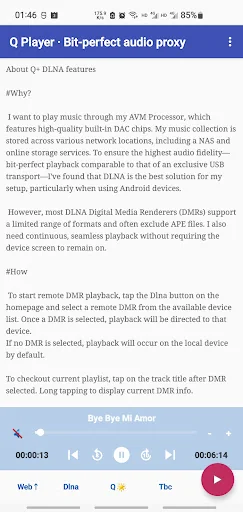
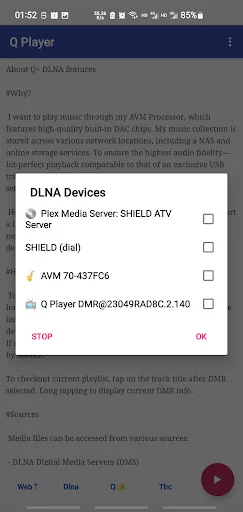
Today this app evolves into a powerful DLNA Control Point—far beyond the capabilities of a typical DMR. While it still functions as a DMR when needed, it now also acts as a media server of sorts—though not in the traditional DLNA DMS sense. Instead, it offers more advanced and flexible features for managing, proxying, and delivering media. The DMR functionality remains fully integrated and optimize…
This media player used to support UPnP DLNA, can be played as a DMR (digital media renderer).
Today this app evolves into a powerful DLNA Control Point—far beyond the capabilities of a typical DMR. While it still functions as a DMR when needed, it now also acts as a media server of sorts—though not in the traditional DLNA DMS sense. Instead, it offers more advanced and flexible features for managing, proxying, and delivering media. The DMR functionality remains fully integrated and optimized, but the app's primary strength now lies in its ability to control playback, manage diverse sources, and ensure bit-perfect, playlist based seamless audio delivery across devices. Bit-perfect playback is comparable to the old days that of an exclusive USB transport.
Here is how Bit-Perfect Proxy works:
- Direct Playback:
If the DMR and the media source are on the same subnet, and the format supported by the DMR, playback occurs directly, bypassing the proxy transmission.
- Passthrough Proxy:
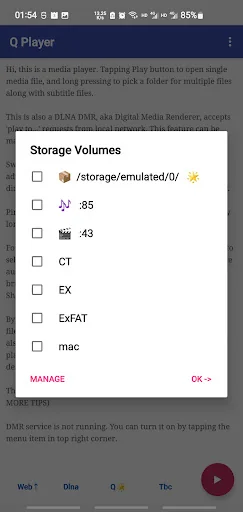
If the DMR is on a different network, say internet, or the data transfer is using some specific protocols the DMR unable to handle, say SMB or WebDAV, a passthrough proxy is used to ensure reliable delivery, with certain IO error recover efforts.
- Playback Proxy:
If the DMR doesn't support the original audio format, say APE, a playback proxy is activated to decode and stream raw WAV data to maintain audio quality.
Also with built-in SMB/WebDAV, it guarantees to playback continuously with device screen off.
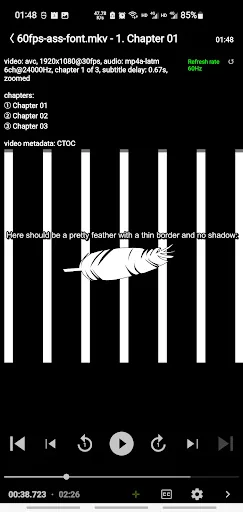
For video playback side, this player supports full-featured SSA/ASS subtitles. Users can add or manage font files by themselves. SSA/ASS subtitles can be dimmed, to fit HDR and DV higher contrast and brightness playback. The font size is resizable.
Subtitles in SUP (Blu-ray) and VobSub (DVD) format are supported as well (start from version 5.1). All subtitles can be either MKV embedded or side-loaded. Users can pick and apply single subtitle file, or package in Zip/7Z/RAR format during playback.
This player supports HDR/DV content, digital audio passthrough, MKV chapters navigation, frame by frame stepping, audio track selection and delay, subtitles selection and time offset. Also frame rate displaying and refresh rate auto adjusting.
Dolby Vision playback on NVidia Shield TV 2019 succeeded. Videos can be rotated on demand, as well as full screen zooming by pinch.
It was originally designed for segmented files playback. They are presented in m3u8 (HLS media list) format, which is originally designed for TS only, but they can be mp4 or flv files now.
Comparable Android apps
The five apps in Entertainment with the closest revenue to Q+ Player, DLNA Proxy DMR Geek. Click any to see its detail page.
Each forecast combines App Store rating, ratings count, monetisation model, pricing tier, IAP signals and ad-supported flag.
The base estimate is then multiplied by a per-category scaling factor learned from apps with founder-verified MRR.
Every number on this page comes from public APIs and bumetric's own snapshot history.
Full methodology covers input variables, accuracy bands per category and how we treat apps without comparable anchors.
See also the live data on Q+ Player, DLNA Proxy DMR Geek's tracker page for current rating, reviews and snapshot timeline.
Building something similar? Get a free AI audit with $-revenue forecasts for every recommendation.


 Telugu Calendar 2025
 Jamaican Movies
 Nepali TV Live Information
 Air Horn
 Radio Spirits