What Quick Buttons - Navigation bar actually does (from store listing)
Convert all your hard buttons into soft buttons with this app! .😎
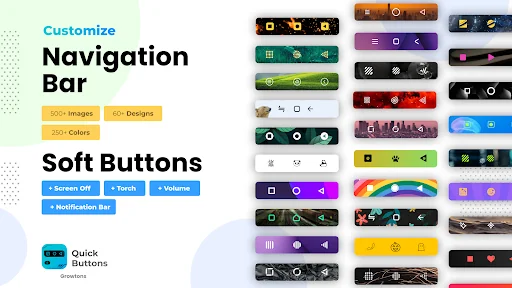
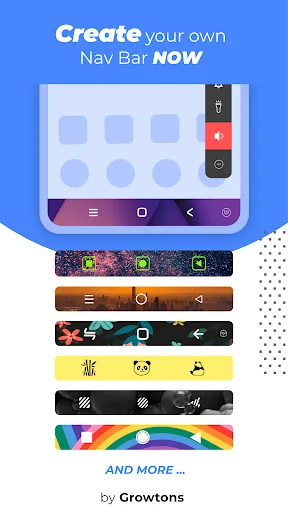
This app provides you with a colorful bottom navigation bar which has the back button , home button and recent apps button along with a set of feature buttons that includes power button , volume button , flash light.
Is your back button, home button or volume button stopped working or are they damaged? This app is for you 😃
Do you love to have a colorful navigation bar or prefer to use soft buttons for power button and v…
Convert all your hard buttons into soft buttons with this app! .😎
This app provides you with a colorful bottom navigation bar which has the back button , home button and recent apps button along with a set of feature buttons that includes power button , volume button , flash light.
Is your back button, home button or volume button stopped working or are they damaged? This app is for you 😃
Do you love to have a colorful navigation bar or prefer to use soft buttons for power button and volume button instead of your device’s hard buttons ? You are at the right place 😃
This app enables you to preserve and safeguard your power button and volume buttons by providing you the soft power button and soft volume button and therefore reducing the need to use your device’s volume button to increase/ decrease volume and power button to turn your screen off.
Working of this app:
1) Install our quick buttons app and enable the accessibility service for this app.
Steps to Enable Accessibility service:
• Once installed, our app prompts you to enable accessibility service
• Clicking on enable takes you to your device’s accessibility settings.
• In this page, choose the Quick buttons App and enable accessibility service for the app.
2) Once accessibility service is Enabled, you will immediately see Navigation bar and feature bar being added to your screen.
3) Once you exit your settings page, you will be landed into the Quick Buttons App.
4) Here you can configure all the features and settings you prefer.
Following are the features / settings you can configure:
o You can configure want the back button at left or right
o You can choose a color for your bottom navigation bar from a list of handpicked colors
o You can choose a set of feature buttons which you want to enable/ disable.
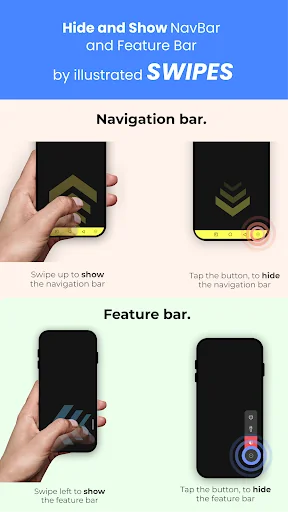
Show or Hide Navigation Bar: If you want to hide navigation bar , just click on the dock button (right most button) provided in the navigation bar. In order to get back your navigation bar, tap or swipe from the bottom and your navigation bar will re appear.
Dock / Undock Feature Bar: Similarly you can dock the feature bar by clicking the dock button (bottom most button) in the feature bar. This will dock the feature bar and will occupy minimum space on the screen. Clicking on the docked bar would reopen the feature bar.
With this app you are always free to choose which features you want. If you prefer to use only the navigation bar ( back button , home button , recents button ), you can just disable the feature buttons from the Quick Button App’s settings.
Similarly, if you wish to use only the feature buttons (power button , volume button and flash light ), you can disable the navigation bar feature from the Quick Buttons App’s settings
NOTE: This app uses accessibility service for the sole purpose of providing navigation bar, power button ,volume button and flash light features.
NOTE: For devices running in Android versions Oreo or below, an additional Device Admin permission may be required for the power button feature. However this permission is not mandatory if you do not wish to use the power button feature.
🏆Key features of this app🏆
1) Two in one feature: Provides a navigation bar ( back button , home button , recents button ) as well as the feature buttons ( power button , volume button and flash light ).
2) Easy way to show / hide Navigation bar
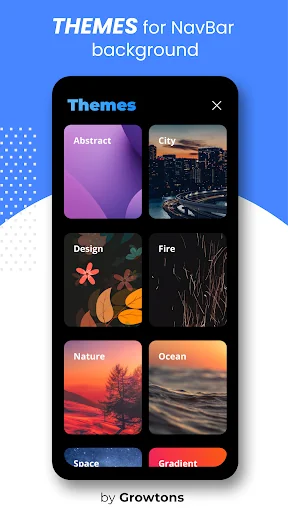
3) New Themes and Icons to personalize your navigation bar.
4) Vibrate option on navigation button click
Enjoy the app and do rate us if you liked the app 😎
Comparable Android apps
The five apps in Tools with the closest revenue to Quick Buttons - Navigation bar. Click any to see its detail page.
Each forecast combines App Store rating, ratings count, monetisation model, pricing tier, IAP signals and ad-supported flag.
The base estimate is then multiplied by a per-category scaling factor learned from apps with founder-verified MRR.
Every number on this page comes from public APIs and bumetric's own snapshot history.
Full methodology covers input variables, accuracy bands per category and how we treat apps without comparable anchors.
See also the live data on Quick Buttons - Navigation bar's tracker page for current rating, reviews and snapshot timeline.
Building something similar? Get a free AI audit with $-revenue forecasts for every recommendation.


 Togo apps
 IP Address & Geolocation (IPv4
 Vibration Meter & Sound Meter
 Aviation Uplift/Fueling
 Install Referrer