What Quick Hindi Keyboard actually does (from store listing)
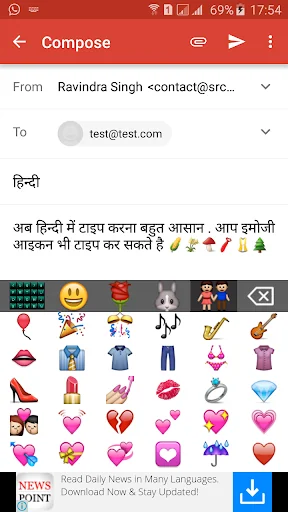
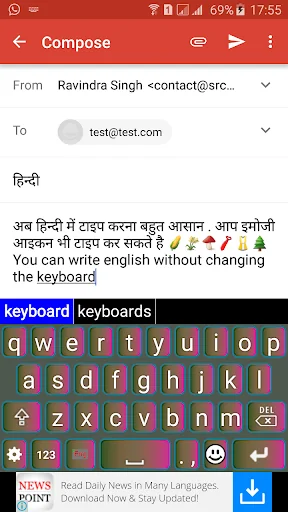
Quick Hindi Keyboard provides the option to type Emoji icons in your message like on Whatsapp,facebook messenger or texting sms.
This is a Soft Keyboard to type Hindi on your Phone. You can type easily on any app like Gmail, Facebook, Whatsapp. You can write blogs in Hindi in your web browser.
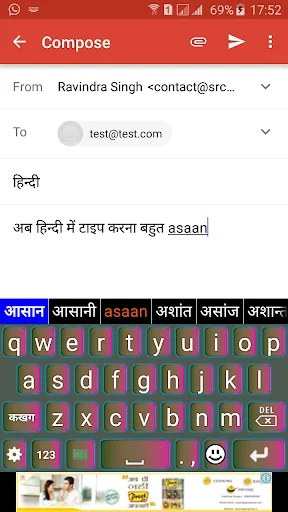
This keyboard works as default keyboard in android phones/tablets for typing/texting in hindi. Just type in English and press spacebar your English word will be converted into Hindi script automatically…
Quick Hindi Keyboard provides the option to type Emoji icons in your message like on Whatsapp,facebook messenger or texting sms.
This is a Soft Keyboard to type Hindi on your Phone. You can type easily on any app like Gmail, Facebook, Whatsapp. You can write blogs in Hindi in your web browser.
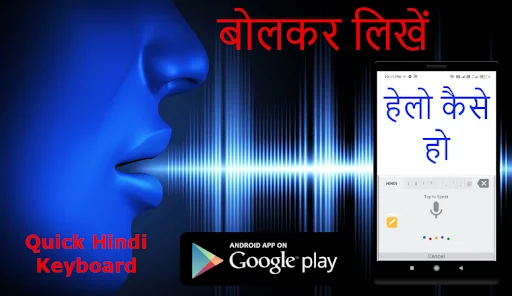
This keyboard works as default keyboard in android phones/tablets for typing/texting in hindi. Just type in English and press spacebar your English word will be converted into Hindi script automatically.
This keyboard provides word suggestions to type in more faster manner. This Keyboard also provides option to type text in English.If you want to type in English just press toggle button to switch English to Hindi or Hindi to English.
If your are able to read "नमस्ते" (Hindi text) on your mobile phone, you can install this application.Quick Keyboard provides easy way to type in Indian languages.Hindi Keyboard helps to enjoy each and every taps with music just on your fingers.
App will help to type your all words in Hindi. Our app is having more than 300 Emoji and it is fully free to use in any text message format.And yes it is supporting more than 10 languages. Quick "Hindi keyboard" app will allows you to type message, Story, E-mails,blogs etc. in Hindi language. You will also find superb eye catching themes on Quick Hindi Keyboard. You can also customize these themes in keyboard and make it more attractive as per your wish by making required modification in custom settings.
For more better understanding Please see video to know how it works.
Features:
Enable Keyboard.
Stunning Themes are there to decorate your keyboard.
You can set your photo as background in keyboard.
See preview of keyboard inside app.
8+ different settings available.
Find Emoji in Quick "Hindi Keyboard" app and add in your text.
Installation.
1. Download and install this application on phone.
2. Open EazyType Home screen. there are two button on screen (i) Enable Keyboard (ii) Choose default
3. Press 'Enable Keyboard" button and select EazyType Keyboard to enable the keyboard
4. Press "Choose default" button and choose EazyType Keyboard as default keyboard.
OR
2. Go to "Setting"->"Language and Input" and tick in check box on EazyType Hindi
3. Go to any text filed in which you want to type.
4. Drag Notification bar (On the top of phone display Screen). Tap on "Select input method"
Now Select "EazyType Hindi" (On a popup)
OR
Long press on text field and choose "Input Method".
Now Select EazyType Hindi (On a popup)
Comparable Android apps
The five apps in Tools with the closest revenue to Quick Hindi Keyboard. Click any to see its detail page.
Each forecast combines App Store rating, ratings count, monetisation model, pricing tier, IAP signals and ad-supported flag.
The base estimate is then multiplied by a per-category scaling factor learned from apps with founder-verified MRR.
Every number on this page comes from public APIs and bumetric's own snapshot history.
Full methodology covers input variables, accuracy bands per category and how we treat apps without comparable anchors.
See also the live data on Quick Hindi Keyboard's tracker page for current rating, reviews and snapshot timeline.
Building something similar? Get a free AI audit with $-revenue forecasts for every recommendation.

 Save Status - Video Status App
 OnePlus Account
 Hide Application
 Microphone-Voice Amplifier
 Note OS 26 - Phone 17 Notes