What Quick Reminders & To Do actually does (from store listing)
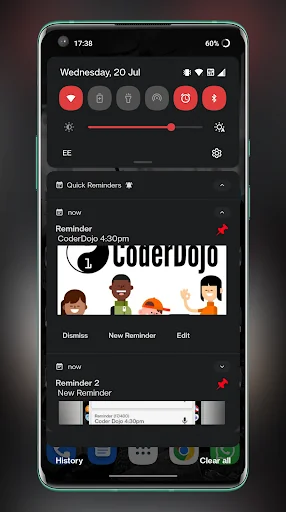
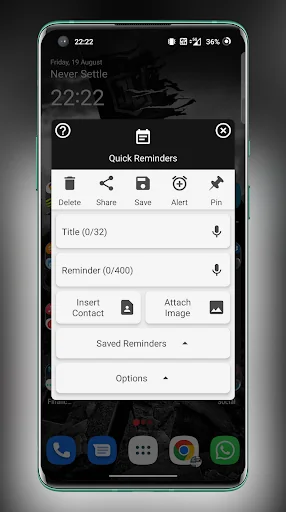
Quick Reminders allows you to add pinned or timed reminders, notes, tasks & images as well as clickable contacts, email addresses & web links as a handy persistent notification in your system pull-down & lock screen.
You can create, edit, share images & text too and from Quick Reminders, pin them straight to your notification pulldown or schedule a reminder to appear at a certain date and time with optional hourly, daily, weekly, monthly or yearly recurrences.
The app is well maintained, r…
Quick Reminders allows you to add pinned or timed reminders, notes, tasks & images as well as clickable contacts, email addresses & web links as a handy persistent notification in your system pull-down & lock screen.
You can create, edit, share images & text too and from Quick Reminders, pin them straight to your notification pulldown or schedule a reminder to appear at a certain date and time with optional hourly, daily, weekly, monthly or yearly recurrences.
The app is well maintained, regularly updated and all user feedback is taken on board with a handy direct contact link to the developer in the app.
Quick Reminders Key Features:
* Notification Notes/Tasks/Reminders.
* Capture or insert images to be displayed as or within reminders.
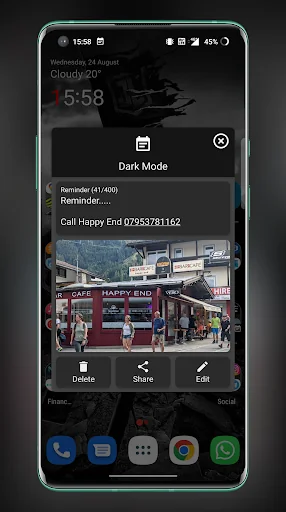
* Insert contact names & numbers from within the app that become clickable once the reminder is created.
* Email addresses & web links can are automatically converted to clickable actions.
* Save notes and images to re-use as templates.
* Create scheduled notifications & pinned reminders.
* Repeat reminders every Minute, Hour, Day, Week, Month or Year.
* Add an always visible title with collapsible contents.
* All Quick Reminders are persistent across reboot & wont be lost.
* Choose a high or low priority notification, this will affect how much the notification can be collapsed & whether or not the icon shows in the status-bar.
* Randomize the notification highlight color or choose a custom highlight color.
* Choose whether to apply the highlight color to the contents text.
* Dismiss, edit or create a new note directly from existing Quick Reminder notifications.
* Share the note/reminder with any other application.
* Send text from any other application to Quick Reminders.
* Expand and collapse your Quick Reminders so they take up less space.
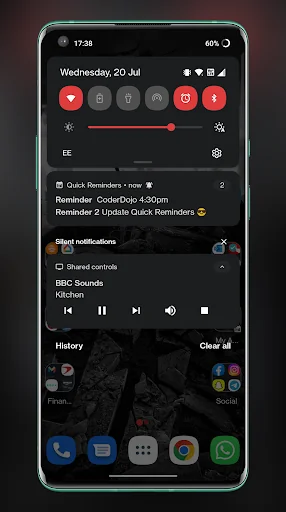
* Optionally group multiple notifications to avoid clutter in the status bar.
* Accessible from the Quick Settings Pull-down (Android 7 and above).
A number of different languages are supported through voluntary translators, the main app is written in English but I will endeavor to translate toe app into other languages where possible, please get in touch if you would like to get involved.
Feel free to contact me via the feedback option in the about dialog, all feature requests will be considered :)
Quick Reminders does not store or share any information or data in the background, it's designed to be simple, straightforward and as convenient as possible, I use it my self daily :)
Yours Sincerely
Lee @LeeDrOiD Apps :)
Comparable Android apps
The five apps in Productivity with the closest revenue to Quick Reminders & To Do. Click any to see its detail page.
Each forecast combines App Store rating, ratings count, monetisation model, pricing tier, IAP signals and ad-supported flag.
The base estimate is then multiplied by a per-category scaling factor learned from apps with founder-verified MRR.
Every number on this page comes from public APIs and bumetric's own snapshot history.
Full methodology covers input variables, accuracy bands per category and how we treat apps without comparable anchors.
See also the live data on Quick Reminders & To Do's tracker page for current rating, reviews and snapshot timeline.
Building something similar? Get a free AI audit with $-revenue forecasts for every recommendation.

 Microsoft Translator
 ICSx⁵ – Subscribe to calendars
 ContactSync - CardDAV and more
 Pipe Fitter Calculator
 All Document Reader and Viewer