How much does RoByte: Roku TV Remote Control earn?
Android app
from TinyByte Apps, LLC
· Video Players & Editors
ML forecast★ 4.2 · 76KFree
~2.0K/mo
ML revenue forecast.
Calibrated against 9327 apps in this category.
Confidence band
±15%
High — many comparable apps with verified data
At a glance
Earns 9.49× more than the category median (215/mo).
Ranks #360 of 9,327 in Video Players & Editors (top 3.9% by revenue).
Launched May 06, 2026 · last updated Mar 11, 2026.
What the app looks like
Live screenshots from the Play Store, captured by our snapshot worker. Tap any image to enlarge.
RoByte: Roku TV Remote Control's revenue trajectory
Forecast revenue from snapshot history. Last 1 months.
Where RoByte: Roku TV Remote Control sits in Video Players & Editors
Revenue distribution of 9327 comparable apps. RoByte: Roku TV Remote Control highlighted.
RoByte: Roku TV Remote Control vs comparable apps
Revenue trajectory side-by-side. Bold = RoByte: Roku TV Remote Control, ghosted = peers.
App spec
Version
2.6.7
Last update
Mar 11, 2026
Launched
May 06, 2026
Price
Free
Monetization
Free
What RoByte: Roku TV Remote Control actually does (from store listing)
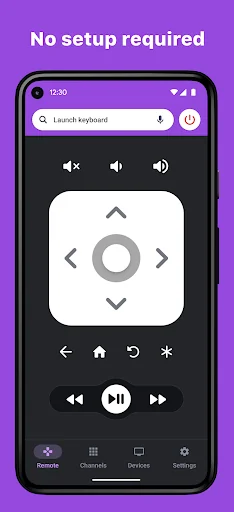
RoByte is a simple and easy to use Roku remote control app that works with your Roku Player or Roku TV.
<b>Features:</b>
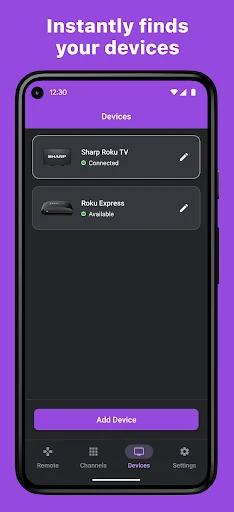
• No Setup required, RoByte automatically scans for your Roku device
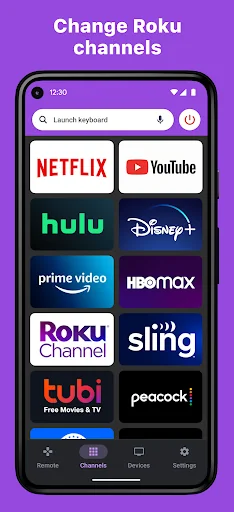
• Easy channel switcher
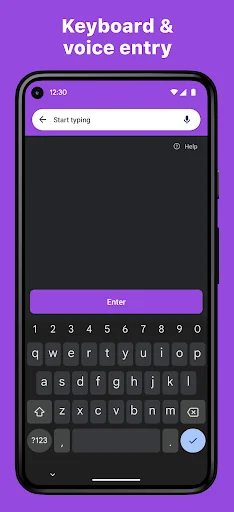
• Use your keyboard for fast text & voice entry on channels like Netflix, Hulu, or Disney+.
• View all your TV channels and jump directly to the one you like.
• Adjust your Roku TV's volume and toggle the input.
• Tablet support
• Wear OS support, quick access to play/pause f…
RoByte is a simple and easy to use Roku remote control app that works with your Roku Player or Roku TV.
Features: • No Setup required, RoByte automatically scans for your Roku device
• Easy channel switcher
• Use your keyboard for fast text & voice entry on channels like Netflix, Hulu, or Disney+.
• View all your TV channels and jump directly to the one you like.
• Adjust your Roku TV's volume and toggle the input.
• Tablet support
• Wear OS support, quick access to play/pause from your wrist
• Navigate using D-pad or Swipe-Pad
• Pair with multiple Roku devices
• Customizable Widgets turn your Android homescreen into a Roku remote
• Option to keep the wifi from sleeping
• Beautiful design with material design
RoByte Free features: • Roku remote control
• Play/pause, fast forward, rewind
• Pair with multiple Roku devices
RoByte Pro features: • Roku channel switcher
• Power button
• Volume control
• Keyboard & Voice Search
• TV channels switcher
• Homescreen widgets
• Wear OS app
With RoByte Roku TV Remote, we wanted everyone to have the best Roku remote app so we made the remote control functionality free.
Help Guide: If you are having issues, please do the following on your Roku TV:
Go to Settings -> System -> Advanced System Settings -> Control by mobile apps, and select "Enabled"
Quick tips: • Most problems connecting to your Roku can be resolved by simply reinstalling RoByte.
• RoByte can only connect if you are on the same wifi network as your Roku device.
Each forecast combines App Store rating, ratings count, monetisation model, pricing tier, IAP signals and ad-supported flag.
The base estimate is then multiplied by a per-category scaling factor learned from apps with founder-verified MRR.
Every number on this page comes from public APIs and bumetric's own snapshot history.
Full methodology covers input variables, accuracy bands per category and how we treat apps without comparable anchors.
See also the live data on RoByte: Roku TV Remote Control's tracker page for current rating, reviews and snapshot timeline.
Building something similar? Get a free AI audit with $-revenue forecasts for every recommendation.


 Music video maker
 Video Editor No Watermark Make
 Video Downloader
 Video for VK
 Remote for LG TV