What Rodali Assamese Keyboard actually does (from store listing)
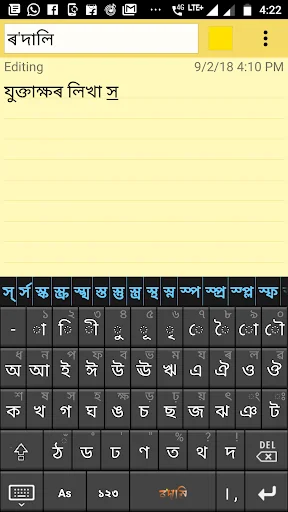
Rodali Assamese Keyboard is an application through which you can easily write messages, update on social networking sites or compose emails in ASSAMESE on your Android phone or tablet. It mainly contains two typing methods(layouts).One is "Simple", where the Assamese letters are displayed on the keyboard and you have to just tap the letters to write. There will be automatic suggestion for valid conjunct characters (Juktaxars) with each letter. Another method is "Phonetic" where you can type Ass…
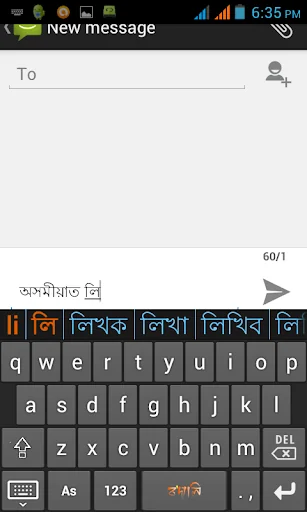
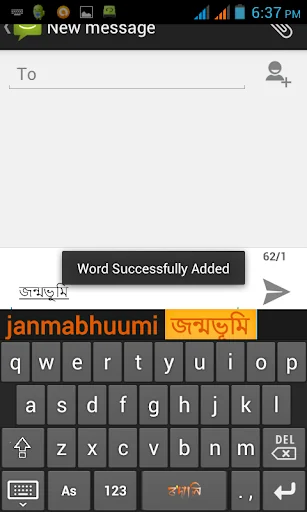
Rodali Assamese Keyboard is an application through which you can easily write messages, update on social networking sites or compose emails in ASSAMESE on your Android phone or tablet. It mainly contains two typing methods(layouts).One is "Simple", where the Assamese letters are displayed on the keyboard and you have to just tap the letters to write. There will be automatic suggestion for valid conjunct characters (Juktaxars) with each letter. Another method is "Phonetic" where you can type Assamese words using English characters and it transliterates the text into Assamese on the fly. In each method, you can type in English by switching the "As" mode to "En" . In phonetic layout, the App also provides auto-suggestion for some commonly misspelled Assamese words while typing. You can also add your own words for auto-suggestion or delete any unwanted word from the suggestion list. You can also take backup of the words that you added to the dictionary and retrieve them at the time of retrieving the app.
KEY FEATURES:
★ Totally FREE
★ Directly write Assamese on any editor or application without the hassle of copying and pasting text.
★ Contains three layouts- Simple, Phonetic and Old.
★ In addition to direct typing, supports popular Rodali Phonetic scheme in which to write নমস্কাৰ just type "namaskaar".
★ Auto-suggestion of Juktaxars(conjunct characters) in Simple layout
★ Auto-suggestion of Englsih and Assamese words in phonetic layout
★ Users can add/delete words to/from Auto-suggestion list
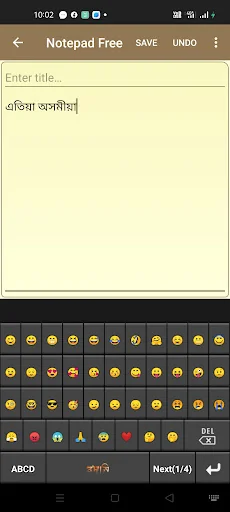
★ Same Keyboard can be used to write English by simply clicking a toggle button. No need to change the Input Method
INSTALLATION AND SETUP
1. Download and install this app
2. After installation, you will see the Rodali launcher icon in the apps list. Tap on it.
3. Tap on "Activate Rodali" (On Sidebar Menu)
4. Tap on "Enable Rodali Phonetic" or "Enable Rodali Simple" or "Enable Rodali Old" whichever you want.
5. Choose “Rodali Phonetic” or “Rodali Simple” or "Rodali Old" listed in the list of available keyboards.
6. Tap on “Select Rodali Phonetic As Default” or “Select Rodali Simple As Default” or “Select Rodali Old As Default”whichever method you want to use.
7. Exit from the app.
8. Open the editor where you want to write and start typing.
Please watch this video tutorial to know more https://www.youtube.com/watch?v=_ZK2lJXG2iQ
---------------------------------------------------------
If you have any feedback, question or concern, please email us at:
rodalihelp@gmail.com
or join our support forum on Facebook
https://www.facebook.com/groups/rodali/
Comparable Android apps
The five apps in Tools with the closest revenue to Rodali Assamese Keyboard. Click any to see its detail page.
Each forecast combines App Store rating, ratings count, monetisation model, pricing tier, IAP signals and ad-supported flag.
The base estimate is then multiplied by a per-category scaling factor learned from apps with founder-verified MRR.
Every number on this page comes from public APIs and bumetric's own snapshot history.
Full methodology covers input variables, accuracy bands per category and how we treat apps without comparable anchors.
See also the live data on Rodali Assamese Keyboard's tracker page for current rating, reviews and snapshot timeline.
Building something similar? Get a free AI audit with $-revenue forecasts for every recommendation.


 Universal SoundBar Remote Cont
 Android TV Core Services
 QR Code Reader - Scanner App
 Totalcmd Plugin for OneDrive
 Touch Lockscreen photopassword