RSAR App (Rachna Sagar)
Rachna Sagar Pvt. Ltd. proudly presents the RSAR App, a revolutionary learning platform powered by Augmented Reality (AR) technology. Designed to complement Rachna Sagar textbooks, this app offers an enhanced, interactive learning experience for both students and teachers. Using advanced AR, the app lets users scan images from textbooks and instantly play corresponding educational videos, bringing concepts to life right on their devices.
Key Features:
Augmented Re…
RSAR App (Rachna Sagar)
Rachna Sagar Pvt. Ltd. proudly presents the RSAR App, a revolutionary learning platform powered by Augmented Reality (AR) technology. Designed to complement Rachna Sagar textbooks, this app offers an enhanced, interactive learning experience for both students and teachers. Using advanced AR, the app lets users scan images from textbooks and instantly play corresponding educational videos, bringing concepts to life right on their devices.
Key Features:
Augmented Reality based Learning
Scan textbook pages marked with AR icon to instantly watch educational videos aligned with each chapter.
Tailored for Students & Teachers
o Teachers can access videos across ALL Classes, Subjects & Book.
o Students can view videos specific to their grade & subject.
Centralized Video Library
All chapter-wise videos are available at ONE PLACE for easy access and download through the app interface.
Steps to use Rachna Sagar (RSAR) App:
1. Install and grant all permissions in first installation
2. Choose your user type: Teacher or Student
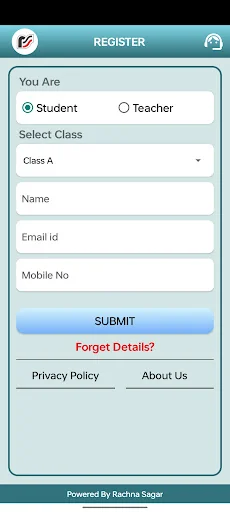
3. Enter your Name, Email ID and Mobile Number
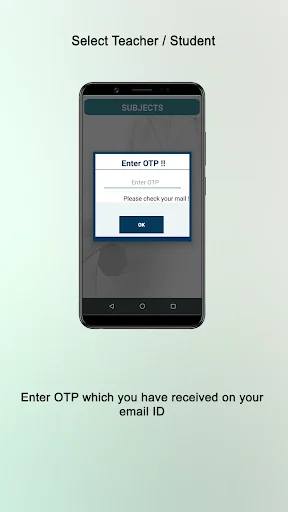
4. Tap Submit and verify using the OTP sent to your email ID
5. Navigate as per your requirement:
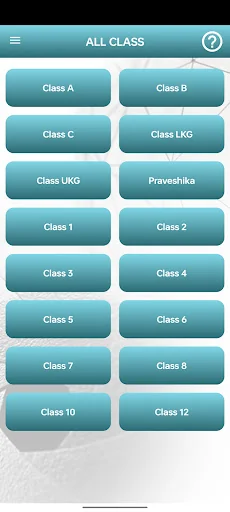
o Teachers: Select Class (Can access any) → Subject → Book
o Students: Select Subject → Book
6. Tap the RSAR button
7. Choose the chapter and tap to download the video
8. Choose your preferred playback method:
o Tap Play icon to watch without a book
o Tap Start the Scan to activate AR video
9. If using AR, point your camera at the marked page and enjoy the video experience.
App Permissions Required:
o Camera: To scan book pages and play AR videos
o Storage: To download and store video content on your device
Note: 1. Point the camera to the download chapter and scan the targeted chapter image to view the video on your mobile screen/tablets.
2. Make sure that your hand (device) do not shake while scanning the image.
Comparable Android apps
The five apps in Music & Audio with the closest revenue to RSAR APP. Click any to see its detail page.
Each forecast combines App Store rating, ratings count, monetisation model, pricing tier, IAP signals and ad-supported flag.
The base estimate is then multiplied by a per-category scaling factor learned from apps with founder-verified MRR.
Every number on this page comes from public APIs and bumetric's own snapshot history.
Full methodology covers input variables, accuracy bands per category and how we treat apps without comparable anchors.
See also the live data on RSAR APP's tracker page for current rating, reviews and snapshot timeline.
Building something similar? Get a free AI audit with $-revenue forecasts for every recommendation.


 Thai Quran : อัลกุรอาน ภาษาไทย
 رواية أنتيخريستوس صوتية كاملة
 FM España
 سورة يس مكتوبة كاملة بدون نت
 Radio Sverige - Online Radio