How much does Scannen von Dokumenten als PDF earn?
iOS app
from Municorn Limited
· Business
ML forecast★ 4.8 · 73K+14573.6% MoMPaid
~26.5K/mo
ML revenue forecast.
Calibrated against 2436 apps in this category.
Confidence band
±15%
High — many comparable apps with verified data
At a glance
Earns 34.27× more than the category median (773/mo).
Ranks #29 of 2,436 in Business (top 1.2% by revenue).
Ratings volume grew 14573.6% over the last 30 days, suggesting active user acquisition.
Launched Aug 24, 2018 · last updated May 12, 2026.
24 months of snapshot history tracked.
What the app looks like
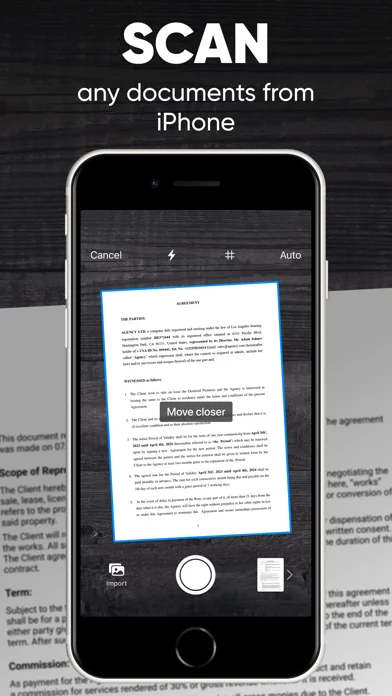
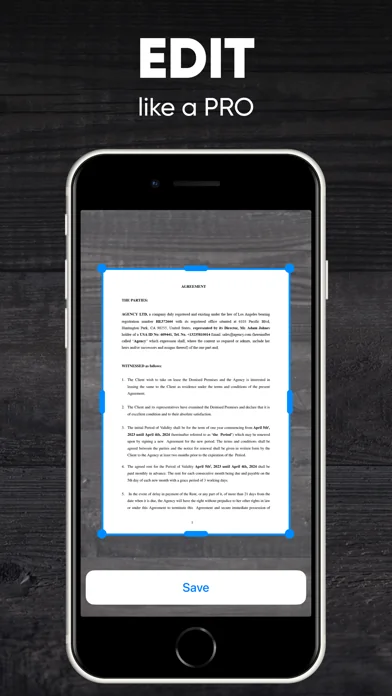
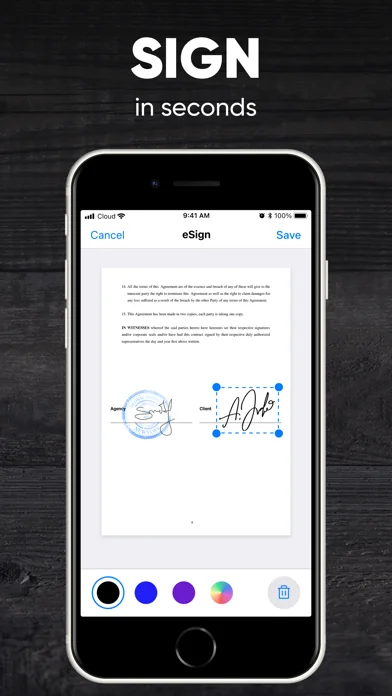
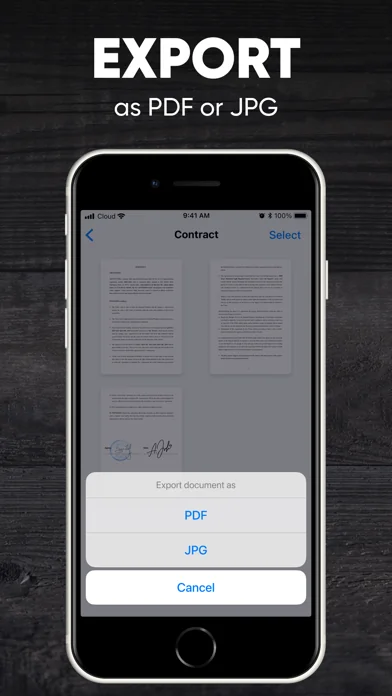
Live screenshots from the App Store, captured by our snapshot worker. Tap any image to enlarge.
Scannen von Dokumenten als PDF's revenue trajectory
Forecast revenue from snapshot history. Last 24 months.
Where Scannen von Dokumenten als PDF sits in Business
Revenue distribution of 2436 comparable apps. Scannen von Dokumenten als PDF highlighted.
Scannen von Dokumenten als PDF vs comparable apps
Revenue trajectory side-by-side. Bold = Scannen von Dokumenten als PDF, ghosted = peers.
App spec
Version
2.7.2
Last update
May 12, 2026
Launched
Aug 24, 2018
Min OS
16.4
Rating
4+
Price
Free
Monetization
Paid
Languages
EN, FR, DE, HI +9
What Scannen von Dokumenten als PDF actually does (from App Store listing)
Transform your iPhone or iPad into a versatile mobile scanner with the Scanner App, PDF Editor now equipped with powerful PDF converter features, including Optical Character Recognition (OCR) and Handwriting Recognition. Scanning services near me - easily scan, edit, save, and share documents, receipts, business cards, notes, and books as high-quality PDF or JPG files.
Whether you need to convert to PDF, create PDFs from photos, turn a picture into a PDF, or extract text with OCR, this app has …
Transform your iPhone or iPad into a versatile mobile scanner with the Scanner App, PDF Editor now equipped with powerful PDF converter features, including Optical Character Recognition (OCR) and Handwriting Recognition. Scanning services near me - easily scan, edit, save, and share documents, receipts, business cards, notes, and books as high-quality PDF or JPG files.
Whether you need to convert to PDF, create PDFs from photos, turn a picture into a PDF, or extract text with OCR, this app has you covered. Choose between automatic or manual image capturing modes, and enhance your scans with edge detection, optimization, and color corrections.
Key Features: - Scan premium quality PDFs or JPGs. Document scanner. - Convert images to PDF effortlessly. - Use a PDF Editor. - Capture documents quickly with automatic or manual modes. - Enhance scans with edge detection, OCR, and handwriting recognition. - Use a digital signature easily anywhere. - Save multi-page documents efficiently. - Seamlessly integrate with cloud services like iCloud, Dropbox, Evernote, Yandex Disk, Box, OneDrive, Google Drive, and more.
No need for an Internet connection – all your scans are stored locally on your device. Say farewell to traditional office scanners and to a print scan - embrace one of the best scanner app for iPhone for your daily business needs!
Capture HIGH-QUALITY images How to scan on iPhone? Scanner App ensures optimal image converter quality with automatic document edge identification.
Convert QUICKLY How to create a pdf on iPhone? Experience lightning-fast scanning with Scanner App – scan a document to PDF in just one tap.
Scan ANYTHING Scanner App is your go-to solution for scanning all types of documents.
Sign docs ANYWHERE Create your digital e signature and easily sign documents anywhere.
Convert to SHARE Effortlessly share your scanned documents anywhere, making collaboration a breeze.
How to send pdf to email and more? Share and upload scanned documents to cloud services like iCloud, Dropbox, Evernote, Yandex Disk, Box, OneDrive, or Google Drive with ease.
Discover the ultimate PDF maker in the palm of your hand with the Scanner App!
Subscription plans: - 1-week subscription with a 3-day trial version for $5.99 - 1-month subscription for $9.99 - 12-month subscription for $39.99
Note: Prices may vary by location.
Subscription auto-renewal information: — A free trial period is available. — Payment will be charged to your iTunes account upon confirmation of purchase. — Your free trial subscription will automatically renew to a paid subscription unless auto-renew is turned off at least 24-hours before the end of the free trial period. — The subscription will automatically renew unless auto-renew is turned off at least 24-hours before the end of the current subscription. — The account will be charged for renewal within 24-hours before the end of the current subscription. The cost depends on the selected plan. — Users can manage their subscriptions, and auto-renewal can be turned off by going to the user’s Account Settings after purchase. — Any unused portion of the free trial will be forfeited when the user purchases a subscription.
Privacy Policy: https://scanner.biz/privacy/ Terms of Use: https://scanner.biz/terms/
For any questions or inquiries, please contact us at support@scanz.app.
🆕 What's new · v2.7.2
- Bug fixes and performance improvements
Comparable iOS apps
The five apps in Business with the closest revenue to Scannen von Dokumenten als PDF. Click any to see its detail page.
Each forecast combines App Store rating, ratings count, monetisation model, pricing tier, IAP signals and ad-supported flag.
The base estimate is then multiplied by a per-category scaling factor learned from apps with founder-verified MRR.
Every number on this page comes from public APIs and bumetric's own snapshot history.
Full methodology covers input variables, accuracy bands per category and how we treat apps without comparable anchors.
See also the live data on Scannen von Dokumenten als PDF's tracker page for current rating, reviews and snapshot timeline.
Building something similar? Get a free AI audit with $-revenue forecasts for every recommendation.


 dotloop
 Rechnung schreiben Invoice Fly
 Aufnahme-App für das iPhone
 Smart Drucker App - Print Scan
 Lebenslauf Vorlagen