How much does Screen Cast -View Mobile on PC earn?
Android app
from Deskshare Inc
· Tools
ML forecast★ 3.2 · 4K→ StableFree
~759/mo
ML revenue forecast.
Calibrated against 77129 apps in this category.
Confidence band
±15%
High — many comparable apps with verified data
At a glance
Earns 4.01× more than the category median (189/mo).
Ranks #6,611 of 77,129 in Tools (top 8.6% by revenue).
Launched Jan 13, 2017 · last updated Dec 06, 2025.
What the app looks like
Live screenshots from the Play Store, captured by our snapshot worker. Tap any image to enlarge.
Screen Cast -View Mobile on PC's revenue trajectory
Forecast revenue from snapshot history. Last 2 months.
Where Screen Cast -View Mobile on PC sits in Tools
Revenue distribution of 77129 comparable apps. Screen Cast -View Mobile on PC highlighted.
Screen Cast -View Mobile on PC vs comparable apps
Revenue trajectory side-by-side. Bold = Screen Cast -View Mobile on PC, ghosted = peers.
App spec
Version
7.2
Last update
Dec 06, 2025
Launched
Jan 13, 2017
Price
Free
Monetization
Free
What Screen Cast -View Mobile on PC actually does (from store listing)
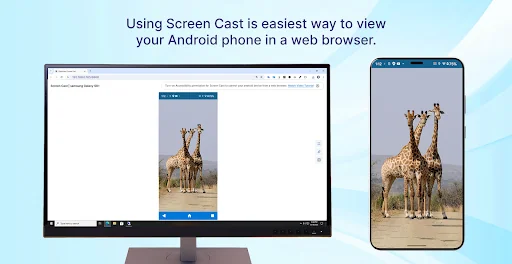
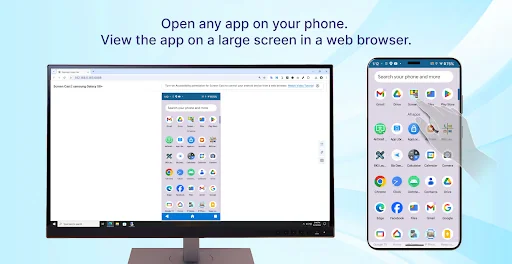
View your Android screen on any device with a web browser. No extra equipment. No complicated setup. Just share a link and start watching.
Perfect for watching videos on the big screen, sharing photos with family, business presentations, online teaching, and providing remote IT support.
<b>Actually Free with No Limits</b>
Unlike competitors with time limits or watermarks:
• Stream as long as needed—no time limits
• Share with entire classroom or family—no viewer restrictions
• No wat…
View your Android screen on any device with a web browser. No extra equipment. No complicated setup. Just share a link and start watching.
Perfect for watching videos on the big screen, sharing photos with family, business presentations, online teaching, and providing remote IT support.
Actually Free with No Limits
Unlike competitors with time limits or watermarks:
• Stream as long as needed—no time limits
• Share with entire classroom or family—no viewer restrictions
• No watermarks
• Wi-Fi and Mobile Hotspot modes included
Simple 30-Second Setup
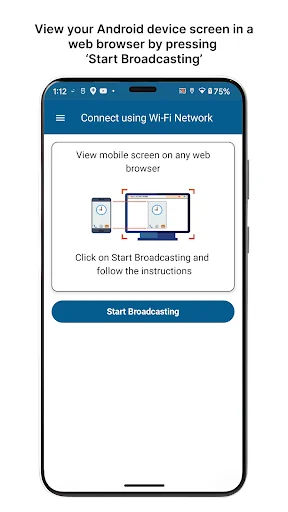
Just tap "Start Broadcast" and share the link. Works on all major browsers—Chrome, Safari, Edge, Firefox, Samsung Internet, Brave.
Free Features • Wi-Fi & Mobile Hotspot broadcasting
• Multiple simultaneous viewers
• One-tap link sharing
• Multi-language: German, French, Spanish, Portuguese, Italian
• Modern interface optimized for Android 15
Premium Features - $3.99/month or $29.99/year (Save 37%)
Remote Broadcasting: Share your screen across the internet. Present from home, teach remotely, or connect with family in different cities.
Remote Device Control & IT Support: Control Android devices from your browser with full touch support. Help family troubleshoot tech problems, fix friends' devices remotely, or provide IT support to employees. Guide users through settings and fix issues from anywhere.
Keyboard & Mouse Input: Type and navigate using your computer keyboard and mouse.
Note: Accessibility permission required only for remote control feature.
Password Protection: Secure broadcasts with custom passwords for private sessions.
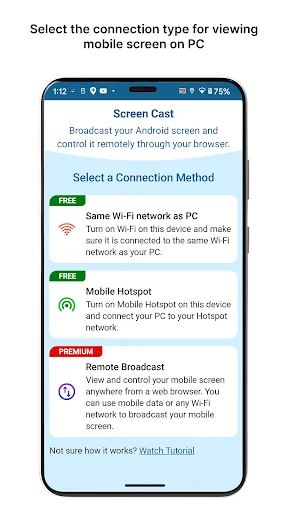
Three Broadcasting Modes
Wi-Fi (Free): Broadcast on your local network. Perfect for home, office, or classroom. No internet required.
Mobile Hotspot (Free): Share via your phone's hotspot. Great for locations without Wi-Fi.
Remote Broadcast (Premium): Share across any network with encryption and password protection. Ideal for remote work and distance learning.
Perfect For
Remote IT Support: Help family troubleshoot devices, provide tech support to friends, or assist employees. See their screen and control it to solve problems without being there in person.
Entertainment: Stream movies, YouTube, and shows to any TV or computer. Perfect for family movie nights.
Teachers: Share lessons with 30+ students simultaneously. No app installation on student devices required.
Business: Present mobile app demos in meetings. Show workflows to clients or colleagues instantly.
Families: Share vacation photos with everyone at once. Each person watches on their own device.
Privacy & Security • Local broadcasts stay within your network
• Remote broadcasts use encryption and passwords
• No audio capture—only screen mirrored
• Broadcasts never recorded
• Links expire when you end broadcast
Why Screen Cast? • No app installation on viewing devices
• No viewer limits (free version)
• No watermarks
• Affordable premium ($3.99 vs $39.95)
• Simple setup
Download Free - Try Before Upgrading
Start with free features including multiple viewers on Wi-Fi and Hotspot. Upgrade to Premium ($3.99/month or $29.99/year) for remote broadcasting, IT support control, or password protection.
Compatible with Android 8.0+ | Optimized for Android 15
Last updated: September 2025
Support Website: https://www.deskshare.com
Email: support@deskshare.com
Forum: http://www.deskshare.com/forums/ds_topics25_Screen-Cast.aspx
Comparable Android apps
The five apps in Tools with the closest revenue to Screen Cast -View Mobile on PC. Click any to see its detail page.
Each forecast combines App Store rating, ratings count, monetisation model, pricing tier, IAP signals and ad-supported flag.
The base estimate is then multiplied by a per-category scaling factor learned from apps with founder-verified MRR.
Every number on this page comes from public APIs and bumetric's own snapshot history.
Full methodology covers input variables, accuracy bands per category and how we treat apps without comparable anchors.
See also the live data on Screen Cast -View Mobile on PC's tracker page for current rating, reviews and snapshot timeline.
Building something similar? Get a free AI audit with $-revenue forecasts for every recommendation.


 맞춤법 검사기 / 띄어쓰기
 Bahía SUBE (Bahía Urbana)
 Web to PDF Converter
 zTranslate: Translate subtitle
 일본어 발음 번역