What Screen Lock actually does (from store listing)
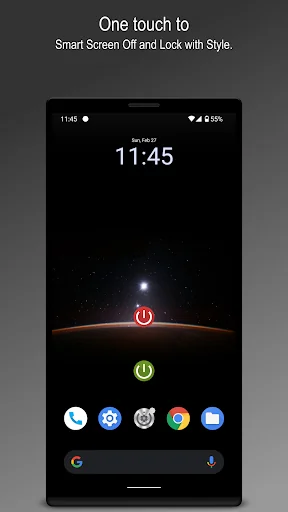
<b>Screen Lock</b>, is created to extend the life of the hardware power button by using the feature within the app. Support for both <b>Admin lock</b> and <b>Smart lock</b> system. Easy to Screen off and lock the device depending on your selected preferences.
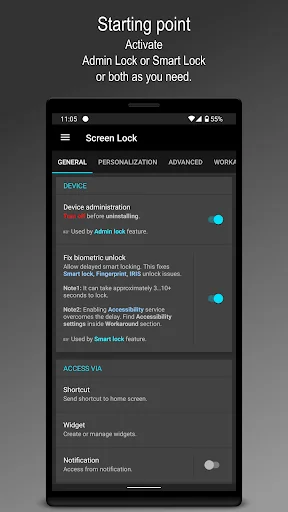
This app uses the <b>Device Administrator</b> permission. Necessary for the app to lock with <b>Admin lock</b>. <b>Read write system settings</b> permission to enable the <b>Smart lock</b> feature if needed.
This app uses <b>Accessibi…
Screen Lock, is created to extend the life of the hardware power button by using the feature within the app. Support for both Admin lock and Smart lock system. Easy to Screen off and lock the device depending on your selected preferences.
This app uses the Device Administrator permission. Necessary for the app to lock with Admin lock. Read write system settings permission to enable the Smart lock feature if needed.
This app uses Accessibility service. It is optional for only Android 9 and above. Used only for taking advantage of the internal Screen Lock option to overcome the delay in the Smart lock feature.
One tap to off and lock the device using: ☞ Admin lock (Shortcut)
☞ Smart lock (Shortcut)
☞ Screen lock widget
☞ Admin lock and Smart lock from notification
☞ Floating widget
Screen lock using available device sensors for both lock and wakeup feature: ☞ Flip cover
☞ Air swipe
☞ Desk option
☞ Awesome shake
Usability enhancements: ☞ ‘Movement listener’ option for a distraction-free reading experience.
☞ ‘On home screen’ for easygoing.
☞ ‘Pause on landscape’ to play games effortlessly.
☞ ‘Pause on call’ to let the device follow its default course of action.
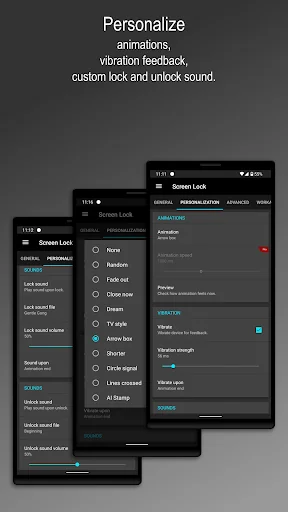
Personalisation features: Animations to pick for Phone lock experience. Vibration feedback upon Phone locked. Lock and unlock sound at varied points to play the tone you love to hear. Sound volume is picked from notification sound as volume and can be further adjusted with ease, also respecting DND mode.
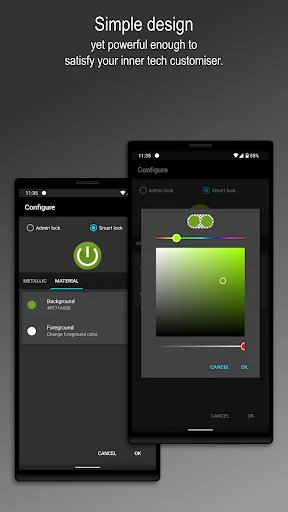
Highly customisable lock icon with an easy-to-use interface. Option to use Metallic and Material icon as a choice for both Admin lock and Smart lock.
Animation speed is adjusted with the “Transition animation scale," and “Animator duration scale”. Our advice, use 1x for the best ‘Screen Off’ experience. The changes may take place after lock and unlock.
Note 1: Device administration must be disabled before uninstalling.
Note 2: Disable default device lock and unlock sound, if applying from this app.
Any suggestions for improving the Screen Lock app are most welcome. We’ll do our best to present you desired usage experience.
Comparable Android apps
The five apps in Tools with the closest revenue to Screen Lock. Click any to see its detail page.
Each forecast combines App Store rating, ratings count, monetisation model, pricing tier, IAP signals and ad-supported flag.
The base estimate is then multiplied by a per-category scaling factor learned from apps with founder-verified MRR.
Every number on this page comes from public APIs and bumetric's own snapshot history.
Full methodology covers input variables, accuracy bands per category and how we treat apps without comparable anchors.
See also the live data on Screen Lock's tracker page for current rating, reviews and snapshot timeline.
Building something similar? Get a free AI audit with $-revenue forecasts for every recommendation.

 Signal Strength
 CCSWE App Manager (Root)
 Gravity Screen - On/Off
 ハイドスクリーンプラス(Hide Screen Plus)
 Text Reader: Text to Speech