ML revenue forecast.
Calibrated against 53506 apps in this category.
Confidence band
±15%
High — many comparable apps with verified data
At a glance
Tracks close to the Android app category median (228/mo).
Ranks #29,094 of 53,506 in Personalization (top 54.4% by revenue).
Launched Jan 12, 2019 · last updated Mar 04, 2025.
What the app looks like
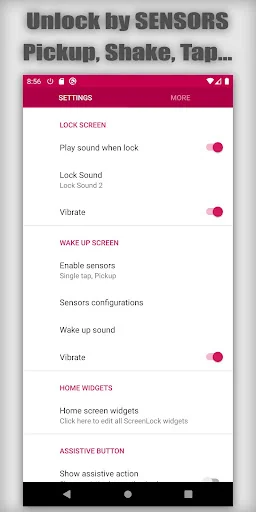
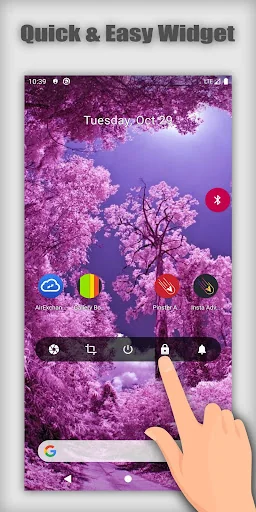
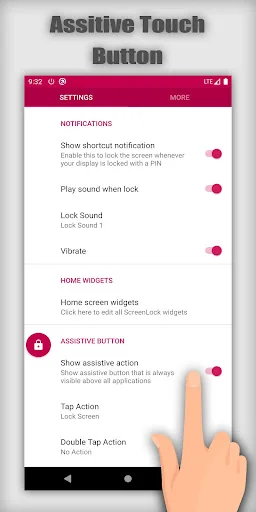
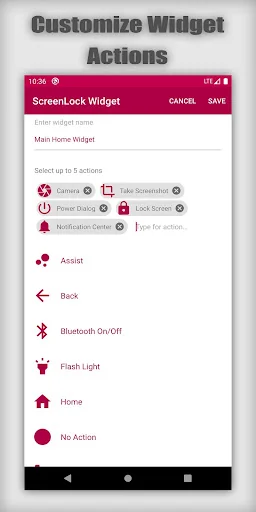
Live screenshots from the Play Store, captured by our snapshot worker. Tap any image to enlarge.
Screen lock and off - Sensors's revenue trajectory
Forecast revenue from snapshot history. Last 1 months.
Where Screen lock and off - Sensors sits in Personalization
Revenue distribution of 53506 comparable apps. Screen lock and off - Sensors highlighted.
Screen lock and off - Sensors vs comparable apps
Revenue trajectory side-by-side. Bold = Screen lock and off - Sensors, ghosted = peers.
App spec
Version
25.3.4
Last update
Mar 04, 2025
Launched
Jan 12, 2019
Price
Free
Monetization
Free
What Screen lock and off - Sensors actually does (from store listing)
Turn off your screen from anywhere. Save device power button. 100% Freeee!!!
You can turn off your screen from 3 options: ScreenLock notification, ScreenLock widget and ScreenLock assistive button which ever you prefer.
Turn on you device using Sensors without using your Power button. Save it for life.
With ScreenLock app and ScreenLock widgets you can turn off your screen, poweroff or restart device, turn on/off wifi and bluetooth, Take screenshots, use soft button Home, Back & Recent, o…
Turn off your screen from anywhere. Save device power button. 100% Freeee!!!
You can turn off your screen from 3 options: ScreenLock notification, ScreenLock widget and ScreenLock assistive button which ever you prefer.
Turn on you device using Sensors without using your Power button. Save it for life.
With ScreenLock app and ScreenLock widgets you can turn off your screen, poweroff or restart device, turn on/off wifi and bluetooth, Take screenshots, use soft button Home, Back & Recent, open volume control, open Notification drawer... super fast and easy on your big screen & save your physical buttons.
SENSORS - How to use:
- Double tap or Single tap: This use proximity sensor. To use it, tap or double tap your hand on proximity sensor near your front camera to turn screen on
- Shake: Just shake your phone in any direction to turn screen on
- Pickup: Assume your phone lie on the table. Pick it up and slip face up to turn screen on.
Turn Off - How to use:
Option 1:
- Go to Home screen, touch & hold and select "Add Widget"
- Find ScreenLock Resizable Widget and drag it to your Home screen
- Select available actions to add to widget
- All done
Option 2:
- Enable Assistive Touch Button
- Assistive Touch Button will display above all application
- Click this button will turn off your display
- You can change button color, its transparency and change other action below as you desired
Option 3:
- Click the notification shortcut to turn off & lock your screen
- One click notification to turn off screen without entering PIN or Pattern Code
Home Widget & Assistive Button Features:
Support actions for Widget, Tap, Double tap and Long press action
- Lock Screen 🔒
- Back
- Home
- Recents
- Open specific app. Select favorite app and tap to open from anywhere.
- Volume Controls 🔊
- WiFi ON/OFF 🛜
- Bluetooth ON/OFF ᛒ
- Flashlight ⚡
- Open Google Assist
- Open Voice Assist Command
- Phone dialer
- Power Dialog
- Take Screenshot 📷
- Screen Recorder 📹 🔴
- Open Settings
- Open Camera
- Notification Center
- Quick Settings
- Web search
- Web browser
Main Permission:
- Device Administrator lock & turn off screen
- Accessibility Permission
- android.permission.SYSTEM_ALERT_WINDOW (Display over other apps)
* This app uses the Device Administrator lock & turn off screen permission. Please allow it when asked so it can work.
* Accessibility Permission is required to use for these feature actions: Home, Back, Recent Apps, Power Dialog, Toggle Split Screen, open Notification Center, open Quick Settings. The permission is used only to perform above actions and no data is collected or shared. Please allow it so these actions can work and only when you use them, you can turn off the permission anytime in the device Settings.
* Display over other apps is to show the assistive button over others app so you can perform you setting action quickly.
If you like the app, don't mind giving us 5* to support our development!
Comparable Android apps
The five apps in Personalization with the closest revenue to Screen lock and off - Sensors. Click any to see its detail page.
Each forecast combines App Store rating, ratings count, monetisation model, pricing tier, IAP signals and ad-supported flag.
The base estimate is then multiplied by a per-category scaling factor learned from apps with founder-verified MRR.
Every number on this page comes from public APIs and bumetric's own snapshot history.
Full methodology covers input variables, accuracy bands per category and how we treat apps without comparable anchors.
See also the live data on Screen lock and off - Sensors's tracker page for current rating, reviews and snapshot timeline.
Building something similar? Get a free AI audit with $-revenue forecasts for every recommendation.


 Pink Spring Blossom Keyboard T
 Frog Cartoon Launcher Theme
 Ganesh Live Wallpaper
 Lavender Drops Keyboard Theme
 Uttam - Wallpaper App