ML revenue forecast.
Calibrated against 77129 apps in this category.
Confidence band
±15%
High — many comparable apps with verified data
At a glance
Earns 3.34× more than the category median (189/mo).
Ranks #8,401 of 77,129 in Tools (top 10.9% by revenue).
Launched May 07, 2017 · last updated Nov 01, 2025.
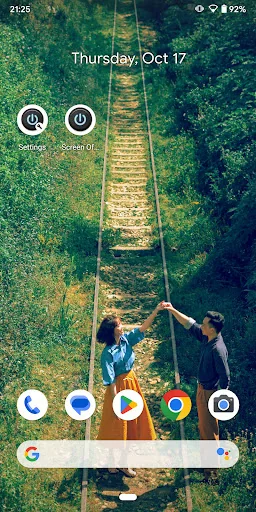
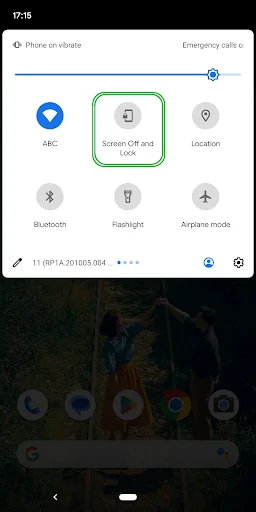
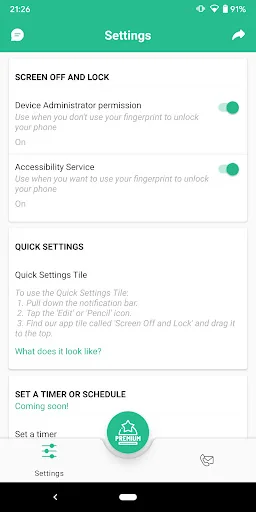
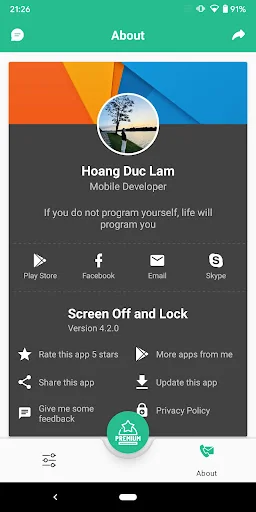
What the app looks like
Live screenshots from the Play Store, captured by our snapshot worker. Tap any image to enlarge.
Screen Off and Lock's revenue trajectory
Forecast revenue from snapshot history. Last 1 months.
Where Screen Off and Lock sits in Tools
Revenue distribution of 77129 comparable apps. Screen Off and Lock highlighted.
Screen Off and Lock vs comparable apps
Revenue trajectory side-by-side. Bold = Screen Off and Lock, ghosted = peers.
App spec
Version
4.4.1
Last update
Nov 01, 2025
Launched
May 07, 2017
Price
Free
Monetization
Free
What Screen Off and Lock actually does (from store listing)
Function:
Turn off and lock the screen for your beloved handset.
This function already exists on your phone, which is the power button. But because of too much pressure it will quickly become greasy and gradually damage the power button. So we write this application helps the user to share the burden on the power button (Power).
Launch icon:
After installation, the application will have 2 launch icons:
1. "Screen Off and Lock" is used to perform the function of turning off and lo…
Function:
Turn off and lock the screen for your beloved handset.
This function already exists on your phone, which is the power button. But because of too much pressure it will quickly become greasy and gradually damage the power button. So we write this application helps the user to share the burden on the power button (Power).
Launch icon:
After installation, the application will have 2 launch icons:
1. "Screen Off and Lock" is used to perform the function of turning off and locking the screen
2. "Settings" is used to set up settings and manage your Premium account.
This app uses the following permissions:
1. Device Administrator permission.
To uninstall Lock Screen app:
1. Turn off "Device Administrator permission" in Settings or Go to phone's Settings > Security > Device administrators > Uncheck
Screen Off and Lock.
2. Go to phone's Settings > Apps > Lock Screen > Tap uninstall.
2. AccessibilityServices API: For supported phones fingerprint, to turn off and
lock the screen and screen unlock operations with fingerprints on your
phone device.
To off AccessibilityServices: Turn off "Accessibility Service" in Settings and follow the instructions or Go to phone's Settings > Accessibility >
Downloaded apps/Installed services > Screen Off and Lock > Switch off
Comparable Android apps
The five apps in Tools with the closest revenue to Screen Off and Lock. Click any to see its detail page.
Each forecast combines App Store rating, ratings count, monetisation model, pricing tier, IAP signals and ad-supported flag.
The base estimate is then multiplied by a per-category scaling factor learned from apps with founder-verified MRR.
Every number on this page comes from public APIs and Bumetric's own snapshot history.
Full methodology covers input variables, accuracy bands per category and how we treat apps without comparable anchors.
See also the live data on Screen Off and Lock's tracker page for current rating, reviews and snapshot timeline.
Building something similar? Get a free AI audit with $-revenue forecasts for every recommendation.


 TVWeb Browser for TV
 Copy to Clipboard
 TV Cast for Chromecast
 Reading Lamp (Non-Profit)
 Who is connected to My Wifi