What Send To Kindle actually does (from store listing)
Send To Kindle – Read Web Articles on Your Kindle
The simplest way to send web pages to your Kindle device. Clean, distraction-free reading.
How It Works:
Share any web page from your browser
Select "Send to Kindle" from the share menu
The article is automatically cleaned and converted
Send it to your Kindle via email
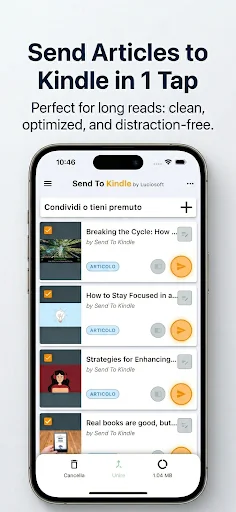
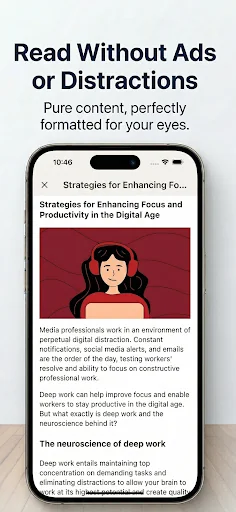
Only the text and images are kept — ads and clutter are removed for a premium reading experience.
NEW: Full Control Over Your Content Customize every detail before …
The simplest way to send web pages to your Kindle device. Clean, distraction-free reading.
How It Works:
Share any web page from your browser
Select "Send to Kindle" from the share menu
The article is automatically cleaned and converted
Send it to your Kindle via email
Only the text and images are kept — ads and clutter are removed for a premium reading experience.
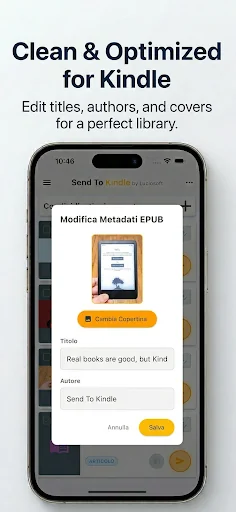
NEW: Full Control Over Your Content Customize every detail before sending! Edit titles, change authors, and replace cover images. Your library, your rules.
Powerful Features:
Merge Articles – Combine multiple articles into a single document (max 25MB)
Metadata Editor – Edit title, author, and cover image of any article or EPUB
File Conversion – Convert PDF, MOBI, and AZW to Kindle format (EPUB)
Offline Reading – Open and manage files locally
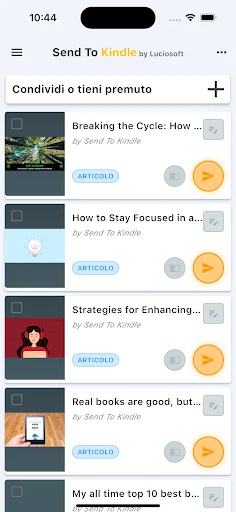
Beautiful Library – Visual preview with cover images for every article
Supported Files: MOBI, AZW, DOC, DOCX, RTF, TXT, JPEG, JPG, PNG, GIF, BMP, PDF, EPUB Max file size: 25MB
Setup: Your send-to email must match your Amazon Kindle email (e.g.,
MyEmail@kindle.com) and be whitelisted in your Amazon account.
Credits: Logo: Serena Romito | Translations: Lavinia Luciano, Serena Romito, Adam Kwarciak, Mert Kaya
This app is not created or endorsed by Amazon.
Comparable Android apps
The five apps in News & Magazines with the closest revenue to Send To Kindle. Click any to see its detail page.
Each forecast combines App Store rating, ratings count, monetisation model, pricing tier, IAP signals and ad-supported flag.
The base estimate is then multiplied by a per-category scaling factor learned from apps with founder-verified MRR.
Every number on this page comes from public APIs and Bumetric's own snapshot history.
Full methodology covers input variables, accuracy bands per category and how we treat apps without comparable anchors.
See also the live data on Send To Kindle's tracker page for current rating, reviews and snapshot timeline.
Building something similar? Get a free AI audit with $-revenue forecasts for every recommendation.


 América de Corazón
 KSTP 5 Minneapolis-St. Paul MN
 Jerusalem Post
 FOX 8
FOX 8
 أخبارنا - Akhbarona