What Set multiple alarms - OneClock actually does (from store listing)
Tired of setting 5 alarms every evening to wake up?
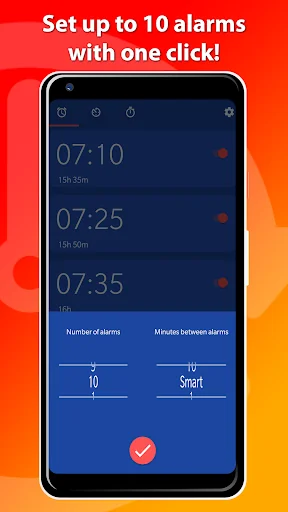
With this smart alarm app called OneClock, you can set multiple alarms with just one click! You can also delete all alarms at once with the delete button below.
The smart alarm app OneClock will set automatically up to 8 alarms at once with a time difference of your choosing between those alarms. When adding an alarm OneClock will ask you how many alarms you wish and how minutes between them you’d like to have. Choose SMART for an automat…
Tired of setting 5 alarms every evening to wake up?
With this smart alarm app called OneClock, you can set multiple alarms with just one click! You can also delete all alarms at once with the delete button below.
The smart alarm app OneClock will set automatically up to 8 alarms at once with a time difference of your choosing between those alarms. When adding an alarm OneClock will ask you how many alarms you wish and how minutes between them you’d like to have. Choose SMART for an automatic time difference. In the next step you’d be able to choose the time you wish to wake up at with our smart time picker. And voila! OneClock has set multiple alarms for you with a customized time between the alarms. Best of all, this alarm clock is completely free!
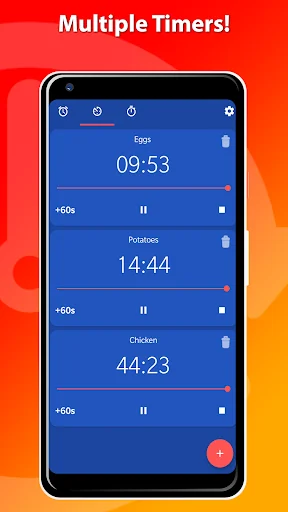
Besides being a smart alarm clock, OneClock also has a timer and a stopwatch. You can add multiple timers simultaneously and label them. With the smart stopwatch you can also track your laps.
Features
• Multiple Alarms
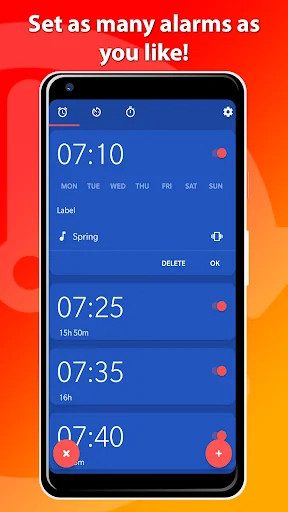
With OneClock you can set up to 8 alarms at once. You can change the number of alarms and the minutes between them when adding a new alarm. It’s also possible to just add one alarm. You can also label the alarms!
• Delete all alarms
What a smart alarm clock! You can also delete all alarms at once with just One Click! (pun intended)
• Smart time difference between alarms
Choose for smart when setting a new alarm for automatic time difference between multiple alarms.
• Multiple Timers
OneClock also allows you to use multiple timers simultaneously. You can also add labels to the multiple timers!
• Stopwatch
The stopwatch is easy to use and helps you to track your laps.
• Themes
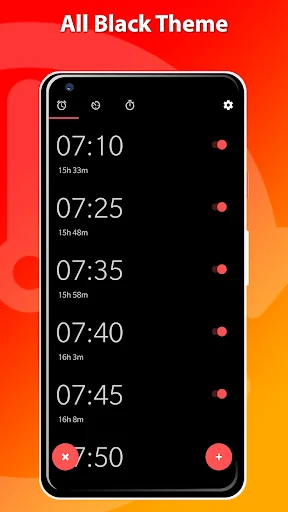
Choose from four different themes to customize your favorite alarm app. We also have a black theme for AMOLED phones, so you can save battery while using this smart alarm clock.
• Silent Alarm
Don’t like loud alarms? Turn down the volume in the settings menu, enable vibration and enjoy the silent alarm!
Settings
• Change the Timepicker Style
• Silence Alarm after time of your choosing
• Customize the Snooze Duration
• Change the Alarm Volume for silent alarm or loud alarm
• Get Notifications for Upcoming Alarms
• Choose the First Day of your Week
• Choose your favorite Ringtone
• Enable Vibration for some morning buzz
Comparable Android apps
The five apps in Lifestyle with the closest revenue to Set multiple alarms - OneClock. Click any to see its detail page.
Each forecast combines App Store rating, ratings count, monetisation model, pricing tier, IAP signals and ad-supported flag.
The base estimate is then multiplied by a per-category scaling factor learned from apps with founder-verified MRR.
Every number on this page comes from public APIs and bumetric's own snapshot history.
Full methodology covers input variables, accuracy bands per category and how we treat apps without comparable anchors.
See also the live data on Set multiple alarms - OneClock's tracker page for current rating, reviews and snapshot timeline.
Building something similar? Get a free AI audit with $-revenue forecasts for every recommendation.


 RSMART
 Solutionist - Aramhuvis
 인스타페이-모든 책 20%할인 4세대 결제플랫폼
 FFFFOUND!
 Fortune Lucky Wheel