What Settings App actually does (from store listing)
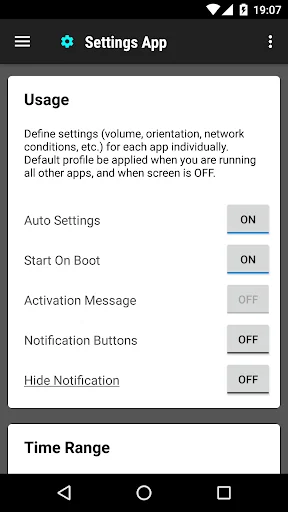
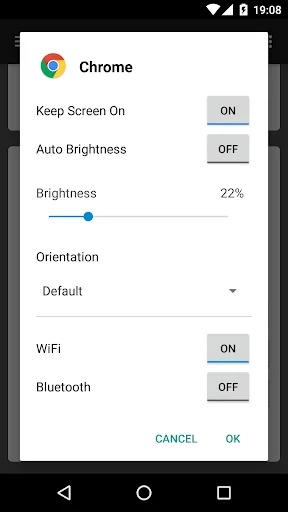
Different apps need different configurations and settings. This app help you to switch to different set of settings for your each of your app individually. It includes volume, orientation, network conditions, Bluetooth connection, screen brightness, keep screen awake, etc.
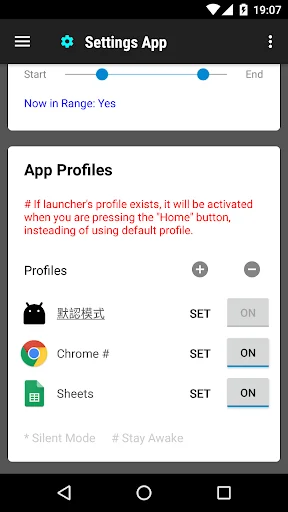
You can create profile for each app. When you launch the app, the corresponding profile will be applied. After that, you can adjust the settings as usual. The profile is to serve as a setting template for your app, and it …
Different apps need different configurations and settings. This app help you to switch to different set of settings for your each of your app individually. It includes volume, orientation, network conditions, Bluetooth connection, screen brightness, keep screen awake, etc.
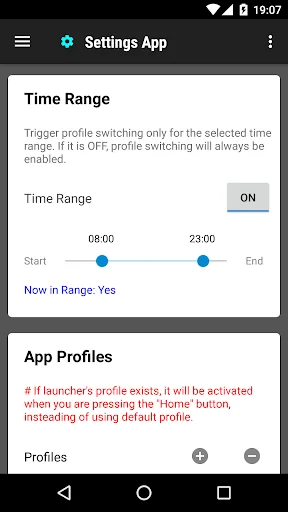
You can create profile for each app. When you launch the app, the corresponding profile will be applied. After that, you can adjust the settings as usual. The profile is to serve as a setting template for your app, and it will only be applied when you app START. Please also set up the default profile. It will be applied when you are running all other apps, and when your screen is off.
This help you to save time and battery, because you do not need to switch off system function manually. You can reduce the brightness of the screen when it is needed, and turn it off again in the default profile. It make sure you do not forget to turn some power unfriendly features, such as WiFi and Bluetooth.
You can configure your apps behavior by adjusting the profile in this app. For example, when you are reading news and watching video, you might want to adjust to a specify orientation and keep the screen awake.
* Please do not use it with other profile tools to avoid conflict
Comparable Android apps
The five apps in Tools with the closest revenue to Settings App. Click any to see its detail page.
Each forecast combines App Store rating, ratings count, monetisation model, pricing tier, IAP signals and ad-supported flag.
The base estimate is then multiplied by a per-category scaling factor learned from apps with founder-verified MRR.
Every number on this page comes from public APIs and Bumetric's own snapshot history.
Full methodology covers input variables, accuracy bands per category and how we treat apps without comparable anchors.
See also the live data on Settings App's tracker page for current rating, reviews and snapshot timeline.
Building something similar? Get a free AI audit with $-revenue forecasts for every recommendation.


 Video Cutter & Video Editor
 Puzzle Solver
 English for Smart Keyboard
 Calculator Vault - Hide Photos
 Photo recovery App, Deleted