What Skipping Silence Recorder actually does (from store listing)
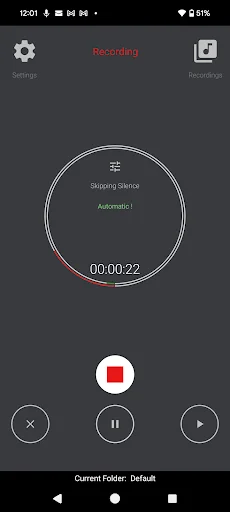
Auto setup, skip silence within 1 second.
1. All clips are saved in one file.
2. Record and play in the background for a long time.
3. The timer is synchronized with the actual recording length.
4. Unlimited recordings for free.
5. Recordings can be easily shared or copied for all latest Android versions (Scoped Storage Model) .
Compared with similar popular apps, this app has more features such as Folder / Compressor/ multi-file deleting and sharing etc.
Shorten the recording time …
Auto setup, skip silence within 1 second.
1. All clips are saved in one file.
2. Record and play in the background for a long time.
3. The timer is synchronized with the actual recording length.
4. Unlimited recordings for free.
5. Recordings can be easily shared or copied for all latest Android versions (Scoped Storage Model) .
Compared with similar popular apps, this app has more features such as Folder / Compressor/ multi-file deleting and sharing etc.
Shorten the recording time by omitting relative silence in real time. Focus on the recording content whose silence is filtered out, a different solution from "voice activated recorder".
You can use it for sleep / dream talk recording (may record snoring), class / meeting recording, and any other conversation recording etc.
Features:
- Easy to use. With the automatic threshold setting of the skipping silence feature, It is as easy to use as a regular recorder.
- Record and play in the background for a long time, even when the screen is Off.
- The timer is synchronized with the skipping silence feature, and the actual recording length is displayed in real time.
- High quality recording, the sample rate can be set to 44.1K.
- All recorded clips are saved in one single file.
- Recordings can be compressed into m4a format files, saving a lot of storage space as well as easier to transfer and share.
- Multiple skipping silence modes: automatic, manual, and off.
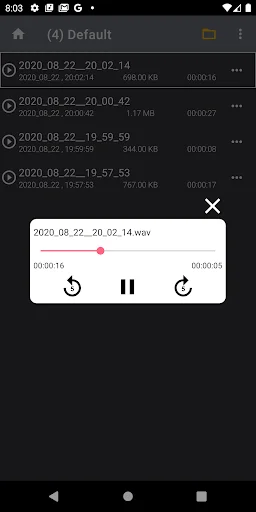
- All recordings are named by date and time, and sorted on timeline.
- Unlimited folder management. (Paid feature)
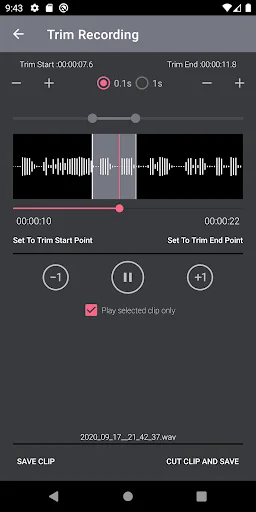
- Trimming recording with 0.1 second accuracy. (Paid feature)
- Recordings can be shared / deleted in single or multiple, also can be labelled and moved between folders.
- Highlighting the current recording during playback.
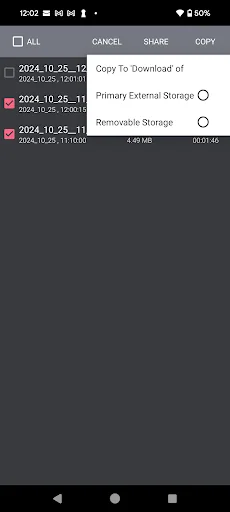
- For Android 10+(scoped storage model) , users can copy multiple recordings to the shared directory "Download" on primary external storage and removable storage(SD card etc.), for Android 10-, all recordings can be accessed directly, the path is available.
If you have any questions, please click the "Contact" button on the settings page to email us. Thanks!
Q: Every time I play and record, I always hear an annoying notification sound, how can I turn it off ?
A: Please go to the device settings, click "Apps", find the app name and click, then click "Notifications" to turn it off.
Comparable Android apps
The five apps in Productivity with the closest revenue to Skipping Silence Recorder. Click any to see its detail page.
Each forecast combines App Store rating, ratings count, monetisation model, pricing tier, IAP signals and ad-supported flag.
The base estimate is then multiplied by a per-category scaling factor learned from apps with founder-verified MRR.
Every number on this page comes from public APIs and Bumetric's own snapshot history.
Full methodology covers input variables, accuracy bands per category and how we treat apps without comparable anchors.
See also the live data on Skipping Silence Recorder's tracker page for current rating, reviews and snapshot timeline.
Building something similar? Get a free AI audit with $-revenue forecasts for every recommendation.


 YoungevityGo2
 Repeat Reminder
 Canada Calendrier 2025
 Jamaica Calendar 2026 - 2027
 Eastern NS Waste Info