What Smart Alarm (Alarm Clock) actually does (from store listing)
This is a simple and highly functional alarm clock "Smart Alarm" Free version.
It is also very easy to use!
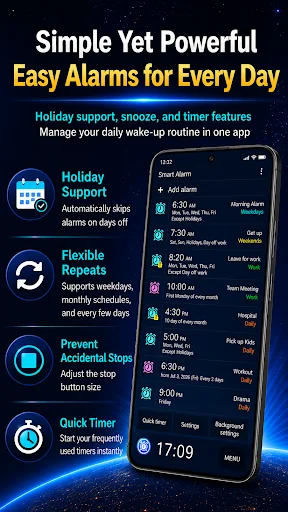
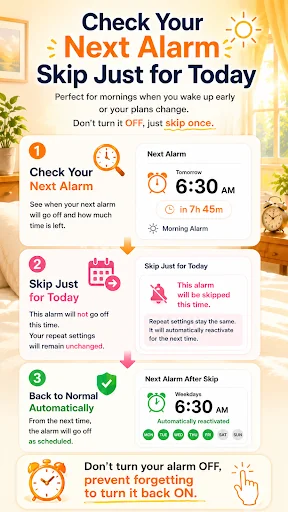
You can get the alarm again at the specified time by snooze function even if the alarm is stopped.
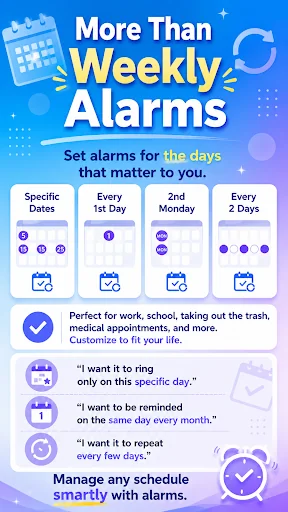
The alarm can be set to repeat every week on specified days of the week.
The wallpaper which is used in the device can be showed as the background for this app by using the transparency setting.
【Other functions】
■ Corresponds to the holiday in the United States. You can exclude t…
This is a simple and highly functional alarm clock "Smart Alarm" Free version.
It is also very easy to use!
You can get the alarm again at the specified time by snooze function even if the alarm is stopped.
The alarm can be set to repeat every week on specified days of the week.
The wallpaper which is used in the device can be showed as the background for this app by using the transparency setting.
【Other functions】
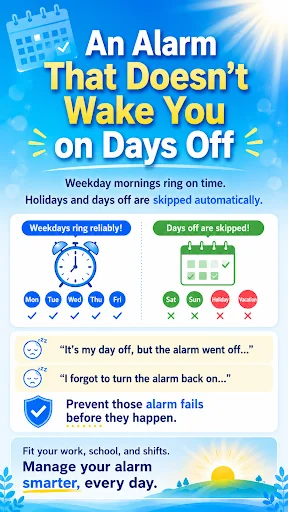
■ Corresponds to the holiday in the United States. You can exclude the public holiday from repeated alarm settings
■ You can set the music that is on SD card as the alarm sound.
■ This alarm clock has the mode to increase gradually with an alarm sound and it has vibration that can be set by the strength of the two-stage. They will prevent be surprised to sudden loud alarm sound.
■ It is possible to change the size of the alarm stop button and snooze button. It will prevent the mistake to stop the alarm by mistake.
■ It is possible to set the alarm to stop by solving a math problem or enter the number. You can prevent overslept by an intricate alarm stop operation
■ You can customize Side key, Back key and Menu key as to stop alarm or snooze or adjust the alarm volume.
■ You can switch to enable / disable the alarm sound and vibration in silent mode.
■ You can set whether output the alarm sound from the speaker of the device when the headphones are plugged in.
【Restriction of the free version】
○ The ad will be displayed.
○ The alarms that can be registered are 10 or less.
【Note】
● If the power of the device is not turned on at the time that alarm is set, the alarm will not work.
●Please register on the exclusion list if you are using any task killer apps or power-saving apps. And do not force stop app on task manager. It may cause the alarm does not work.
● When you set any music on SD card as the alarm sound, it will sound the alarm in the default ringtone if SD card mounts are off at alarm time.
※ We recommend that you set the alarm after confirming the operation of the preview feature when you set the alarm.
【About permissions】
"FULL INTERNET ACCESS"
"VIEW NETWORK STATE"
→ are used for advertising display function.
"PREVENT DEVICE FROM SLEEPING"
→ are used for prevent device from sleeping when alerting.
"CONTROL VIBRATOR"
→ is used for the vibration function.
"AUTOMATICALLY START AT BOOT"
→ is used in order to configure the alarm timer when you boot the device.
"MODIFY/DELETE USB STORAGE CONTENTS MODIFY/DELETE SD CARD CONTENTS"
→ is used for backup and restore the alarm settings.
"MODIFY GLOBAL SYSTEM SETTINGS"
→ is used to show next alarm time on lock screen.
Comparable Android apps
The five apps in Lifestyle with the closest revenue to Smart Alarm (Alarm Clock). Click any to see its detail page.
Each forecast combines App Store rating, ratings count, monetisation model, pricing tier, IAP signals and ad-supported flag.
The base estimate is then multiplied by a per-category scaling factor learned from apps with founder-verified MRR.
Every number on this page comes from public APIs and bumetric's own snapshot history.
Full methodology covers input variables, accuracy bands per category and how we treat apps without comparable anchors.
See also the live data on Smart Alarm (Alarm Clock)'s tracker page for current rating, reviews and snapshot timeline.
Building something similar? Get a free AI audit with $-revenue forecasts for every recommendation.


 Digital Tasbeeh Counter
 GB.X : Ghost Box X
 Checklist of stock+
 Daily Horoscope - Zodiac Signs
 Daily Board