Live screenshots from the Play Store, captured by our snapshot worker. Tap any image to enlarge.
Smart lock screen's revenue trajectory
Forecast revenue from snapshot history. Last 1 months.
App spec
Version
1.5.1
Last update
Oct 16, 2026
Launched
Nov 01, 2026
Price
Free
Monetization
Free
What Smart lock screen actually does (from store listing)
<b>Lock screen</b> with many types of lock passwords, auto-change wallpaper
★ <b>Lock Screen</b> is a smart application that prevents unauthorized users from accessing your device and protects your personal information on the phone in the safest way. Lock Screen provides many different lock types such as <b>passcode - fingerprint - timed password</b> to meet personal security needs, and suitable for all users of different ages.
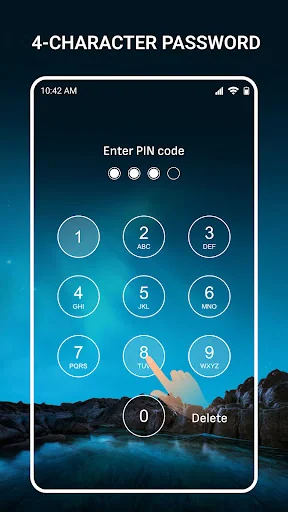
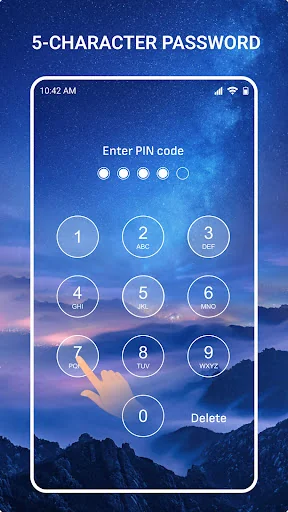
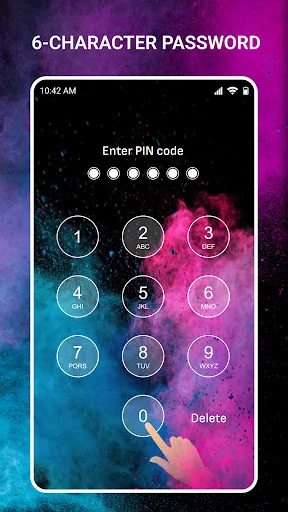
★ Lock password up to<b> 6 characters </b>in combination with fi…
Lock screen with many types of lock passwords, auto-change wallpaper
★ Lock Screen is a smart application that prevents unauthorized users from accessing your device and protects your personal information on the phone in the safest way. Lock Screen provides many different lock types such as passcode - fingerprint - timed password to meet personal security needs, and suitable for all users of different ages.
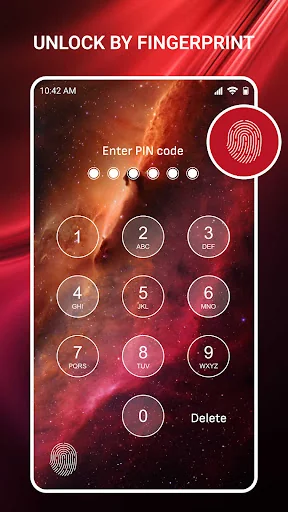
★ Lock password up to 6 characters in combination with fingerprint lock feature which can bring you maximum security and convenient experience. Moreover, the advanced fingerprint recognition technology will protect your phone's privacy the best today.
👉Password management: - Is a password management feature, which provides many different lock types that you can install to enhance privacy security, device security, and also make it more convenient for users.
- Change your password easily
- With Lock Screen, you can set many types of passwords at the same time such as master lock screen, screen lock with current time, screen lock in combination with your password with the current hour-minute - date, or lock screen with a temporary password. - Time-based lock screen types help you still have high security without needing to remember too many numbers. Different device access times require entering a different password on the lock screen. Because even if someone sees the password you entered during that time, they cannot access your device, which will increase the security.
- Lock screen with a temporary password is when you want to let someone use your device for a short time, set up and provide a temporary password for them to make it more convenient when they use your device. After a certain time, the temporary password will be ineffective and that person will not be able to access your device any more. This function is suitable for parents who often let their children use their phones for a whike. The app will help you manage and control your device and your child's phone usage time.
👉Lock screen wallpapers – Auto-change wallpapers: - You can optionally change the wallpaper from the available photo library or upload your own photo, creating interesting experiences and feelings when unlocking the screen.
- With the auto-change wallpaper feature, it will stimulate your vision every time you unlock the screen because each time you open it, there will be a different image, giving you a feeling of fresh.
- The lock screen provides many beautiful wallpapers with themes of Nature, Landscapes, Galaxy, Space, etc., you can freely choose what you like.
👉Fake icon: - Use fake icons to replace the regular lock icons so that others don't recognize that it is a lock screen application.
- There are many different fake icons such as camera, music, clock, weather, etc. All are familiar icons that will make no suspiciousness or curiosity.
- Screen lock provides a fake-icon-feature to maximize the security in case someone knows your screen lock password but cannot access the application to change the lock password.
★The lock screen application is a perfect combination of security and user experience, helping to protect your important information in the most effective way and giving users a feeling of flexibility and fun with its feature of the incognito and secrecy of the unique fake icon feature.
Own Smart lock screen? Replace our estimate with your real revenue via Stripe Connect or ASC. Get a public Verified badge.
Each forecast combines App Store rating, ratings count, monetisation model, pricing tier, IAP signals and ad-supported flag.
The base estimate is then multiplied by a per-category scaling factor learned from apps with founder-verified MRR.
Every number on this page comes from public APIs and Bumetric's own snapshot history.
Full methodology covers input variables, accuracy bands per category and how we treat apps without comparable anchors.
See also the live data on Smart lock screen's tracker page for current rating, reviews and snapshot timeline.
Building something similar? Get a free AI audit with $-revenue forecasts for every recommendation.