What Snackbar Tasker Plugin actually does (from store listing)
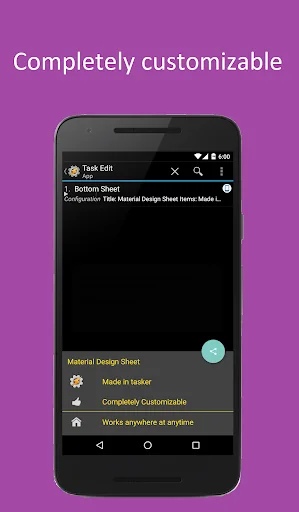
This Tasker Plugin has been made to allow a user-configurable snackbar or material design bottom sheet to be shown anywhere through tasker. The snackbar plugin shows a completely configurable and very fluid snackbar or bottom sheet at any time. With this plugin, you can easily create material design menus and snackbars anywhere in your tasks or apps.
Check out my website to get more info about the plugin and find tutorials to get started: http://www.nicknackdevelopment.com/home.html
Note:…
This Tasker Plugin has been made to allow a user-configurable snackbar or material design bottom sheet to be shown anywhere through tasker. The snackbar plugin shows a completely configurable and very fluid snackbar or bottom sheet at any time. With this plugin, you can easily create material design menus and snackbars anywhere in your tasks or apps.
Check out my website to get more info about the plugin and find tutorials to get started: http://www.nicknackdevelopment.com/home.html
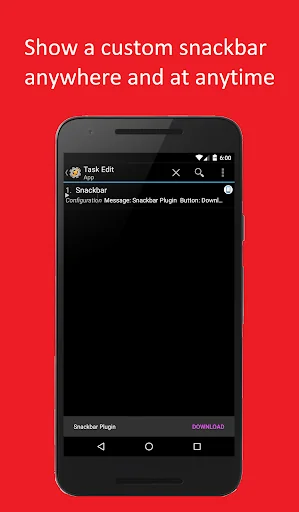
Note: The snackbar is the gray bar that slides from the bottom of many apps to act like a toast except with an action button.
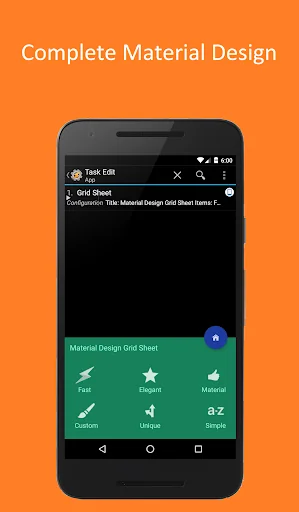
Note: The bottom sheet is a small popup that slides out from the bottom of the screen with multiple options aligned in either a grid or list fashion.
This tasker plugin integrates directly with the Auto Apps Suite so you can use your existing Auto-Apps trigger along with this new snackbar plugin!
- Main Features:
• Lightweight app!
• Easy to use!
• Many different forms of tutorials to make setup a piece of cake!
• Multiple types of actions to get the exact look/functionality you are looking for
• A great Dev that will make things right if you are having issues with the plugin
• Specific tablet support on all actions to make the viewing experience even more customizable
Main Actions:
- Material Design Bottom Sheet:
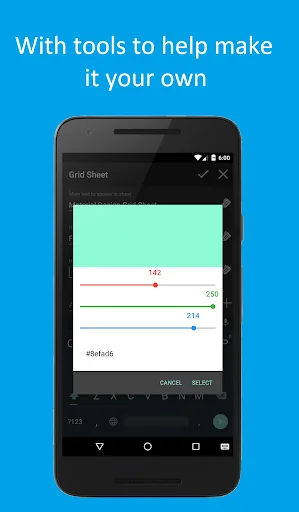
• Change Title, Text, Icons, Text/Background Color, Floating Action Button Icon and Color
• Customizable material design sheet with rows of text and an accompanying icon
• Includes support for HTML to customize your look completely
• Floating Action Button to truly show material design
• Real Bottom Sheet behavior where the sheet follows with your finger with animations
• Tablet style option to have sheet width lowered to better enhance the tablet experience
- Snackbar:
• Customizable Title, Text, Button and Background Color, and Action
• Shows anywhere and has option for version without button
• Tablet mode option to have snackbar appear floating and to the left
- Direct Share:
• Menu to share data from tasker to any app
• Items include: Title of menu, subject, text, and file to share to app
• Includes compatibility with the Direct Share Marshmallow feature
- Double Button Snackbar:
• A custom snackbar with 2 buttons
• Complete touch passthrough so it is not disruptive at all
• Tablet mode option to have snackbar appear floating and to the left
• Note: Many incidents of issues have been reported on Android Kitkat
Comparable Android apps
The five apps in Productivity with the closest revenue to Snackbar Tasker Plugin. Click any to see its detail page.
Each forecast combines App Store rating, ratings count, monetisation model, pricing tier, IAP signals and ad-supported flag.
The base estimate is then multiplied by a per-category scaling factor learned from apps with founder-verified MRR.
Every number on this page comes from public APIs and bumetric's own snapshot history.
Full methodology covers input variables, accuracy bands per category and how we treat apps without comparable anchors.
See also the live data on Snackbar Tasker Plugin's tracker page for current rating, reviews and snapshot timeline.
Building something similar? Get a free AI audit with $-revenue forecasts for every recommendation.


 Proto.io
 Livedrive
 Dijital Etiket
 Easy Excel Sheet & Table Maker
 OK Prepaid