ML revenue forecast.
Calibrated against 20485 apps in this category.
Confidence band
±15%
High — many comparable apps with verified data
At a glance
Earns 1.54× more than the category median (192/mo).
Ranks #6,086 of 20,485 in Photography (top 29.7% by revenue).
Launched May 06, 2026 · last updated Feb 25, 2026.
What the app looks like
Live screenshots from the Play Store, captured by our snapshot worker. Tap any image to enlarge.
Sony | Transfer & Tagging's revenue trajectory
Forecast revenue from snapshot history. Last 1 months.
Where Sony | Transfer & Tagging sits in Photography
Revenue distribution of 20485 comparable apps. Sony | Transfer & Tagging highlighted.
Sony | Transfer & Tagging vs comparable apps
Revenue trajectory side-by-side. Bold = Sony | Transfer & Tagging, ghosted = peers.
App spec
Version
2.4.2
Last update
Feb 25, 2026
Launched
May 06, 2026
Price
Free
Monetization
Free
What Sony | Transfer & Tagging actually does (from store listing)
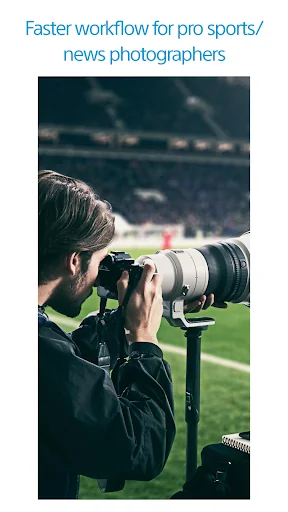
A free application for professional sports and news photographers using a Sony camera that speeds up the workflow of transferring still images . You can deliver images instantly on location anytime and anywhere without having to open your PC/Mac.
For supported models and information on features/functions, see the support page below.
https://support.d-imaging.sony.co.jp/app/transfer/l/devices/cameras.php
You must sign in using Sony Account to use this application.
■ Using the function of …
A free application for professional sports and news photographers using a Sony camera that speeds up the workflow of transferring still images . You can deliver images instantly on location anytime and anywhere without having to open your PC/Mac.
For supported models and information on features/functions, see the support page below.
https://support.d-imaging.sony.co.jp/app/transfer/l/devices/cameras.php
You must sign in using Sony Account to use this application.
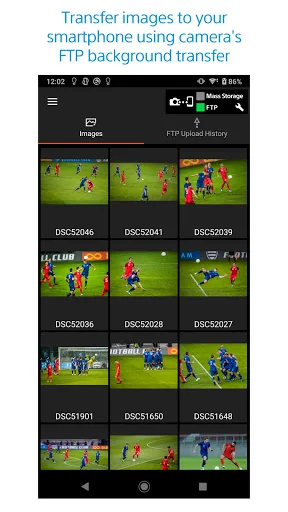
■ Using the function of transferring still images to a smartphone/tablet that works with your camera, you can deliver images quickly without losing concentration while taking photos
・Wireless background transfers to smartphones/tablets is possible using the camera FTP transfer function.
- While maintaining continuous shooting performance, you can transfer still images in the background to a smartphone even while taking photos. *1
・You can quickly and reliably transfer still images protected in your camera to a smartphone with a wired connection.
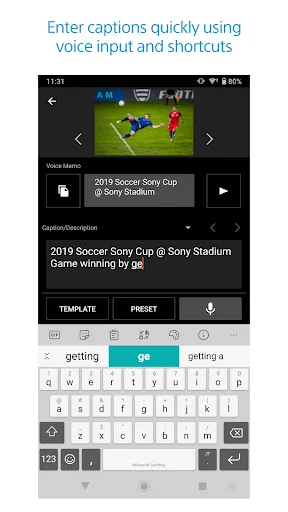
■ Text input of tags/captions for still images can be entered quickly using voice input and shortcut functions
・Hands-free high-speed caption input possible with voice recognition. (Only available in regions where Google services are available)
・After importing images with Voice Memos from a camera, the app can now automatically convert the speech into text as IPTC Metadata. *2
By using this feature with Auto FTP Upload together, you can embed text information in images with Voice Memos and upload them without operating the smartphone. (Only available in regions where Google services are available)
・By using a shortcut to call a pre-registered word in the Caption Glossary, names that are easily mistaken can be quickly entered.
・When transferring still images, you can automatically assign preset tags/captions at once to efficiently enter data.
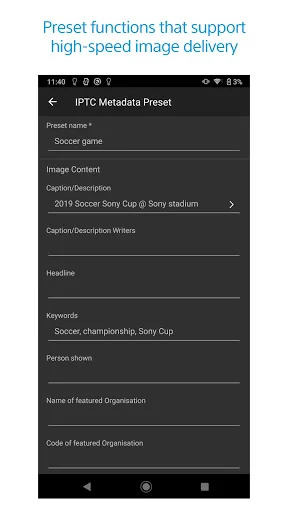
・Tags/captions support the IPTC metadata*3 standard which is commonly used in news and sports coverage.
・You can customize which items are displayed for the IPTC Metadata that are used within the application.
■ Presets and other various functions enable even faster and reliable delivery work
・Up to 50 IPTC metadata presets can be registered. As the appropriate IPTC metadata can be immediately called out according to the subject
・IPTC metadata presets, caption templates*4, and FTP upload presets, Caption Glossaries can be edited on Account Information Page in Creators’ Cloud and shared among multiple devices.
・Even in an environment where a Wi-Fi or wired LAN is not available, images can be delivered using the mobile/carrier line of your smartphone.
・You can write FTP settings created on the application to your camera.
■ Notes
- Supported operating systems: Android 11 to 16
- This app is not guaranteed to work with all smartphones/tablets.
- Features/Functions available for this app vary depending on the camera you are using.
- For supported models and information on features/functions, see the support page below.
https://support.d-imaging.sony.co.jp/app/transfer/l/devices/cameras.php
*1 The camera software must be updated to use this function.
*2 Voice Memo exceeding 50 seconds cannot be converted to text.
*3 IPTC metadata is a standard of metadata included in digital images, formulated by IPTC (International Press Telecommunications Council).
*4 Note that passwords, private keys, and other sensitive information are not stored in the cloud and must be entered again on each device.
Comparable Android apps
The five apps in Photography with the closest revenue to Sony | Transfer & Tagging. Click any to see its detail page.
Each forecast combines App Store rating, ratings count, monetisation model, pricing tier, IAP signals and ad-supported flag.
The base estimate is then multiplied by a per-category scaling factor learned from apps with founder-verified MRR.
Every number on this page comes from public APIs and bumetric's own snapshot history.
Full methodology covers input variables, accuracy bands per category and how we treat apps without comparable anchors.
See also the live data on Sony | Transfer & Tagging's tracker page for current rating, reviews and snapshot timeline.
Building something similar? Get a free AI audit with $-revenue forecasts for every recommendation.


 Timelapse Calculator
 Butterfly Photo Frames
 Eid Frames
 FIMI PLAY
 Casual Suit For Men