What SpeedView: Legacy Edition actually does (from store listing)
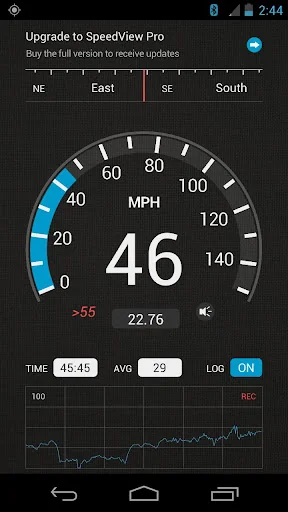
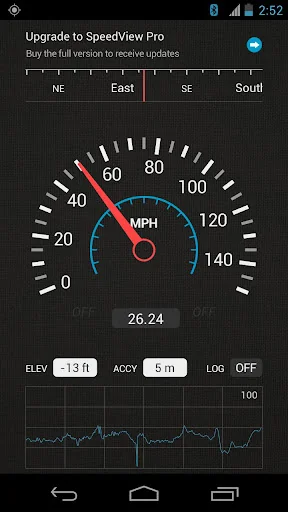
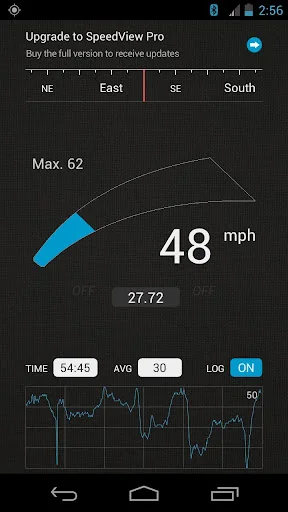
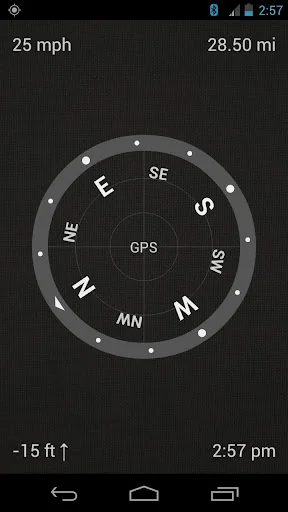
SpeedView is an advanced speedometer application that uses the phone's built-in GPS system to show your current, maximum and average speed, as well as the direction, total distance, and time traveled. Suitable for running, car driving, biking, or hiking.
• High accuracy
GPS-based speedometer that is more accurate than the one in your car.
• Linear compass
Shows your current direction of travel. A compass mode is also available.
• HUD mode
Mirrors the numbers so you can place your pho…
SpeedView is an advanced speedometer application that uses the phone's built-in GPS system to show your current, maximum and average speed, as well as the direction, total distance, and time traveled. Suitable for running, car driving, biking, or hiking.
• High accuracy
GPS-based speedometer that is more accurate than the one in your car.
• Linear compass
Shows your current direction of travel. A compass mode is also available.
• HUD mode
Mirrors the numbers so you can place your phone on your car's dashboard and see the speed reflected in the front glass. You can check out this video to see how it works: http://youtu.be/rzda7CQ-ZAU
• Speed graph
Displays a graph chart covering the last several minutes.
• Speed warning
You can set the speed limits for three different types of roads so that when you go too fast a visual alert or sound will notify you.
• Display units
Supports units such as miles, kilometers, and nautical miles.
• GPX track export
Enables you to save your current track to the SD card or email it to someone. The GPX format is supported by Google Earth and many other programs: http://www.topografix.com/gpx_resources.asp
• Background mode
You can minimize the program and keep it running in the background. It will work as usual and even notify you when you exceed the speed limit.
Please note that the accuracy of GPS measurements is affected by a number of factors including atmospheric conditions, obstructions and the visibility of satellites.
We use Sense360, a third party technology provider, to help us better understand how our users use SpeedView and their devices. SpeedView sends raw sensor data generated by your device to Sense360. This sensor data may include information from GPS receivers, accelerometers, gyroscopes, and other sensors, which may allow Sense360 to determine, for example, your device’s location, acceleration, and orientation. Sense360 may use this data to send us analytic reports regarding how our users are using SpeedView and their devices, or for marketing purposes. To learn more, please visit Sense360’s privacy policy, available at: http://sense360.com/privacy-policy.html.
This version is ad-supported. A paid version without ads and more features is also available.
If you have any questions or comments, feel free to post them on our blog: http://blog.codesector.com/
Comparable Android apps
The five apps in Maps & Navigation with the closest revenue to SpeedView: Legacy Edition. Click any to see its detail page.
Each forecast combines App Store rating, ratings count, monetisation model, pricing tier, IAP signals and ad-supported flag.
The base estimate is then multiplied by a per-category scaling factor learned from apps with founder-verified MRR.
Every number on this page comes from public APIs and bumetric's own snapshot history.
Full methodology covers input variables, accuracy bands per category and how we treat apps without comparable anchors.
See also the live data on SpeedView: Legacy Edition's tracker page for current rating, reviews and snapshot timeline.
Building something similar? Get a free AI audit with $-revenue forecasts for every recommendation.

 Anterin Driver
 SafeBoda with SafeCar
 iRent共享車平台-汽機車24H隨租隨還
 Cotral
 Ola Lite: Lighter Faster Ola A