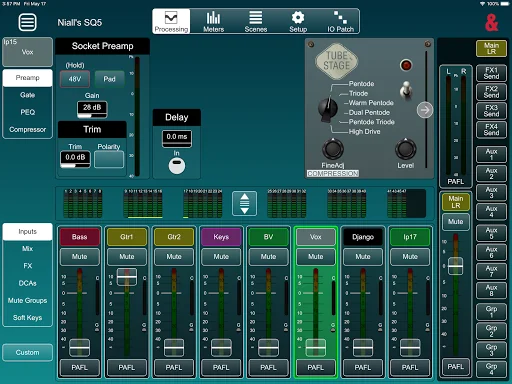
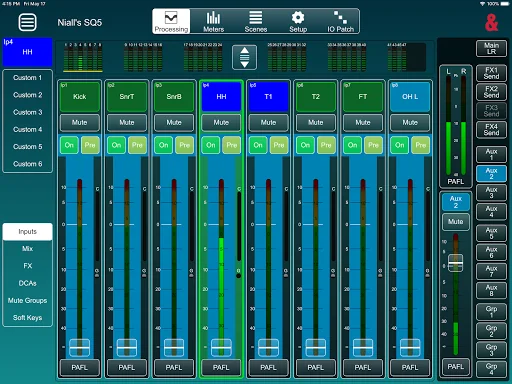
SQ-MixPad allows control of an SQ console over a wired or wireless network.
It can be used simultaneously and independently of the SQ surface, so it can provide supplementary local control as well as giving the engineer the freedom to move around and mix from different listening positions.
Three devices running SQ-MixPad can be connected and used at the same time as using the SQ surface, giving four separate points for control of all mixes.
An ‘Offline’ mode allows for SQ show files to be edi…
SQ-MixPad allows control of an SQ console over a wired or wireless network.
It can be used simultaneously and independently of the SQ surface, so it can provide supplementary local control as well as giving the engineer the freedom to move around and mix from different listening positions.
Three devices running SQ-MixPad can be connected and used at the same time as using the SQ surface, giving four separate points for control of all mixes.
An ‘Offline’ mode allows for SQ show files to be edited and managed without connection to a console.
V1.6.0 -
This version works with SQ consoles running firmware V1.6.x
It provides the following:
Level and Routing Control -
Send levels, panning, assignments, pre/post settings and mutes from all channels to all mixes
Master send levels for all mixes
Send and Return levels for FX
Routing screen with overview and full control
DCA and Mute Group control, including assignments
Processing Control -
Input channel Preamp/DEEP Preamp Model/HPF/Gate/Insert/PEQ/Compressor
Mix channel Ext In/Insert/GEQ/PEQ/Compressor
DEEP compressors and GEQ’s
FX Parameters and FX Return PEQ
Access to all Libraries
Patching –
Full patching matrix for all Inputs/Outputs and Tie Lines
‘1-to-1’ diagonal block patching
Offline Mode –
Edit and manage shows, scenes and libraries without a console connection
Transfer entire shows between MixPad and an SQ
Share/store shows to cloud or email (when available on the device)
Other features include –
Scene Management
Global filters, scene filters and channel safe control
Works with SQ User Permissions
Copy/Paste and Reset functionality
Ganging setup
AMM control and setup
SQ-Drive Control (Online)
Full control of Signal Generator and assignments
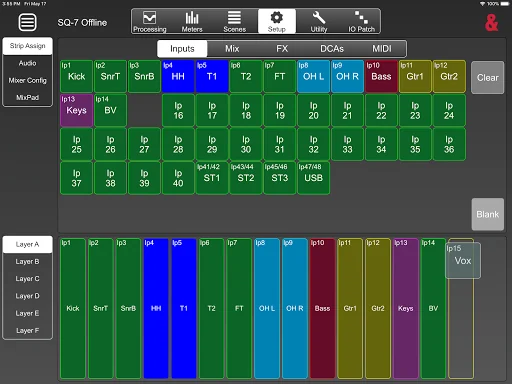
6 custom layers with the ability to copy or use/follow desk layers
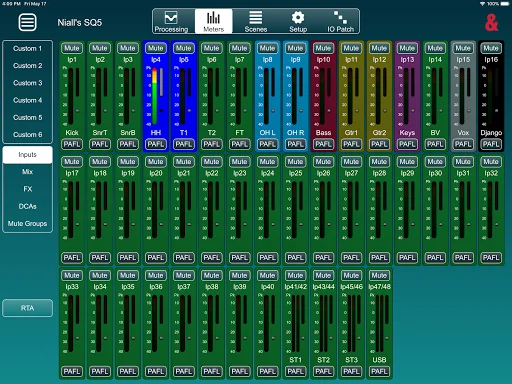
All input/output/processing metering
Meters and Channel RTA view and control
Mixer config and role setup including ‘Listen Level’
PAFL setup and selection
Channel naming/colour
SoftKey and MIDI strips setup and use
Follow mixer Channel/Mix Select option
Comparable Android apps
The five apps in Music & Audio with the closest revenue to SQ MixPad. Click any to see its detail page.
Each forecast combines App Store rating, ratings count, monetisation model, pricing tier, IAP signals and ad-supported flag.
The base estimate is then multiplied by a per-category scaling factor learned from apps with founder-verified MRR.
Every number on this page comes from public APIs and Bumetric's own snapshot history.
Full methodology covers input variables, accuracy bands per category and how we treat apps without comparable anchors.
See also the live data on SQ MixPad's tracker page for current rating, reviews and snapshot timeline.
Building something similar? Get a free AI audit with $-revenue forecasts for every recommendation.


 Quran Radio - اذاعات القران ال
 hr3
hr3
 نورين محمد صديق القران الكريم
 Radio New Zealand: Live Radio
 Radio Doble Nueve 99.1 FM