What SQLite Editor Master Pro actually does (from store listing)
Sqlite Master Pro is the ultimate Sqlite database editor for users on Android. Using Sqlite Master you can do almost anything in a Sqlite database. Functionality includes table data browser/editor, query editor, table export, CSV import and lot more. Root users can use this app to edit apps which have local internal database. Compare to other available SQLite apps, this is most light weight, compact and user friendly with most features and fastest SQLite Manager and Editor.
<b>Why do you to w…
Sqlite Master Pro is the ultimate Sqlite database editor for users on Android. Using Sqlite Master you can do almost anything in a Sqlite database. Functionality includes table data browser/editor, query editor, table export, CSV import and lot more. Root users can use this app to edit apps which have local internal database. Compare to other available SQLite apps, this is most light weight, compact and user friendly with most features and fastest SQLite Manager and Editor.
Why do you to want use SQLite Master Pro
[✔] Fastest and optimized, support large SQLite databases
[✔] Easy and simple user interface, screen theme/color choice
[✔] Very small footprint
[✔] Have almost everything that android users need
The major functionality includes
[✔] Hot System Apps - Rooted System Fix Wi-Fi tethering, Phone settings, contacts, system settings, configure app databases etc.
[✔] Rooted System browse system files in rooted system and configure.
[✔] Create/drop Sqlite databases
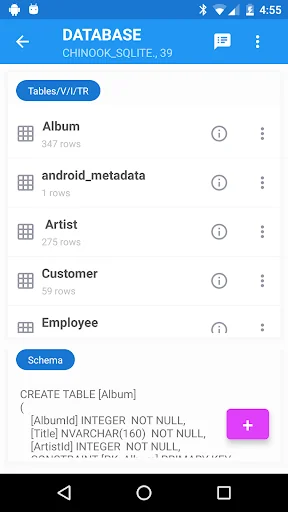
[✔] Create/drop/modify Sqlite tables
[✔] View table data
[✔] Sort table data by simply tapping on the column headers (first tap - ascending, second tap - descending)
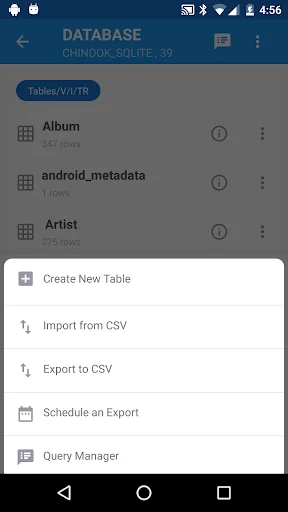
[✔] Export table data to CSV [✔] Import highly configurable CSV data into Table
[✔] Add, delete, update table row
[✔] Copy table row to clipboard by double tapping on a row
[✔] Query Maker to build custom queries and save queries, easy to use interface
[✔] Pre-generated SQL Select Queries for existing tables.
[✔] Save SQL queries which can be used later.
[✔] Delete saved queries which are not needed.
[✔] Import existing queries.
[✔] View/Copy table definition, triggers, views in the database.
[✔] Close table data, clone table schema etc
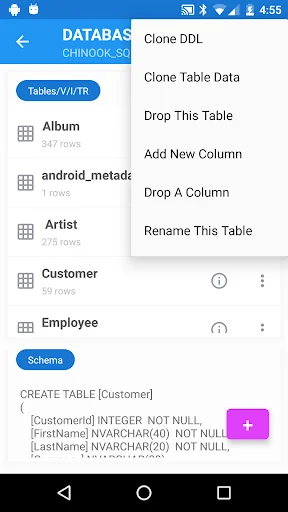
[✔] In table list page, long press has many options such as clone schema, clone data, drop/rename table etc.
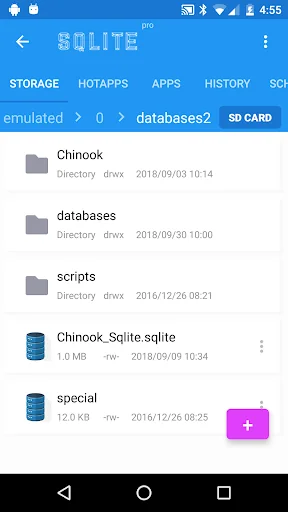
[✔] History of recently opened SQLite databases.
[✔] Scheduler for data export (Schedule onetime/daily) to export results of a query into a file.
Comparable Android apps
The five apps in Tools with the closest revenue to SQLite Editor Master Pro. Click any to see its detail page.
Each forecast combines App Store rating, ratings count, monetisation model, pricing tier, IAP signals and ad-supported flag.
The base estimate is then multiplied by a per-category scaling factor learned from apps with founder-verified MRR.
Every number on this page comes from public APIs and Bumetric's own snapshot history.
Full methodology covers input variables, accuracy bands per category and how we treat apps without comparable anchors.
See also the live data on SQLite Editor Master Pro's tracker page for current rating, reviews and snapshot timeline.
Building something similar? Get a free AI audit with $-revenue forecasts for every recommendation.


 Load Shedding Notifier
 Force LTE Only (4G/5G)
 Feature Pack for SetEdit
 單位換算 (Unit Converter)
 Copy&Paste & Memo&Launcher pro