ML revenue forecast.
Calibrated against 77129 apps in this category.
Confidence band
±15%
High — many comparable apps with verified data
At a glance
Tracks close to the Android app category median (189/mo).
Ranks #26,729 of 77,129 in Tools (top 34.7% by revenue).
Launched Jan 21, 2020 · last updated May 21, 2026.
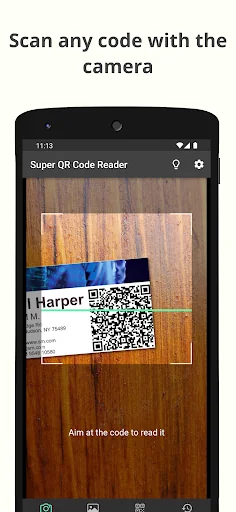
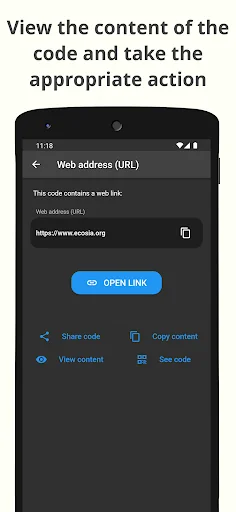
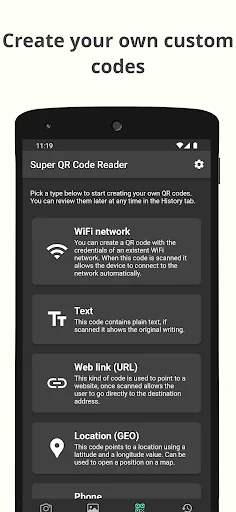
What the app looks like
Live screenshots from the Play Store, captured by our snapshot worker. Tap any image to enlarge.
Super QR Code Reader's revenue trajectory
Forecast revenue from snapshot history. Last 1 months.
Where Super QR Code Reader sits in Tools
Revenue distribution of 77129 comparable apps. Super QR Code Reader highlighted.
Super QR Code Reader vs comparable apps
Revenue trajectory side-by-side. Bold = Super QR Code Reader, ghosted = peers.
App spec
Version
3.20.3
Last update
May 21, 2026
Launched
Jan 21, 2020
Price
Free
Monetization
Free
What Super QR Code Reader actually does (from store listing)
Super QR Code Reader is a QR code scanner and barcode reader that will allow you to read any code you find using your device's camera or by scanning an image. In addition, this application is also a QR code generator and barcode generator, so you can create your own personalized QR codes and barcodes with the data you enter.
Features:
- Scan QR codes and barcodes with your device's camera
- Execute the correct action after scanning with the barcode scanner: open websites, connect to WiFi…
Super QR Code Reader is a QR code scanner and barcode reader that will allow you to read any code you find using your device's camera or by scanning an image. In addition, this application is also a QR code generator and barcode generator, so you can create your own personalized QR codes and barcodes with the data you enter.
Features:
- Scan QR codes and barcodes with your device's camera
- Execute the correct action after scanning with the barcode scanner: open websites, connect to WiFi networks...
- Read codes by scanning images of your device
- QR code generator: create your own QR codes and barcodes
- Keep track of all codes read and created in the History section
- Customize the look and behavior of the app
> What steps do I have to follow to scan a code with the QR scanner?
When you find a QR code or barcode and want to scan it to view its contents with the QR scanner, all you have to do is open the app and point your device's rear camera at the code. The QR code scanner feature will detect it and the details of it will automatically be shown to you. From there you can perform the appropriate action on the code depending on its type, for example opening a website or connecting to a WiFi network, as well as being able to view other details of the code.
> I have a code within an image, can this app scan it?
Yeah! This scanner app allows you to perform a scan of any image file you have saved on your device. To do this, go to the image scanning tab, press the scan button and a selector will open where you can choose the image to scan. The QR reader feature will try to detect QR codes or barcodes and show you the same information screen that would be shown if you had scanned the code with your device's camera.
> Is this app also a QR code creator?
Of course! Super QR Code Reader is not only a scanner app for reading and detecting QR codes, it also has a QR code generator function. To use it as a QR code creator, go to the creation tab where you will see all the different types of QR codes that you can generate. Once the data is entered, the barcode generator function will create the code. Then, this code will be stored in your history section, where you can view it, execute your action, or share it.
> Will the codes I have read with the QR reader or created with the QR code creator be saved?
Of course. You can go to the History section at any time where you can review all the codes you have read with the barcode scanner, either through your device's camera or by scanning an image file. In this same section you can also find the codes generated by you. In addition, you will have complete control over this section, you will not only be able to recover previous codes, but also delete them if you do not need them. Additionally, you can disable the save codes option in this section if you don't need it to save space.
---
In short, Super QR Code Reader is your all-terrain tool that will allow you to read any type of code, whether QR or barcode, to be able to see its details and be able to take the correct action on it. In addition, it will also help you create your own codes. Download now and get this utility for all your code scanning needs!
Comparable Android apps
The five apps in Tools with the closest revenue to Super QR Code Reader. Click any to see its detail page.
Each forecast combines App Store rating, ratings count, monetisation model, pricing tier, IAP signals and ad-supported flag.
The base estimate is then multiplied by a per-category scaling factor learned from apps with founder-verified MRR.
Every number on this page comes from public APIs and bumetric's own snapshot history.
Full methodology covers input variables, accuracy bands per category and how we treat apps without comparable anchors.
See also the live data on Super QR Code Reader's tracker page for current rating, reviews and snapshot timeline.
Building something similar? Get a free AI audit with $-revenue forecasts for every recommendation.



 How to Change Wifi Password
 LTA FIJI
 FIS Authenticator
 Mr.GraphPaper
 Câmera Nuvem